Recovery
Recover an offline or unsaved result
Keep guest play available through local storage problems and understand room retries and the member answer journal where configured.
Before you start
- For solo play, load the app before going offline. Room retries need the local review service; member sync needs the same verified self learner to be restored.
Steps
If a guest device save fails, read the notice
The guest result explains when browser storage could not save it. You can still play again, but do not expect this guest result to remain after leaving the current page.
Open the Results: metrics and local save guideIf a room or member result needs sync, keep its owner
Room Retry sync resends the same room attempt. Member play already continues locally; its finished answer journal is kept in this tab's sessionStorage when available, otherwise only in tab memory. Reconnect retries automatically; Retry sync explicitly resumes after the same verified self learner returns. A different learner cannot receive the queued round, and changing accounts pauses it. If storage is unavailable, keep the tab open until sync succeeds.
Open the Open Challenge: result sync states guideCheck the final status
Accepted means the local room service returned an acceptance receipt. Rejected means there is no room placement. Both states keep the local score visible; neither is Melirate learning evidence.
Open the Open Challenge: result sync states guideReturn to practice if rooms are unavailable
Use Back to solo play from the room-unavailable screen. Multiplayer availability does not gate solo play.
Open the Group play: loading or unavailable guide
What to expect
- Offline time does not pause a solo or Live Race deadline.
- No retry creates a second score from the same submitted attempt.
Other paths
Recover an invalid or unavailable room
Check code, expiry, local service availability, and return paths.
Open guide: Recover an unavailable, expired, or interrupted roomResume a Live Race
Reconnect before its shared deadline to restore the saved answer prefix.
Open guide: Reconnect to a Live RaceProtect guest data
Understand browser storage and the local-only boundary.
Open guide: Understand guest data and practice scores
Visual guide
Recorded walkthrough
These are silent local synthetic preview captures. Account clips and screenshots show the unconfigured guest preview, not the locally prepared member flow. Some demos use 5-, 15-, or 20-second timers; private invitation details are hidden. If playback is unavailable, use the captions when present or read the full transcript below.
Read the full recording transcript
This capture uses a synthetic five-second round to keep the local demonstration short.
The guest starts an Open Challenge round while connected, then loses the network.
The answer and local score remain on screen. The result is pending because the room has not confirmed it.
Reconnect this browser. The app retries the same queued attempt instead of creating a second score.
An accepted receipt confirms the score and permits a room rank. If the room rejects an attempt, the local result remains visible without placement.
Annotated screens
Each numbered note names the control or state marked on the screen.
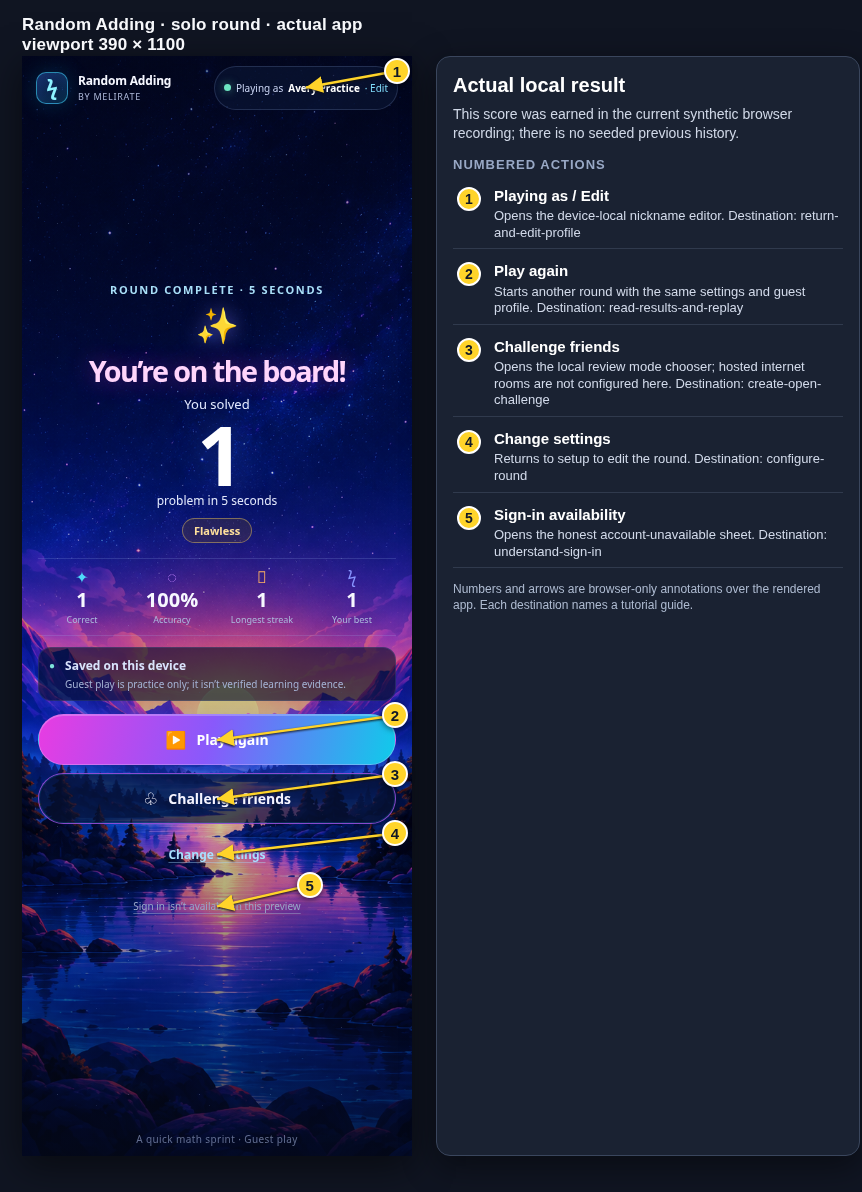 View full-size original annotated screen (new tab)
What the numbered markers show
- 1Playing as / EditOpens the device-local nickname editor.Open guide: Return and edit your guest nickname
- 2Play againStarts another round with the same settings and guest profile.Open guide: Read your results and replay
- 3Challenge friendsOpens the local review mode chooser; hosted internet rooms are not configured here.Open guide: Create an Open Challenge
- 4Change settingsReturns to setup to edit the round.Open guide: Choose round settings
- 5Sign-in availabilityOpens the honest account-unavailable sheet.Open guide: Sign in and choose a learner
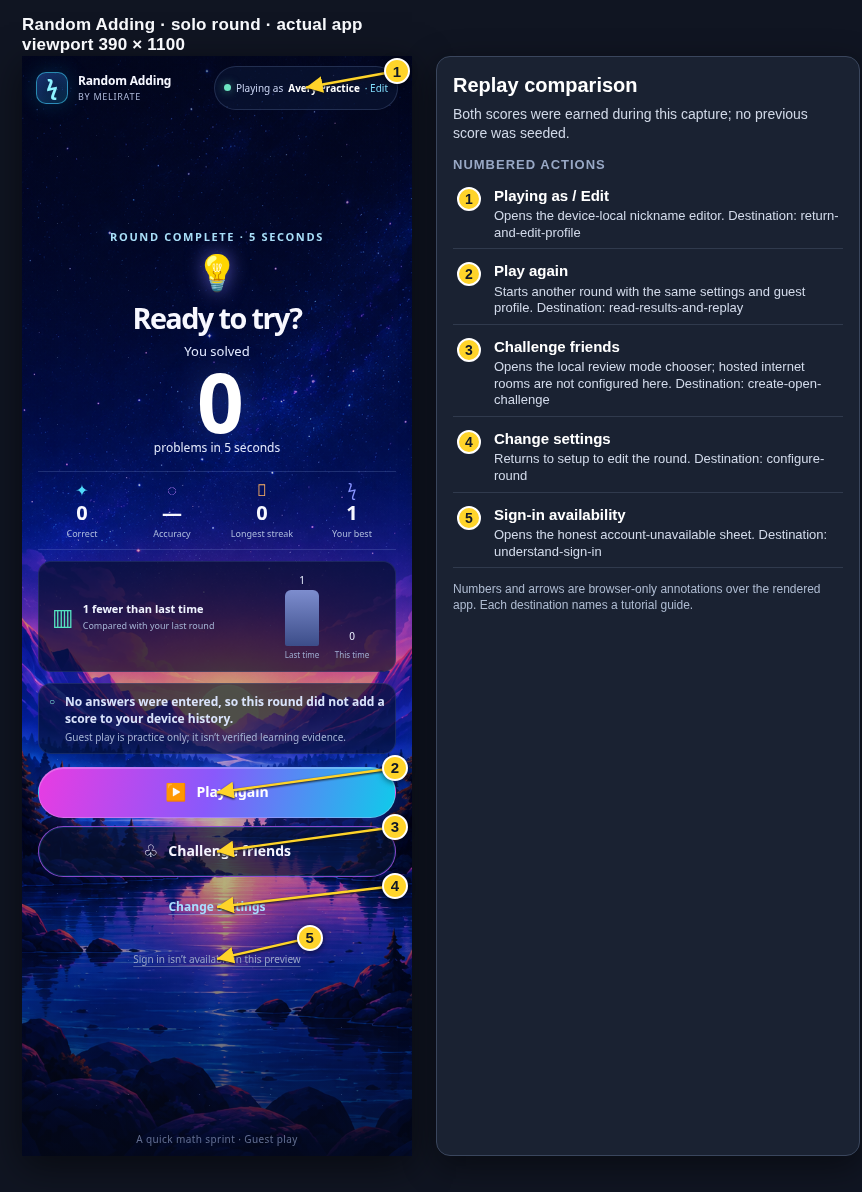 View full-size original annotated screen (new tab)
What the numbered markers show
- 1Playing as / EditOpens the device-local nickname editor.Open guide: Return and edit your guest nickname
- 2Play againStarts another round with the same settings and guest profile.Open guide: Read your results and replay
- 3Challenge friendsOpens the local review mode chooser; hosted internet rooms are not configured here.Open guide: Create an Open Challenge
- 4Change settingsReturns to setup to edit the round.Open guide: Choose round settings
- 5Sign-in availabilityOpens the honest account-unavailable sheet.Open guide: Sign in and choose a learner
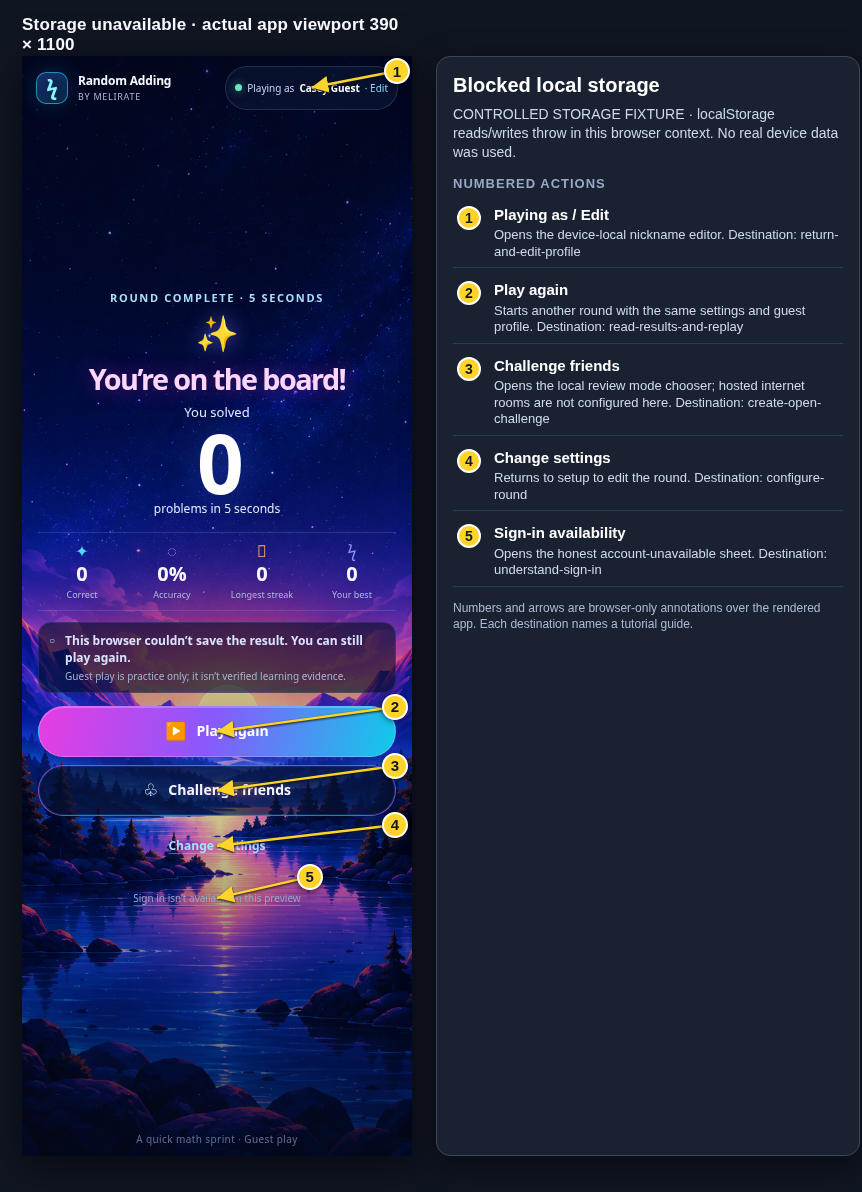 View full-size original annotated screen (new tab)
What the numbered markers show
- 1Playing as / EditOpens the device-local nickname editor.Open guide: Return and edit your guest nickname
- 2Play againStarts another round with the same settings and guest profile.Open guide: Read your results and replay
- 3Challenge friendsOpens the local review mode chooser; hosted internet rooms are not configured here.Open guide: Create an Open Challenge
- 4Change settingsReturns to setup to edit the round.Open guide: Choose round settings
- 5Sign-in availabilityOpens the honest account-unavailable sheet.Open guide: Sign in and choose a learner
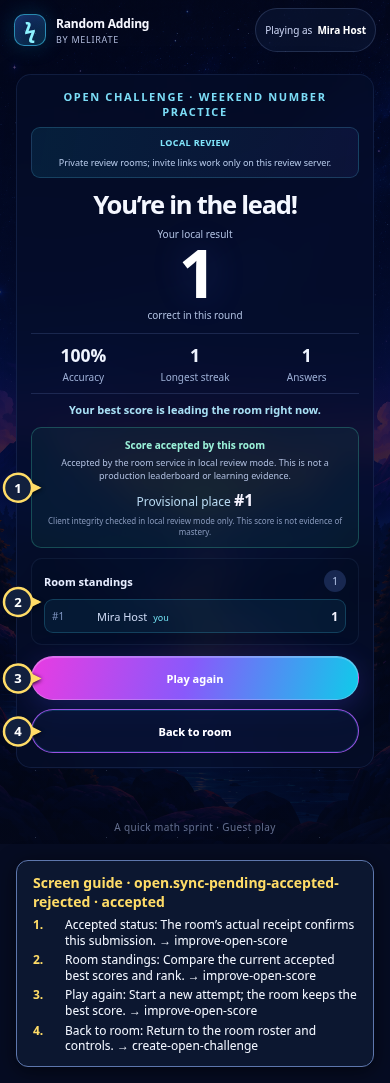 View full-size original annotated screen (new tab)
What the numbered markers show
- 1Accepted statusThe room’s actual receipt confirms this submission.Open guide: Play again and improve an Open Challenge score
- 2Room standingsCompare the current accepted best scores and rank.Open guide: Play again and improve an Open Challenge score
- 3Play againStart a new attempt; the room keeps the best score.Open guide: Play again and improve an Open Challenge score
- 4Back to roomReturn to the room roster and controls.Open guide: Create an Open Challenge
 View full-size original annotated screen (new tab)
What the numbered markers show
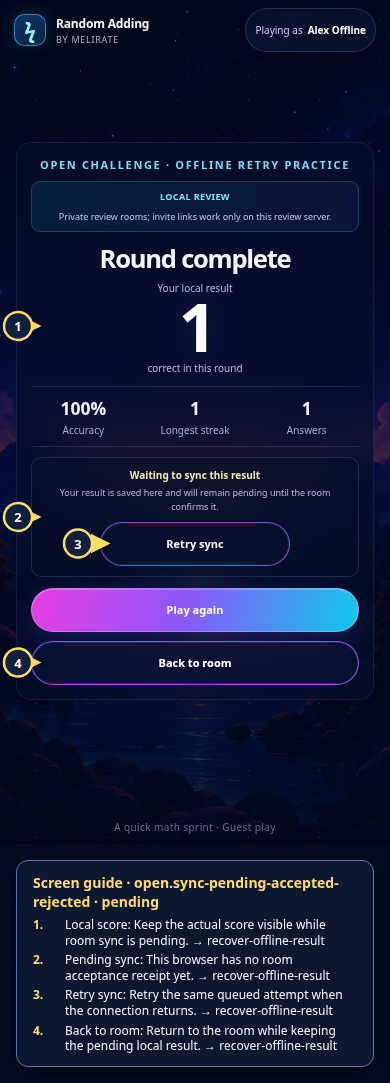
- 1Local scoreKeep the actual score visible while room sync is pending.Open guide: Recover an offline or unsaved result
- 2Pending syncThis browser has no room acceptance receipt yet.Open guide: Recover an offline or unsaved result
- 3Retry syncRetry the same queued attempt when the connection returns.Open guide: Recover an offline or unsaved result
- 4Back to roomReturn to the room while keeping the pending local result.Open guide: Recover an offline or unsaved result
 View full-size original annotated screen (new tab)
What the numbered markers show
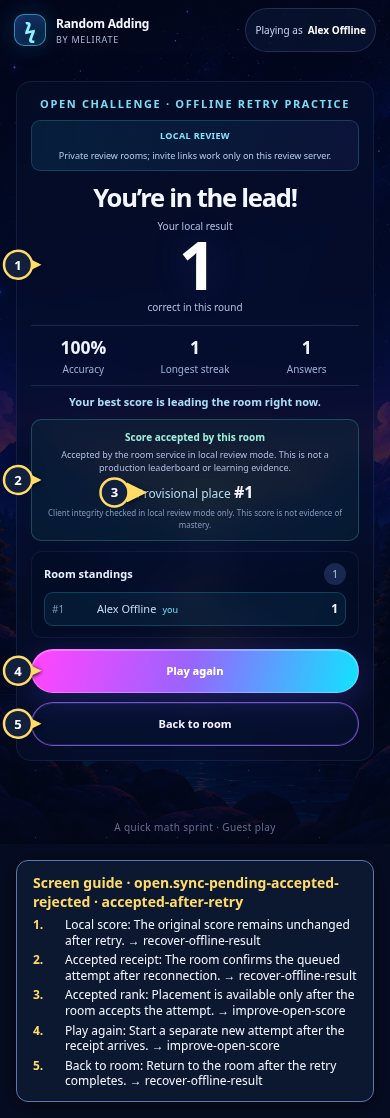
- 1Local scoreThe original score remains unchanged after retry.Open guide: Recover an offline or unsaved result
- 2Accepted receiptThe room confirms the queued attempt after reconnection.Open guide: Recover an offline or unsaved result
- 3Accepted rankPlacement is available only after the room accepts the attempt.Open guide: Play again and improve an Open Challenge score
- 4Play againStart a separate new attempt after the receipt arrives.Open guide: Play again and improve an Open Challenge score
- 5Back to roomReturn to the room after the retry completes.Open guide: Recover an offline or unsaved result
 View full-size original annotated screen (new tab)
What the numbered markers show
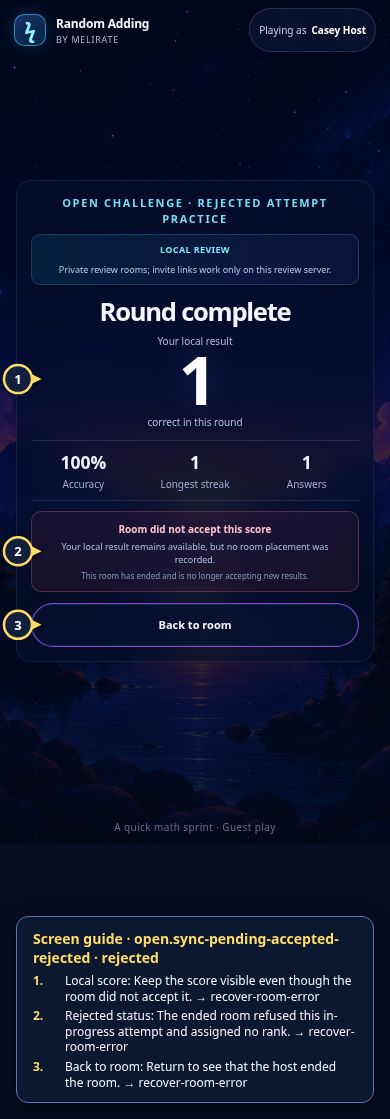
- 1Local scoreKeep the score visible even though the room did not accept it.Open guide: Recover an unavailable, expired, or interrupted room
- 2Rejected statusThe ended room refused this in-progress attempt and assigned no rank.Open guide: Recover an unavailable, expired, or interrupted room
- 3Back to roomReturn to see that the host ended the room.Open guide: Recover an unavailable, expired, or interrupted room
 View full-size original annotated screen (new tab)
What the numbered markers show
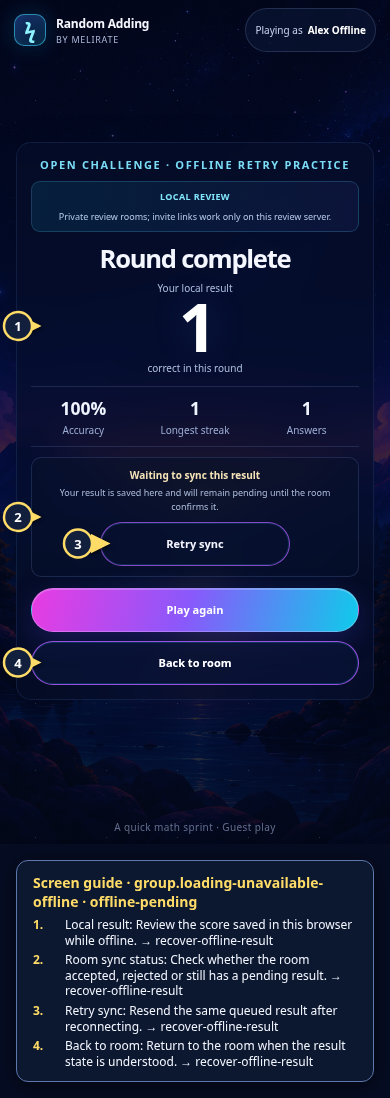
- 1Local resultReview the score saved in this browser while offline.Open guide: Recover an offline or unsaved result
- 2Room sync statusCheck whether the room accepted, rejected or still has a pending result.Open guide: Recover an offline or unsaved result
- 3Retry syncResend the same queued result after reconnecting.Open guide: Recover an offline or unsaved result
- 4Back to roomReturn to the room when the result state is understood.Open guide: Recover an offline or unsaved result
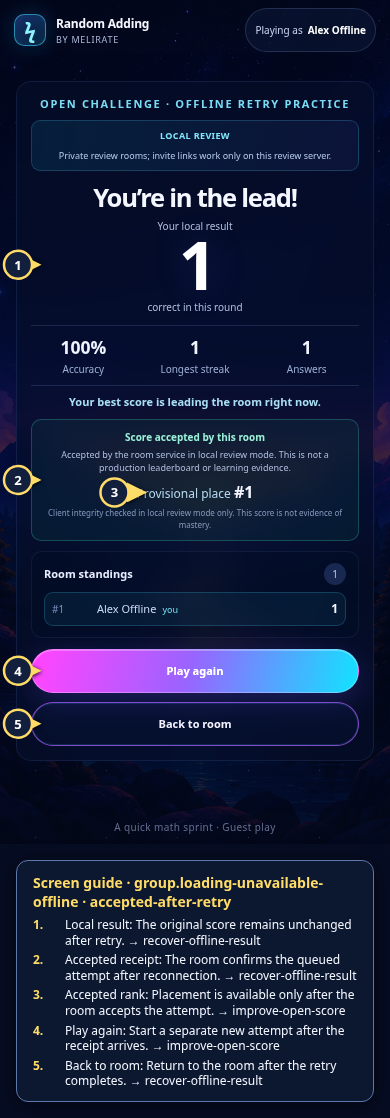 View full-size original annotated screen (new tab)
What the numbered markers show
- 1Local resultThe original score remains unchanged after retry.Open guide: Recover an offline or unsaved result
- 2Accepted receiptThe room confirms the queued attempt after reconnection.Open guide: Recover an offline or unsaved result
- 3Accepted rankPlacement is available only after the room accepts the attempt.Open guide: Play again and improve an Open Challenge score
- 4Play againStart a separate new attempt after the receipt arrives.Open guide: Play again and improve an Open Challenge score
- 5Back to roomReturn to the room after the retry completes.Open guide: Recover an offline or unsaved result
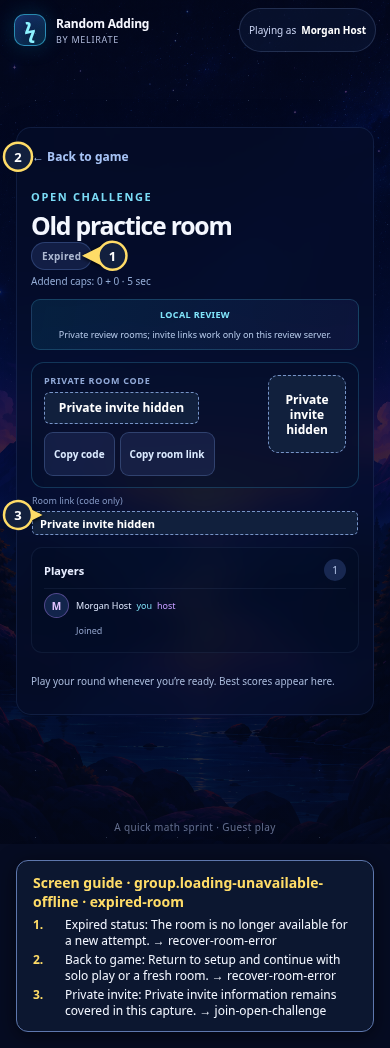 View full-size original annotated screen (new tab)
What the numbered markers show
- 1Expired statusThe room is no longer available for a new attempt.Open guide: Recover an unavailable, expired, or interrupted room
- 2Back to gameReturn to setup and continue with solo play or a fresh room.Open guide: Recover an unavailable, expired, or interrupted room
- 3Private invitePrivate invite information remains covered in this capture.Open guide: Join an Open Challenge
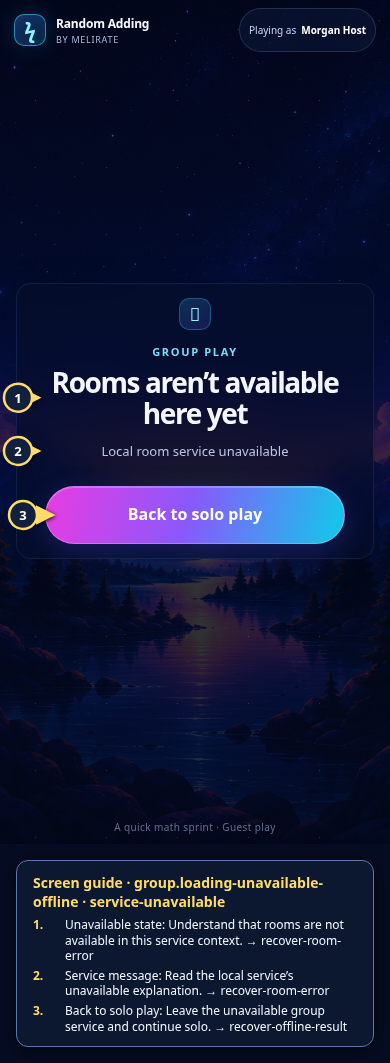 View full-size original annotated screen (new tab)
What the numbered markers show
- 1Unavailable stateUnderstand that rooms are not available in this service context.Open guide: Recover an unavailable, expired, or interrupted room
- 2Service messageRead the local service’s unavailable explanation.Open guide: Recover an unavailable, expired, or interrupted room
- 3Back to solo playLeave the unavailable group service and continue solo.Open guide: Recover an offline or unsaved result