Recovery
Open Challenge: result sync states
Distinguish a local pending result, a local-review receipt, and a rejected upload.
Before you start
- Finish an Open Challenge or Live Race attempt.
Steps
Pending
The result is shown locally while the room has not confirmed it. Retry sync when available.
Open the Open Challenge: result sync states guideAccepted
The local room service returned an acceptance receipt. This is not a production leaderboard or learning evidence.
Open the Open Challenge: result sync states guideRejected
The room did not record a placement. The local result remains visible; use the reason shown to decide whether to return or continue.
Open the Open Challenge: result sync states guide
What to expect
- A placement is not shown as confirmed before an acceptance receipt.
Other paths
Recover a pending result
Retry the same attempt after connectivity returns.
Open guide: Recover an offline or unsaved result
Visual guide
Annotated screens
Each numbered note names the control or state marked on the screen.
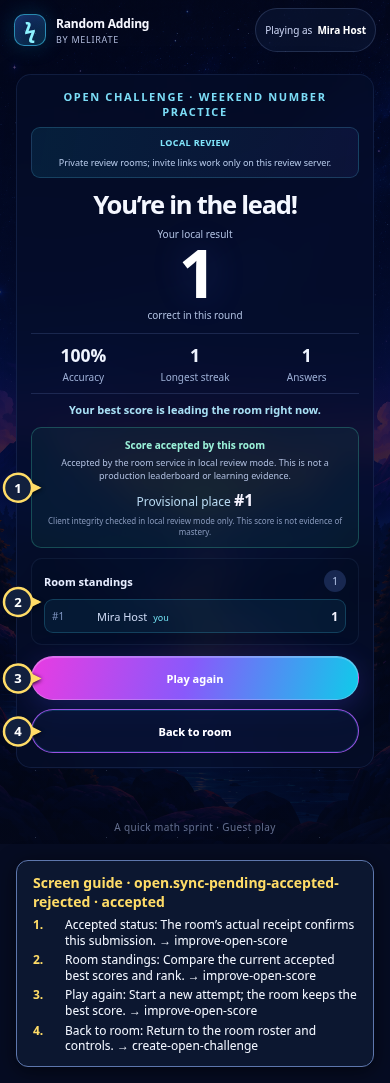 View full-size original annotated screen (new tab)
What the numbered markers show
- 1Accepted statusThe room’s actual receipt confirms this submission.Open guide: Play again and improve an Open Challenge score
- 2Room standingsCompare the current accepted best scores and rank.Open guide: Play again and improve an Open Challenge score
- 3Play againStart a new attempt; the room keeps the best score.Open guide: Play again and improve an Open Challenge score
- 4Back to roomReturn to the room roster and controls.Open guide: Create an Open Challenge
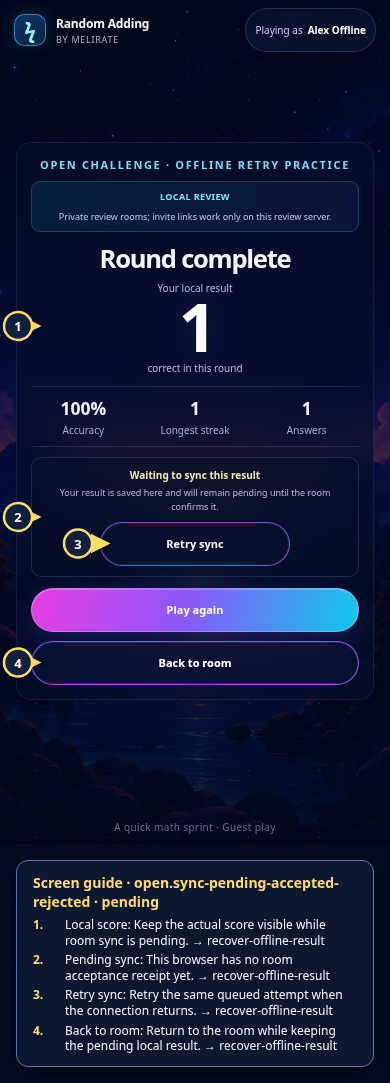 View full-size original annotated screen (new tab)
What the numbered markers show
- 1Local scoreKeep the actual score visible while room sync is pending.Open guide: Recover an offline or unsaved result
- 2Pending syncThis browser has no room acceptance receipt yet.Open guide: Recover an offline or unsaved result
- 3Retry syncRetry the same queued attempt when the connection returns.Open guide: Recover an offline or unsaved result
- 4Back to roomReturn to the room while keeping the pending local result.Open guide: Recover an offline or unsaved result
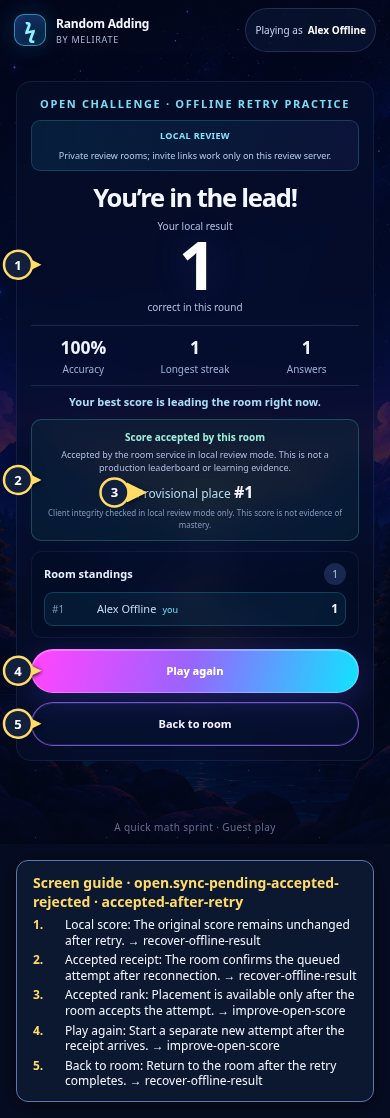 View full-size original annotated screen (new tab)
What the numbered markers show
- 1Local scoreThe original score remains unchanged after retry.Open guide: Recover an offline or unsaved result
- 2Accepted receiptThe room confirms the queued attempt after reconnection.Open guide: Recover an offline or unsaved result
- 3Accepted rankPlacement is available only after the room accepts the attempt.Open guide: Play again and improve an Open Challenge score
- 4Play againStart a separate new attempt after the receipt arrives.Open guide: Play again and improve an Open Challenge score
- 5Back to roomReturn to the room after the retry completes.Open guide: Recover an offline or unsaved result
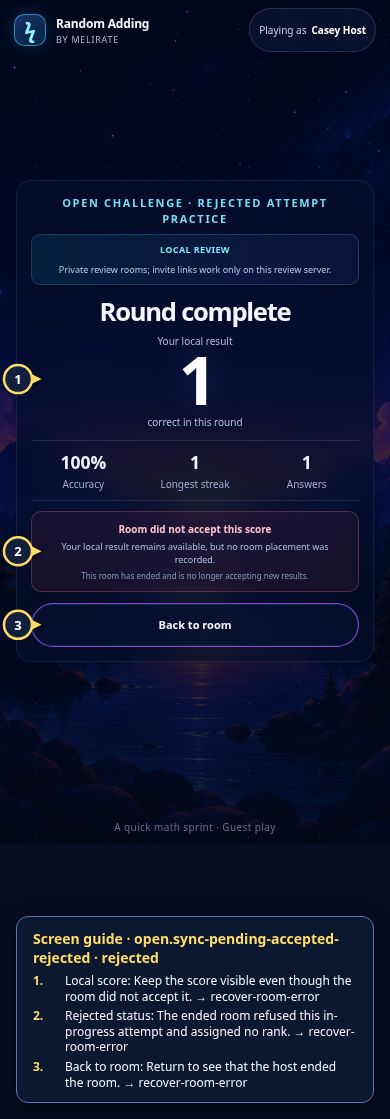 View full-size original annotated screen (new tab)
What the numbered markers show
- 1Local scoreKeep the score visible even though the room did not accept it.Open guide: Recover an unavailable, expired, or interrupted room
- 2Rejected statusThe ended room refused this in-progress attempt and assigned no rank.Open guide: Recover an unavailable, expired, or interrupted room
- 3Back to roomReturn to see that the host ended the room.Open guide: Recover an unavailable, expired, or interrupted room