Guest profile
Understand guest data and practice scores
See what this guest preview keeps on the device, how room results are labeled, and where learning-evidence claims stop.
Before you start
- Use guest play. The current hosted preview remains unconfigured for member access; member code prepared locally is pending activation.
Steps
Use a nickname only
The first Play now or Challenge friends action asks for a nickname. Random Adding does not ask for an email or password. Basic filtering is not a child-safety guarantee.
Open the Guest profile: first nickname guideUnderstand browser storage
Nickname, settings, and solo summary records are stored per browser profile when storage works. Clearing storage, private browsing, or another device may create a new guest identity; there is no cross-device recovery.
Open the Guest profile: returning identity guideCheck the result label
Solo guest results say Saved on this device only after browser storage confirms a write. Group results remain guest room results; local accepted room status is not a Melirate member receipt or learning evidence.
Open the Results: metrics and local save guideKeep guest and member records separate
Guest and group scores are never silently imported into a learner record. In an enabled member flow, verified players and guardians with practice permission can sync new answers to Melirate Activity. Earlier practice saves are summary-only history, separate from new Activity answers. Eligible new solo facts contribute to skill predictions.
Open the Open Challenge: result sync states guide
What to expect
- The result screen reports local save failure instead of showing a false save success.
- No guest score is silently imported as member evidence.
Other paths
Recover a local or room result
Use the recovery steps for storage and sync problems.
Open guide: Recover an offline or unsaved resultReview the sign-in limitation
See exactly what the current sign-in action does.
Open guide: Sign in and choose a learner
Visual guide
Recorded walkthrough
These are silent local synthetic preview captures. Account clips and screenshots show the unconfigured guest preview, not the locally prepared member flow. Some demos use 5-, 15-, or 20-second timers; private invitation details are hidden. If playback is unavailable, use the captions when present or read the full transcript below.
Read the full recording transcript
Create a synthetic guest profile through the real nickname sheet.
The result says whether it was saved on this device and clearly states guest practice is not verified learning evidence.
After a reload, the guest nickname remains on this browser. The page does not offer account deletion or claim hosted storage.
The sign-in information confirms there is no configured account connection here; guest play remains local.
Annotated screens
Each numbered note names the control or state marked on the screen.
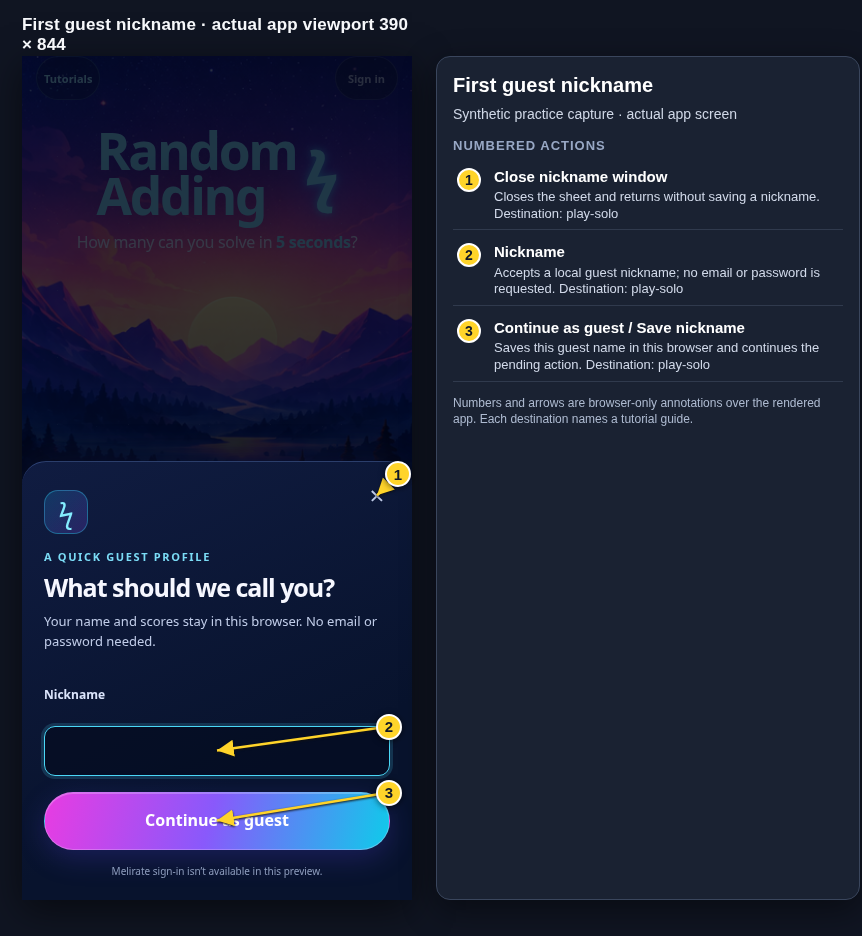 View full-size original annotated screen (new tab)
What the numbered markers show
- 1Close nickname windowCloses the sheet and returns without saving a nickname.Open guide: Play a solo round
- 2NicknameAccepts a local guest nickname; no email or password is requested.Open guide: Play a solo round
- 3Continue as guest / Save nicknameSaves this guest name in this browser and continues the pending action.Open guide: Play a solo round
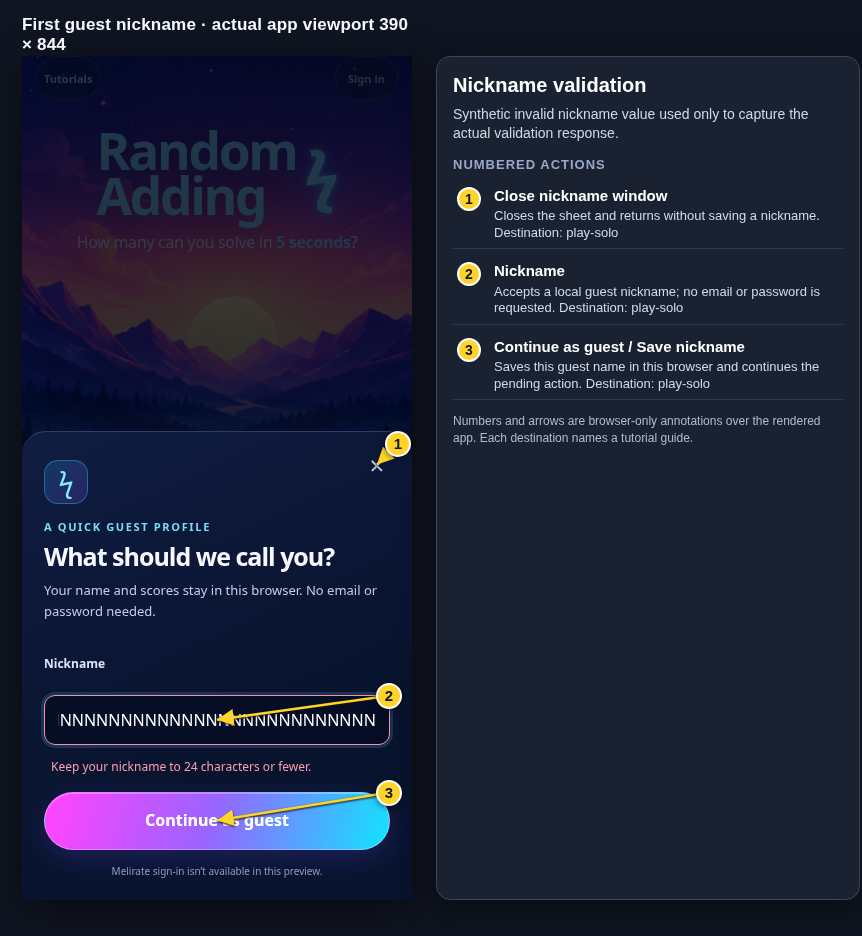 View full-size original annotated screen (new tab)
What the numbered markers show
- 1Close nickname windowCloses the sheet and returns without saving a nickname.Open guide: Play a solo round
- 2NicknameAccepts a local guest nickname; no email or password is requested.Open guide: Play a solo round
- 3Continue as guest / Save nicknameSaves this guest name in this browser and continues the pending action.Open guide: Play a solo round
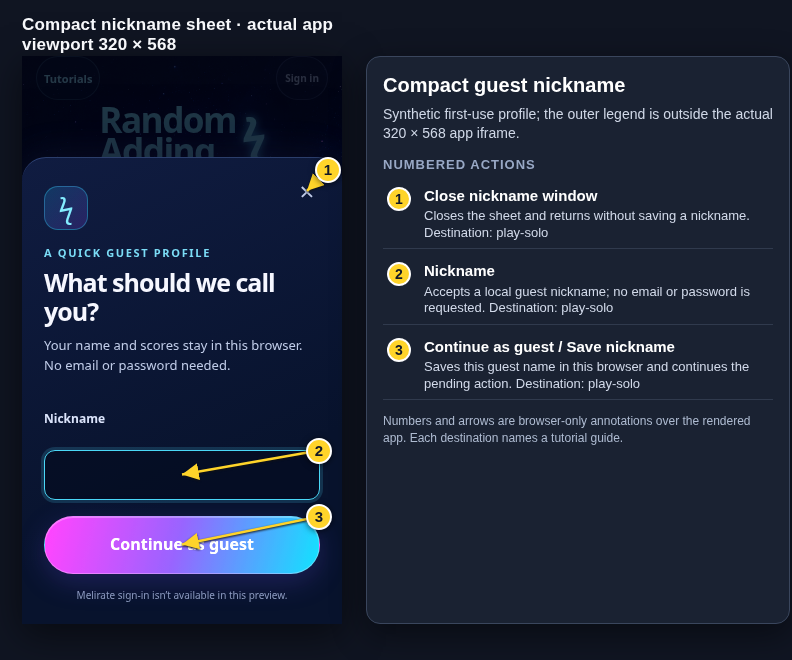 View full-size original annotated screen (new tab)
What the numbered markers show
- 1Close nickname windowCloses the sheet and returns without saving a nickname.Open guide: Play a solo round
- 2NicknameAccepts a local guest nickname; no email or password is requested.Open guide: Play a solo round
- 3Continue as guest / Save nicknameSaves this guest name in this browser and continues the pending action.Open guide: Play a solo round
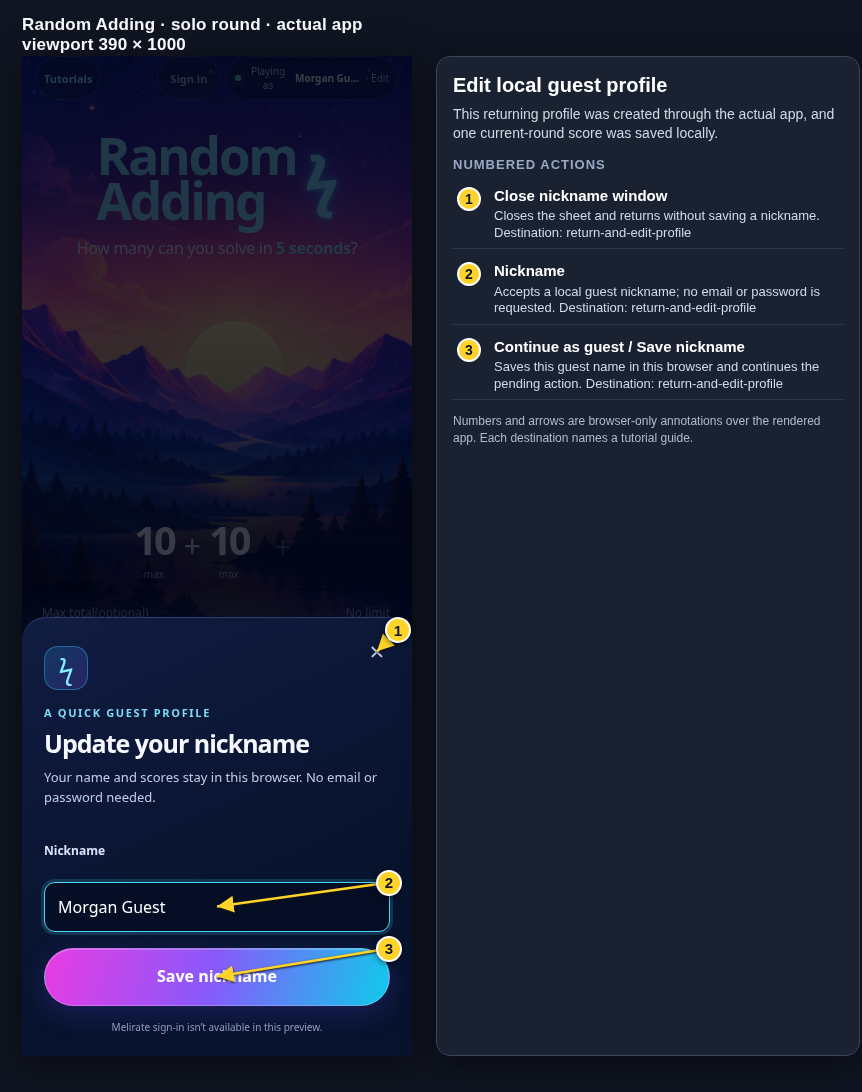 View full-size original annotated screen (new tab)
What the numbered markers show
- 1Close nickname windowCloses the sheet and returns without saving a nickname.Open guide: Return and edit your guest nickname
- 2NicknameAccepts a local guest nickname; no email or password is requested.Open guide: Return and edit your guest nickname
- 3Continue as guest / Save nicknameSaves this guest name in this browser and continues the pending action.Open guide: Return and edit your guest nickname
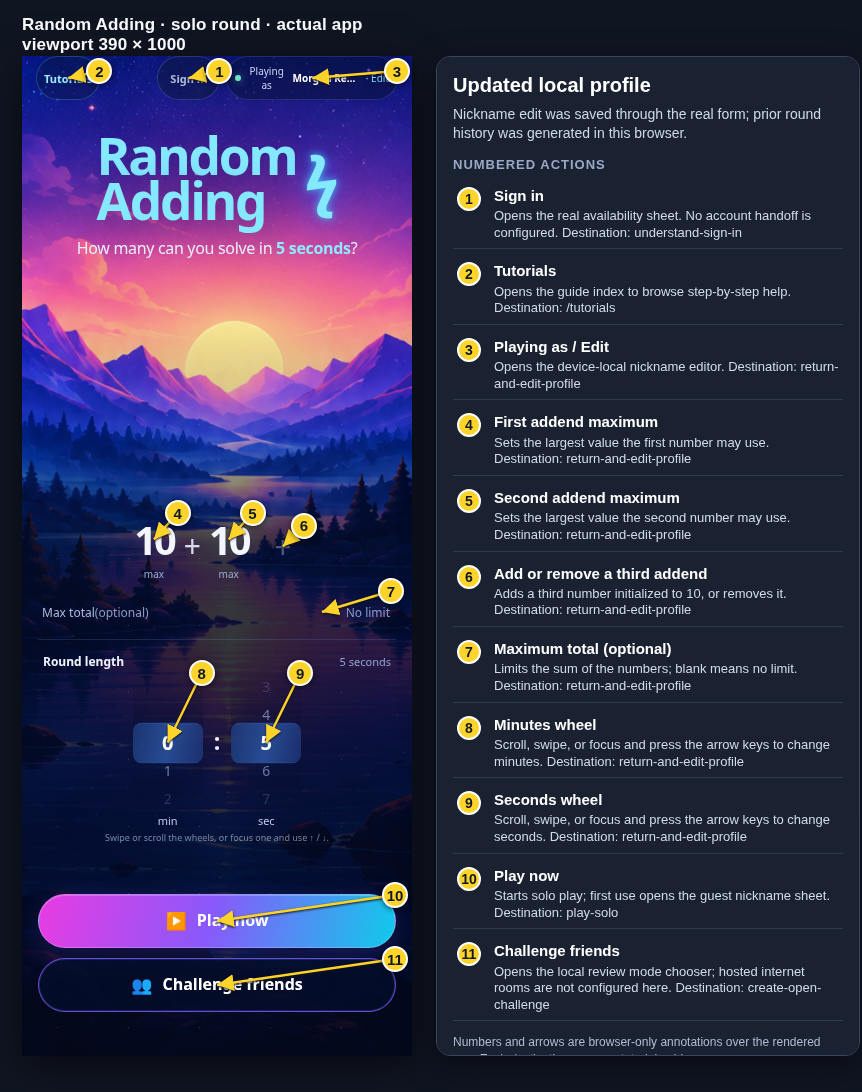 View full-size original annotated screen (new tab)
What the numbered markers show
- 1Sign inOpens the real availability sheet. No account handoff is configured.Open guide: Sign in and choose a learner
- 2TutorialsOpens the guide index to browse step-by-step help.Browse all tutorials
- 3Playing as / EditOpens the device-local nickname editor.Open guide: Return and edit your guest nickname
- 4First addend maximumSets the largest value the first number may use.Open guide: Return and edit your guest nickname
- 5Second addend maximumSets the largest value the second number may use.Open guide: Return and edit your guest nickname
- 6Add or remove a third addendAdds a third number initialized to 10, or removes it.Open guide: Return and edit your guest nickname
- 7Maximum total (optional)Limits the sum of the numbers; blank means no limit.Open guide: Return and edit your guest nickname
- 8Minutes wheelScroll, swipe, or focus and press the arrow keys to change minutes.Open guide: Return and edit your guest nickname
- 9Seconds wheelScroll, swipe, or focus and press the arrow keys to change seconds.Open guide: Return and edit your guest nickname
- 10Play nowStarts solo play; first use opens the guest nickname sheet.Open guide: Play a solo round
- 11Challenge friendsOpens the local review mode chooser; hosted internet rooms are not configured here.Open guide: Create an Open Challenge
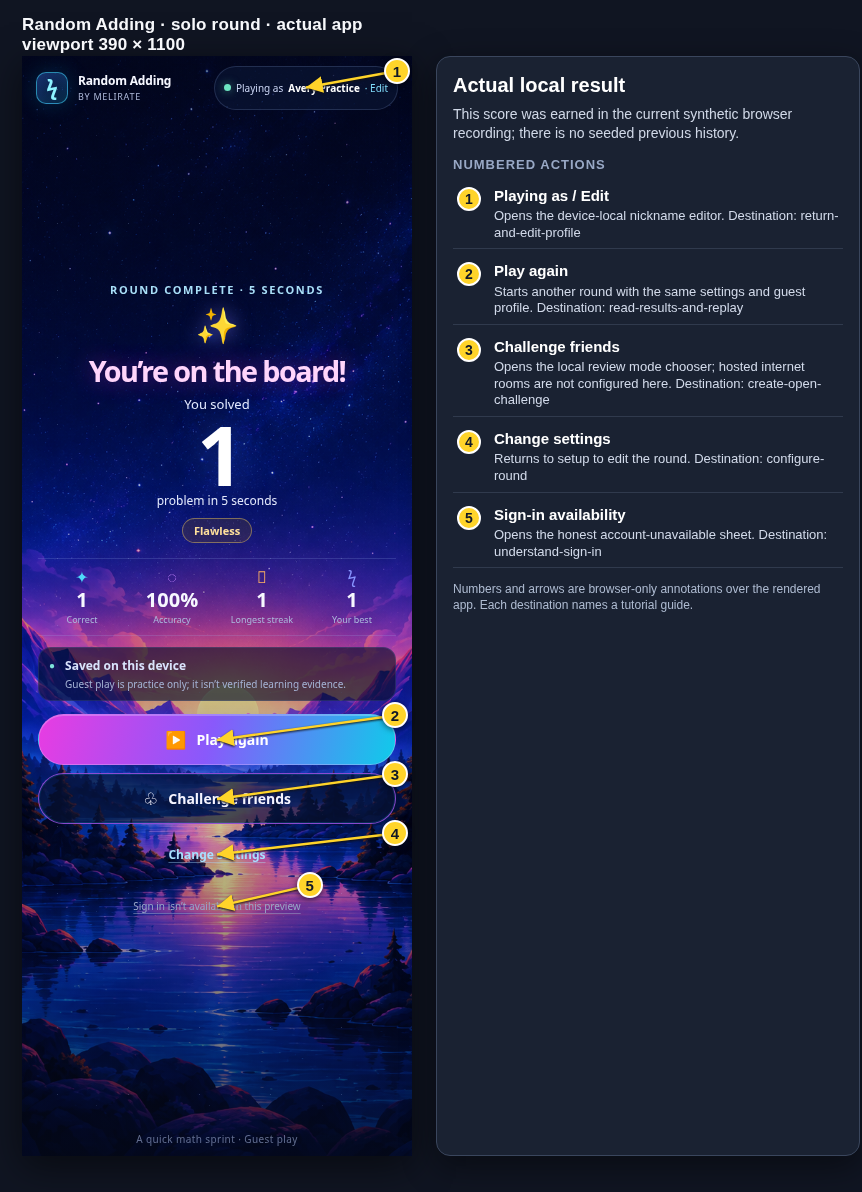 View full-size original annotated screen (new tab)
What the numbered markers show
- 1Playing as / EditOpens the device-local nickname editor.Open guide: Return and edit your guest nickname
- 2Play againStarts another round with the same settings and guest profile.Open guide: Read your results and replay
- 3Challenge friendsOpens the local review mode chooser; hosted internet rooms are not configured here.Open guide: Create an Open Challenge
- 4Change settingsReturns to setup to edit the round.Open guide: Choose round settings
- 5Sign-in availabilityOpens the honest account-unavailable sheet.Open guide: Sign in and choose a learner
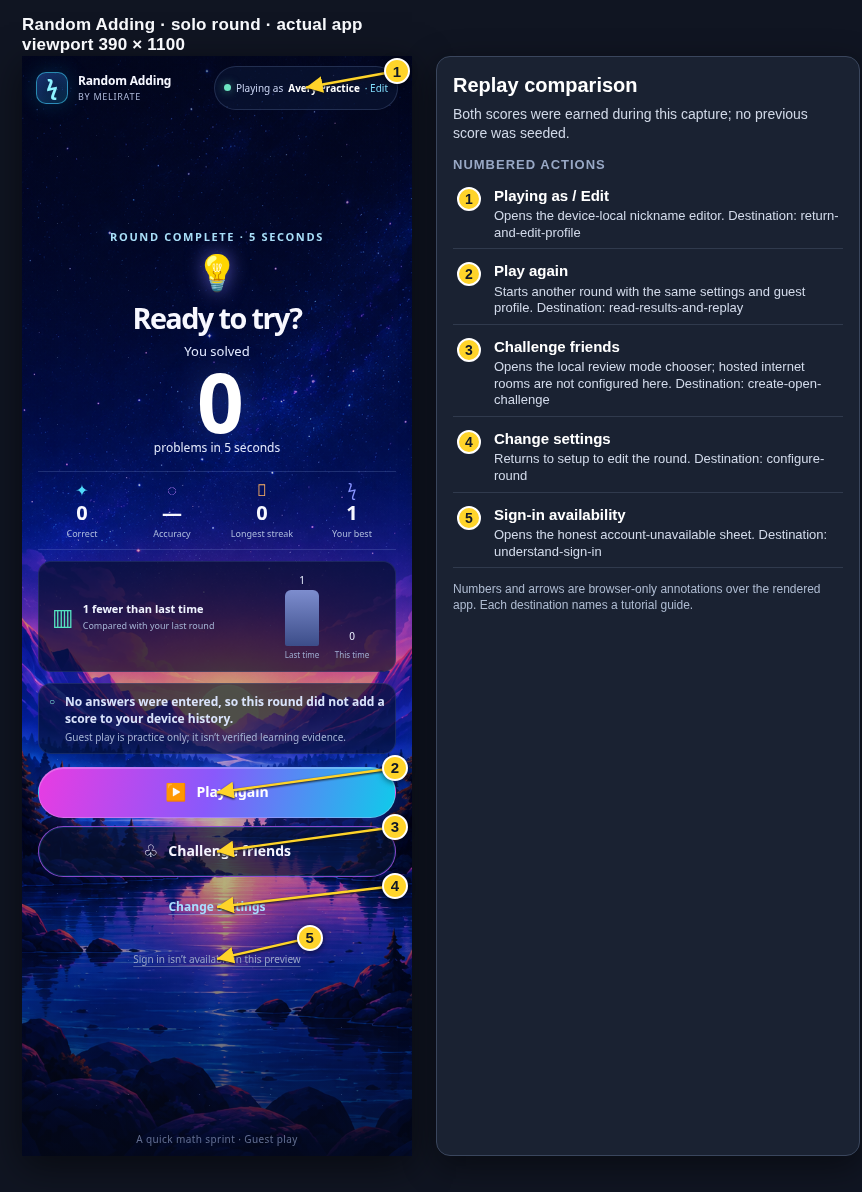 View full-size original annotated screen (new tab)
What the numbered markers show
- 1Playing as / EditOpens the device-local nickname editor.Open guide: Return and edit your guest nickname
- 2Play againStarts another round with the same settings and guest profile.Open guide: Read your results and replay
- 3Challenge friendsOpens the local review mode chooser; hosted internet rooms are not configured here.Open guide: Create an Open Challenge
- 4Change settingsReturns to setup to edit the round.Open guide: Choose round settings
- 5Sign-in availabilityOpens the honest account-unavailable sheet.Open guide: Sign in and choose a learner
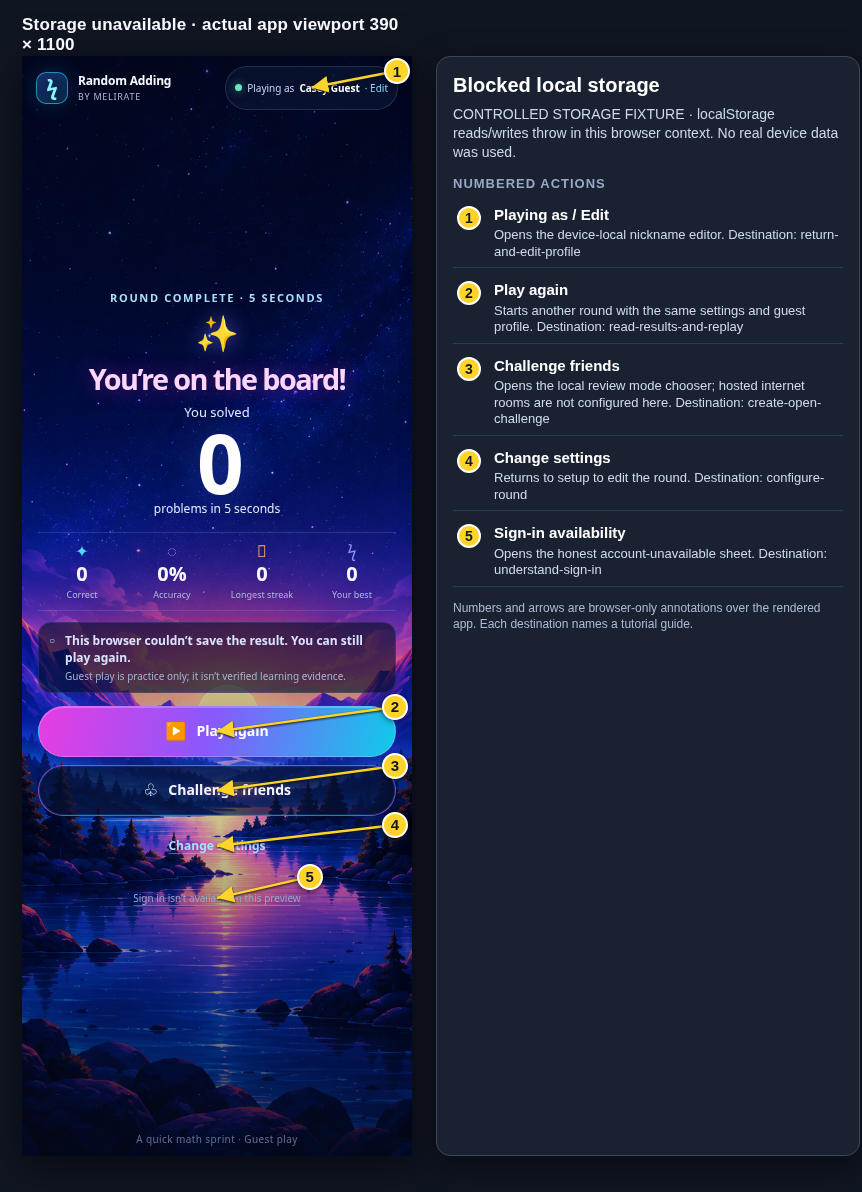 View full-size original annotated screen (new tab)
What the numbered markers show
- 1Playing as / EditOpens the device-local nickname editor.Open guide: Return and edit your guest nickname
- 2Play againStarts another round with the same settings and guest profile.Open guide: Read your results and replay
- 3Challenge friendsOpens the local review mode chooser; hosted internet rooms are not configured here.Open guide: Create an Open Challenge
- 4Change settingsReturns to setup to edit the round.Open guide: Choose round settings
- 5Sign-in availabilityOpens the honest account-unavailable sheet.Open guide: Sign in and choose a learner
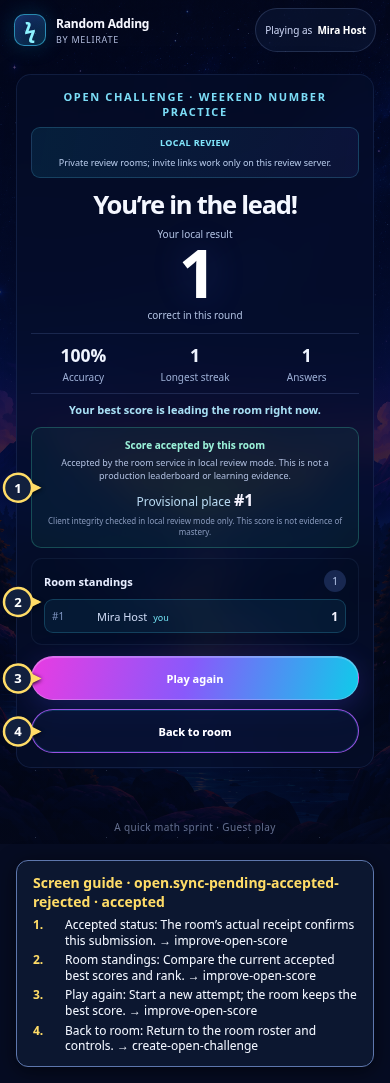 View full-size original annotated screen (new tab)
What the numbered markers show
- 1Accepted statusThe room’s actual receipt confirms this submission.Open guide: Play again and improve an Open Challenge score
- 2Room standingsCompare the current accepted best scores and rank.Open guide: Play again and improve an Open Challenge score
- 3Play againStart a new attempt; the room keeps the best score.Open guide: Play again and improve an Open Challenge score
- 4Back to roomReturn to the room roster and controls.Open guide: Create an Open Challenge
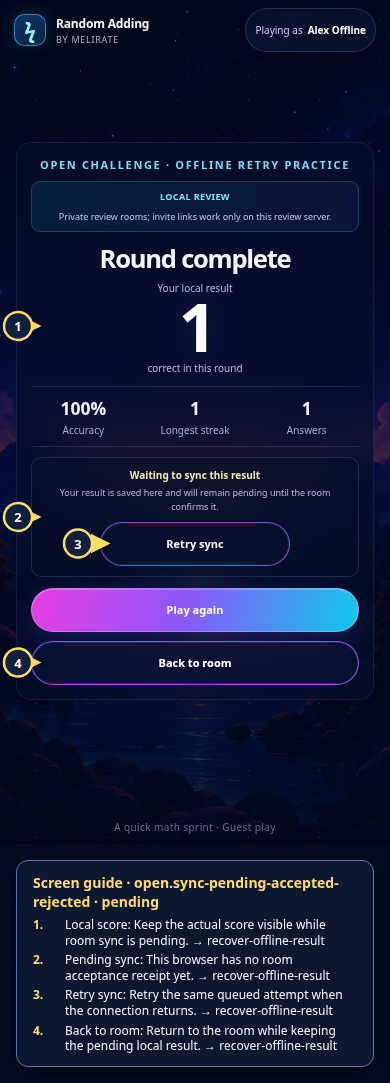 View full-size original annotated screen (new tab)
What the numbered markers show
- 1Local scoreKeep the actual score visible while room sync is pending.Open guide: Recover an offline or unsaved result
- 2Pending syncThis browser has no room acceptance receipt yet.Open guide: Recover an offline or unsaved result
- 3Retry syncRetry the same queued attempt when the connection returns.Open guide: Recover an offline or unsaved result
- 4Back to roomReturn to the room while keeping the pending local result.Open guide: Recover an offline or unsaved result
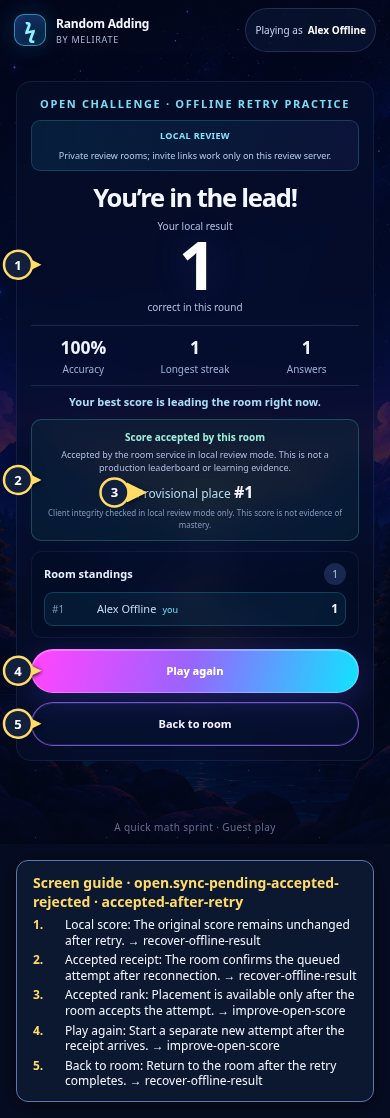 View full-size original annotated screen (new tab)
What the numbered markers show
- 1Local scoreThe original score remains unchanged after retry.Open guide: Recover an offline or unsaved result
- 2Accepted receiptThe room confirms the queued attempt after reconnection.Open guide: Recover an offline or unsaved result
- 3Accepted rankPlacement is available only after the room accepts the attempt.Open guide: Play again and improve an Open Challenge score
- 4Play againStart a separate new attempt after the receipt arrives.Open guide: Play again and improve an Open Challenge score
- 5Back to roomReturn to the room after the retry completes.Open guide: Recover an offline or unsaved result
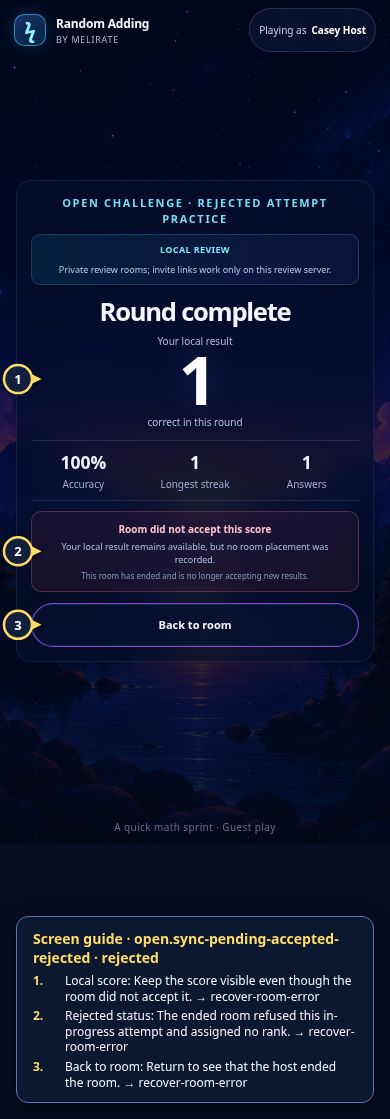 View full-size original annotated screen (new tab)
What the numbered markers show
- 1Local scoreKeep the score visible even though the room did not accept it.Open guide: Recover an unavailable, expired, or interrupted room
- 2Rejected statusThe ended room refused this in-progress attempt and assigned no rank.Open guide: Recover an unavailable, expired, or interrupted room
- 3Back to roomReturn to see that the host ended the room.Open guide: Recover an unavailable, expired, or interrupted room