Open Challenge
Create an Open Challenge
Make a private local-review room, share its code or invite link, and let each player start whenever ready.
Before you start
- Use a local review server with multiplayer enabled on the same machine. The room API accepts loopback requests only, so another device cannot join through the generated link; there is no hosted room service here.
Steps
Open room choices
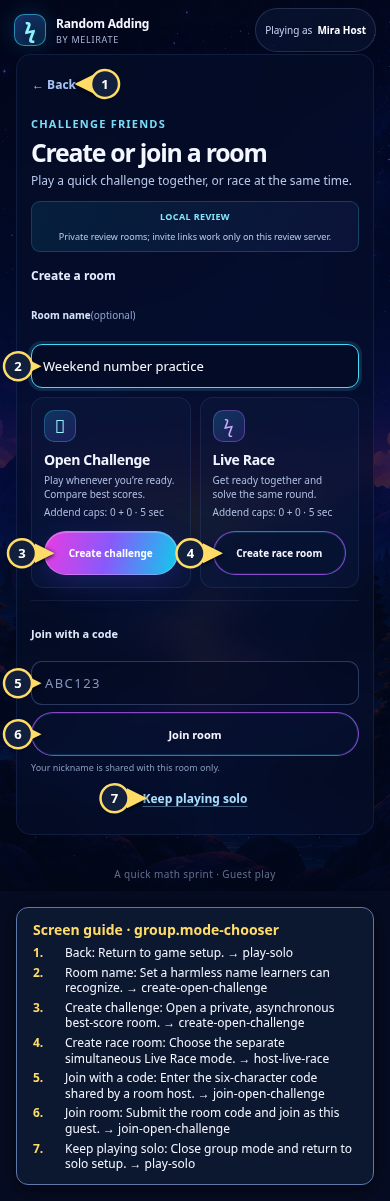
From setup, choose Challenge friends. If this is the first guest action, save a nickname first; after that the mode chooser opens.
Open the Rooms: choose a mode guideCreate an Open Challenge
Optionally enter a room name, then choose Create challenge. It uses the current addend and duration settings; room settings cannot be changed after creation.
Open the Open Challenge: invitation guideReview the invitation controls
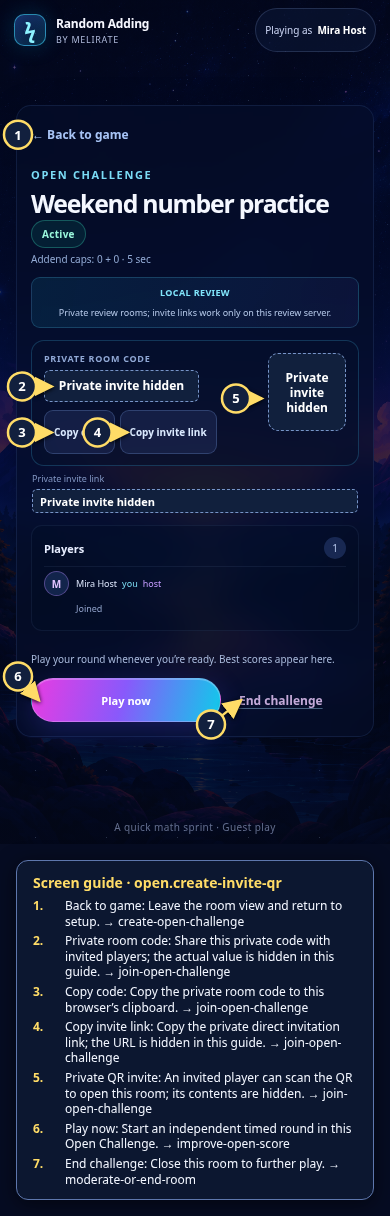
Copy the six-character code or private invite link, or display the QR. Keep the long-token link private. This local loopback URL cannot be used from another device; code-only entry is also for local review.
Open the Open Challenge: invitation guideStart your own round
Choose Play now in the room. Open Challenge has no ready-up gate; the host can play before anyone else joins.
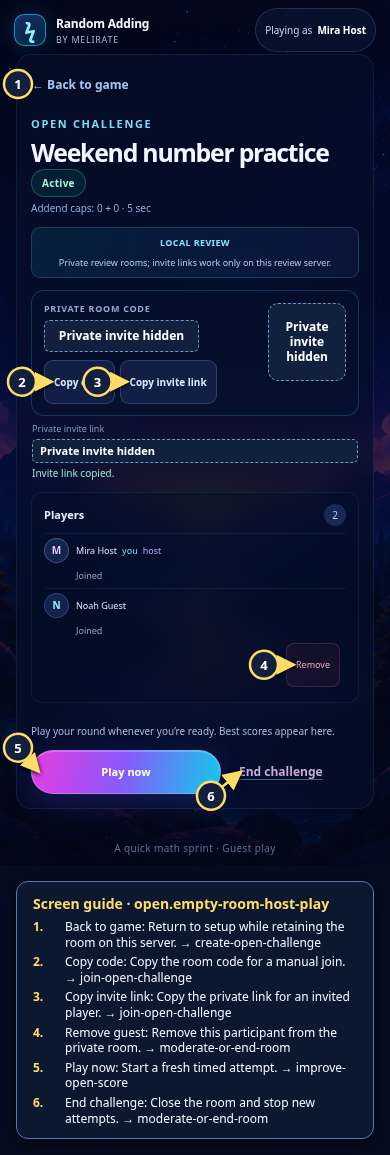
Open the Open Challenge: empty room guide
What to expect
- The room is private and is not listed in a public directory.
- The app marks local review clearly; room links are not public production invitations.
Other paths
Join an Open Challenge
Follow an invite link or enter its code.
Open guide: Join an Open ChallengeProject a room
Use the room code and QR for a local group activity.
Open guide: Review the projected-room flow locallyEnd or moderate a room
Review host-only room controls and their effects.
Open guide: Moderate or end a room
Visual guide
Recorded walkthrough
These are silent local synthetic preview captures. Account clips and screenshots show the unconfigured guest preview, not the locally prepared member flow. Some demos use 5-, 15-, or 20-second timers; private invitation details are hidden. If playback is unavailable, use the captions when present or read the full transcript below.
Read the full recording transcript
This capture uses a synthetic five-second round to keep the local demonstration short.
Open Challenge creates a private room for independent timed rounds and best-score comparison.
Choose a harmless room name, create the challenge, then copy its code or invite link. The private code, URL and QR are hidden in this recording.
An invited guest joins with the code. The host can see the participant, start a round, or end the room.
After the timer ends, the room returns an accepted receipt and updates its local standings. This local review score is not learning evidence.
Annotated screens
Each numbered note names the control or state marked on the screen.
 View full-size original annotated screen (new tab)
What the numbered markers show
- 1BackReturn to game setup.Open guide: Play a solo round
- 2Room nameSet a harmless name learners can recognize.Open guide: Create an Open Challenge
- 3Create challengeOpen a private, asynchronous best-score room.Open guide: Create an Open Challenge
- 4Create race roomChoose the separate simultaneous Live Race mode.Open guide: Host a Live Race
- 5Join with a codeEnter the six-character code shared by a room host.Open guide: Join an Open Challenge
- 6Join roomSubmit the room code and join as this guest.Open guide: Join an Open Challenge
- 7Keep playing soloClose group mode and return to solo setup.Open guide: Play a solo round
 View full-size original annotated screen (new tab)
What the numbered markers show
- 1Back to gameLeave the room view and return to setup.Open guide: Create an Open Challenge
- 2Private room codeShare this private code with invited players; the actual value is hidden in this guide.Open guide: Join an Open Challenge
- 3Copy codeCopy the private room code to this browser’s clipboard.Open guide: Join an Open Challenge
- 4Copy invite linkCopy the private direct invitation link; the URL is hidden in this guide.Open guide: Join an Open Challenge
- 5Private QR inviteAn invited player can scan the QR to open this room; its contents are hidden.Open guide: Join an Open Challenge
- 6Play nowStart an independent timed round in this Open Challenge.Open guide: Play again and improve an Open Challenge score
- 7End challengeClose this room to further play.Open guide: Moderate or end a room
 View full-size original annotated screen (new tab)
What the numbered markers show
- 1Back to gameReturn to setup while retaining the room on this server.Open guide: Create an Open Challenge
- 2Copy codeCopy the room code for a manual join.Open guide: Join an Open Challenge
- 3Copy invite linkCopy the private link for an invited player.Open guide: Join an Open Challenge
- 4Remove guestRemove this participant from the private room.Open guide: Moderate or end a room
- 5Play nowStart a fresh timed attempt.Open guide: Play again and improve an Open Challenge score
- 6End challengeClose the room and stop new attempts.Open guide: Moderate or end a room