Round setup
Choose round settings
Adjust the number range, optional total cap, and timed-round length before playing.
Before you start
- Open the setup screen. Settings are kept in this browser when local storage is available.
Steps
Set the addend maximums
Edit either displayed maximum directly. Each active addend accepts a whole number from 0 to 999. Use + to add a third maximum, which starts at 10; use − to remove it.
Open the Setup: two or three addends guideOptionally cap the sum
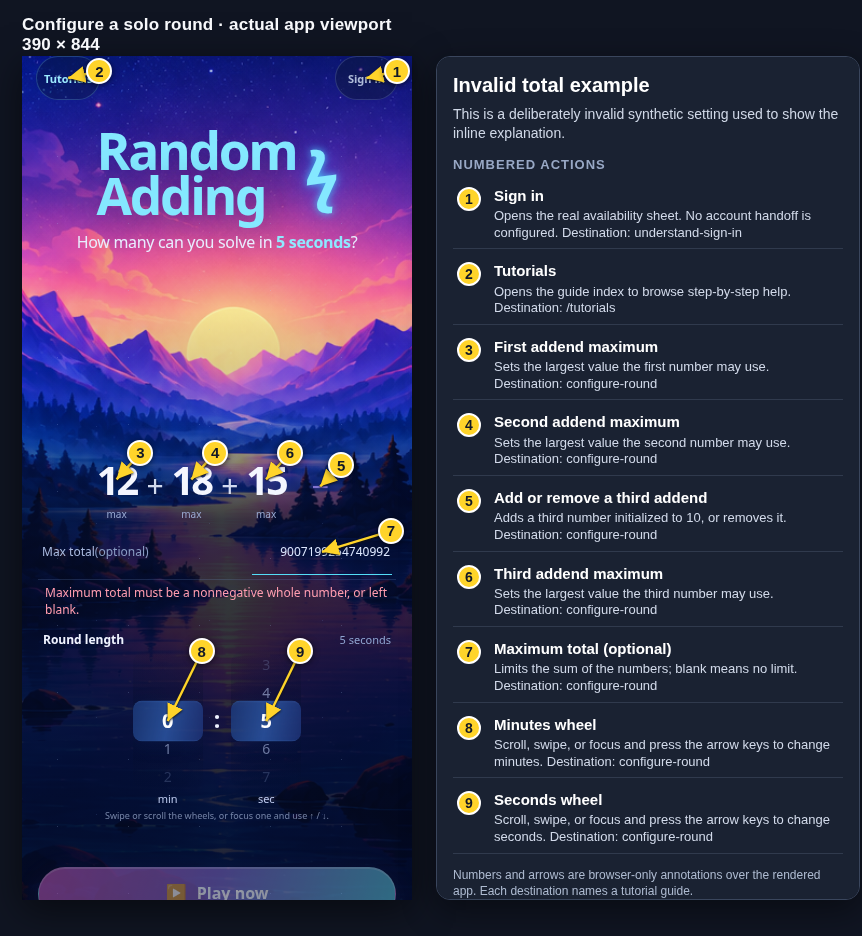
Enter a nonnegative whole number in Max total (optional). Leave it blank for No limit. Invalid text is explained inline and keeps Play now disabled until corrected.
Open the Setup: optional total cap guideChoose a duration
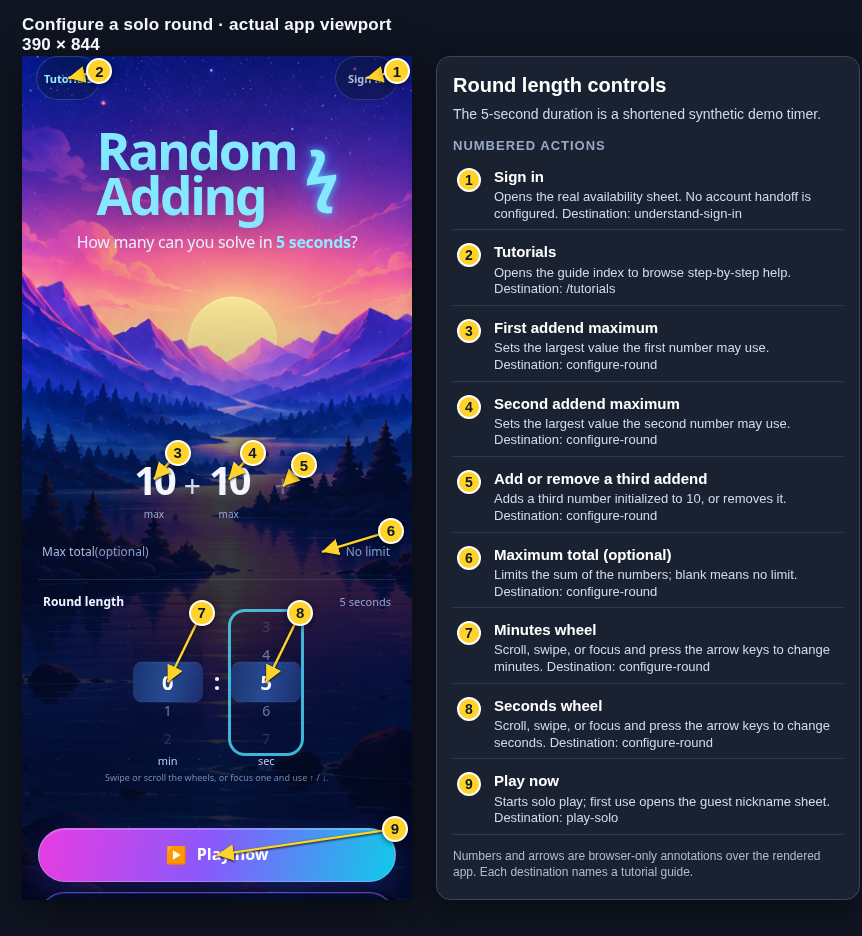
Adjust the minutes and seconds wheels. The default 0:60 means 60 seconds. Round lengths must total from 5 seconds to 10 minutes; a seconds selection of 60 rolls into the next minute when possible.
Open the Setup: duration wheels guideStart when the settings are valid
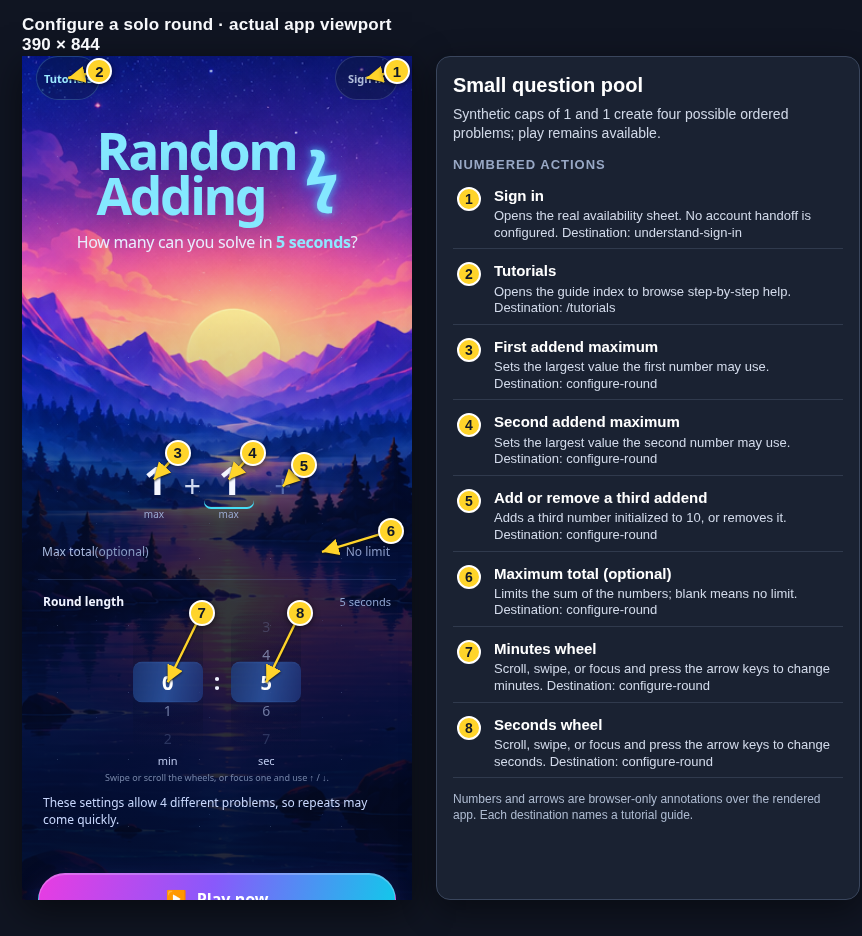
Play now uses the current valid settings. A very small question pool may show a note, but one-problem configurations are allowed.
Open the Setup: a small problem pool guide
What to expect
- The equation preview reflects two or three addends.
- Personal-best comparisons are kept separate for different settings.
Other paths
Start a solo round
Go from these settings straight into timed play.
Open guide: Play a solo roundSee the setup controls
Open the guide for the default setup screen.
Open guide: Setup: the default round
Visual guide
Recorded walkthrough
These are silent local synthetic preview captures. Account clips and screenshots show the unconfigured guest preview, not the locally prepared member flow. Some demos use 5-, 15-, or 20-second timers; private invitation details are hidden. If playback is unavailable, use the captions when present or read the full transcript below.
Read the full recording transcript
The default is two addend maximums of 10, no total limit, and one minute.
The plus control adds a third number. Set each maximum and use the optional total field if the sum needs a limit.
Focus a minutes or seconds wheel and use the arrow keys, or scroll or swipe the wheel. This demo uses a short timer.
Annotated screens
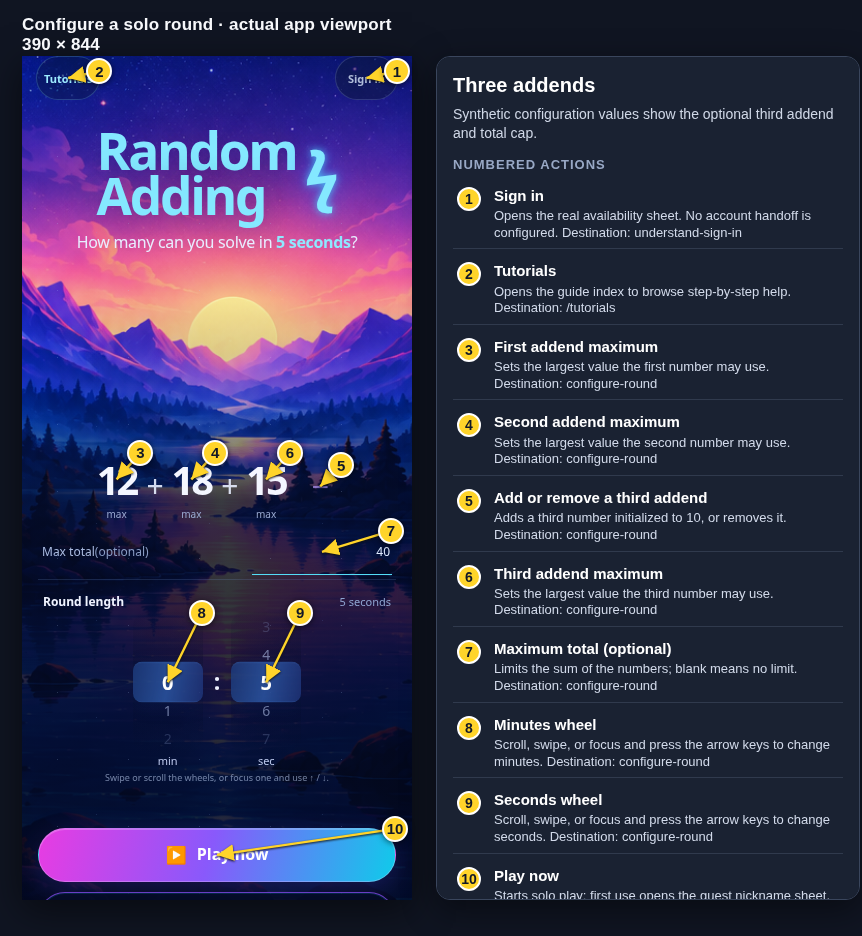
Each numbered note names the control or state marked on the screen.
 View full-size original annotated screen (new tab)
What the numbered markers show
- 1Sign inOpens the real availability sheet. No account handoff is configured.Open guide: Sign in and choose a learner
- 2TutorialsOpens the guide index to browse step-by-step help.Browse all tutorials
- 3First addend maximumSets the largest value the first number may use.Open guide: Choose round settings
- 4Second addend maximumSets the largest value the second number may use.Open guide: Choose round settings
- 5Add or remove a third addendAdds a third number initialized to 10, or removes it.Open guide: Choose round settings
- 6Third addend maximumSets the largest value the third number may use.Open guide: Choose round settings
- 7Maximum total (optional)Limits the sum of the numbers; blank means no limit.Open guide: Choose round settings
- 8Minutes wheelScroll, swipe, or focus and press the arrow keys to change minutes.Open guide: Choose round settings
- 9Seconds wheelScroll, swipe, or focus and press the arrow keys to change seconds.Open guide: Choose round settings
- 10Play nowStarts solo play; first use opens the guest nickname sheet.Open guide: Play a solo round
 View full-size original annotated screen (new tab)
What the numbered markers show
- 1Sign inOpens the real availability sheet. No account handoff is configured.Open guide: Sign in and choose a learner
- 2TutorialsOpens the guide index to browse step-by-step help.Browse all tutorials
- 3First addend maximumSets the largest value the first number may use.Open guide: Choose round settings
- 4Second addend maximumSets the largest value the second number may use.Open guide: Choose round settings
- 5Add or remove a third addendAdds a third number initialized to 10, or removes it.Open guide: Choose round settings
- 6Third addend maximumSets the largest value the third number may use.Open guide: Choose round settings
- 7Maximum total (optional)Limits the sum of the numbers; blank means no limit.Open guide: Choose round settings
- 8Minutes wheelScroll, swipe, or focus and press the arrow keys to change minutes.Open guide: Choose round settings
- 9Seconds wheelScroll, swipe, or focus and press the arrow keys to change seconds.Open guide: Choose round settings
 View full-size original annotated screen (new tab)
What the numbered markers show
- 1Sign inOpens the real availability sheet. No account handoff is configured.Open guide: Sign in and choose a learner
- 2TutorialsOpens the guide index to browse step-by-step help.Browse all tutorials
- 3First addend maximumSets the largest value the first number may use.Open guide: Choose round settings
- 4Second addend maximumSets the largest value the second number may use.Open guide: Choose round settings
- 5Add or remove a third addendAdds a third number initialized to 10, or removes it.Open guide: Choose round settings
- 6Maximum total (optional)Limits the sum of the numbers; blank means no limit.Open guide: Choose round settings
- 7Minutes wheelScroll, swipe, or focus and press the arrow keys to change minutes.Open guide: Choose round settings
- 8Seconds wheelScroll, swipe, or focus and press the arrow keys to change seconds.Open guide: Choose round settings
- 9Play nowStarts solo play; first use opens the guest nickname sheet.Open guide: Play a solo round
 View full-size original annotated screen (new tab)
What the numbered markers show
- 1Sign inOpens the real availability sheet. No account handoff is configured.Open guide: Sign in and choose a learner
- 2TutorialsOpens the guide index to browse step-by-step help.Browse all tutorials
- 3First addend maximumSets the largest value the first number may use.Open guide: Choose round settings
- 4Second addend maximumSets the largest value the second number may use.Open guide: Choose round settings
- 5Add or remove a third addendAdds a third number initialized to 10, or removes it.Open guide: Choose round settings
- 6Maximum total (optional)Limits the sum of the numbers; blank means no limit.Open guide: Choose round settings
- 7Minutes wheelScroll, swipe, or focus and press the arrow keys to change minutes.Open guide: Choose round settings
- 8Seconds wheelScroll, swipe, or focus and press the arrow keys to change seconds.Open guide: Choose round settings