Recovery
Gameplay: timer expiry and background tab
Understand the fixed deadline when the timer reaches zero or the browser tab is hidden.
Before you start
- Start a timed round.
Steps
Let the deadline pass
When the configured duration ends, the round finishes and the result screen appears.
Open the Gameplay: timer expiry and background tab guideReturn from a hidden tab
The deadline continues while the tab is hidden. When the app becomes visible again, it reconciles the timer and finishes an expired round.
Open the Gameplay: timer expiry and background tab guide
What to expect
- Backgrounding does not pause or extend the selected duration.
Other paths
Recover offline
Review what remains local and what can be retried.
Open guide: Recover an offline or unsaved resultReconnect to a race
Live Race uses the same shared deadline for everyone.
Open guide: Reconnect to a Live Race
Visual guide
Annotated screens
Each numbered note names the control or state marked on the screen.
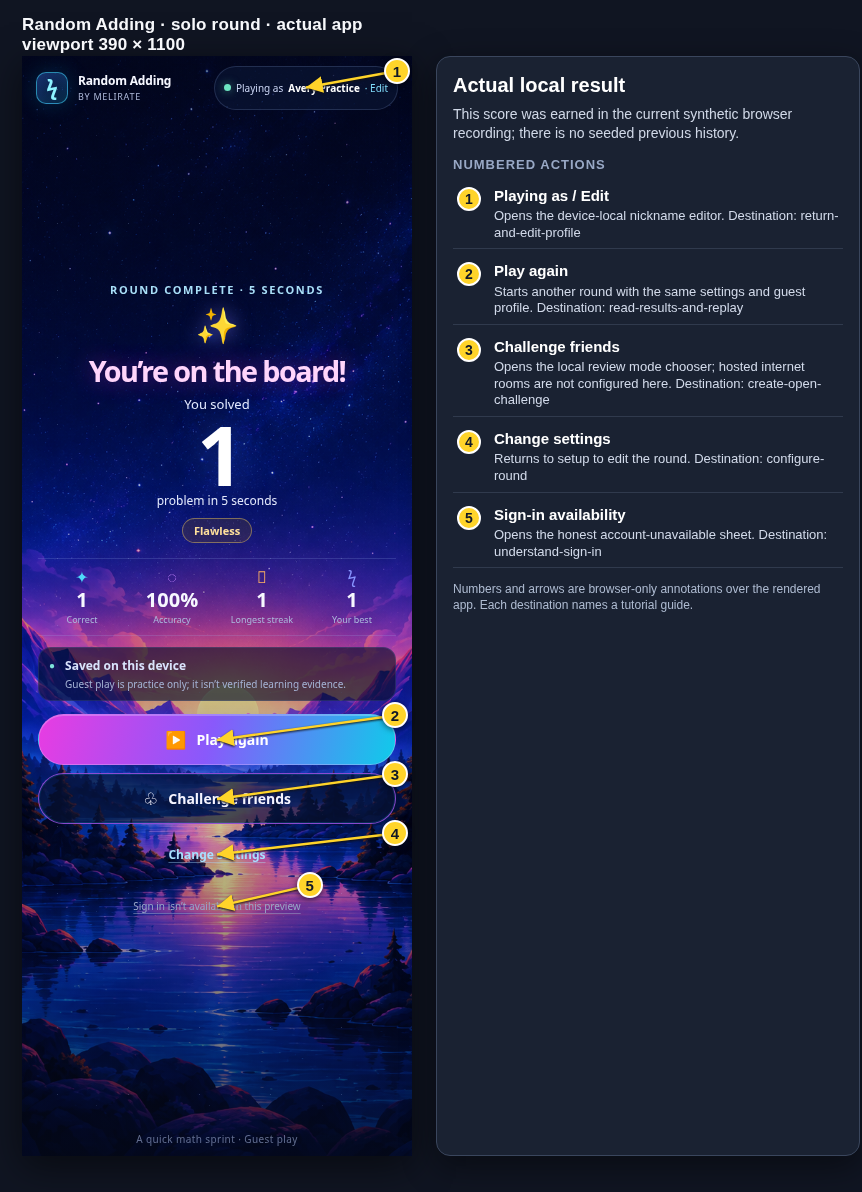 View full-size original annotated screen (new tab)
What the numbered markers show
- 1Playing as / EditOpens the device-local nickname editor.Open guide: Return and edit your guest nickname
- 2Play againStarts another round with the same settings and guest profile.Open guide: Read your results and replay
- 3Challenge friendsOpens the local review mode chooser; hosted internet rooms are not configured here.Open guide: Create an Open Challenge
- 4Change settingsReturns to setup to edit the round.Open guide: Choose round settings
- 5Sign-in availabilityOpens the honest account-unavailable sheet.Open guide: Sign in and choose a learner