Results
Read your results and replay
Understand guest device saves and member practice receipts, and choose what to do after a round.
Before you start
- Complete a guest or member round, or let its timer reach zero. Empty member rounds have no answers to sync.
Steps
Read the score and headline
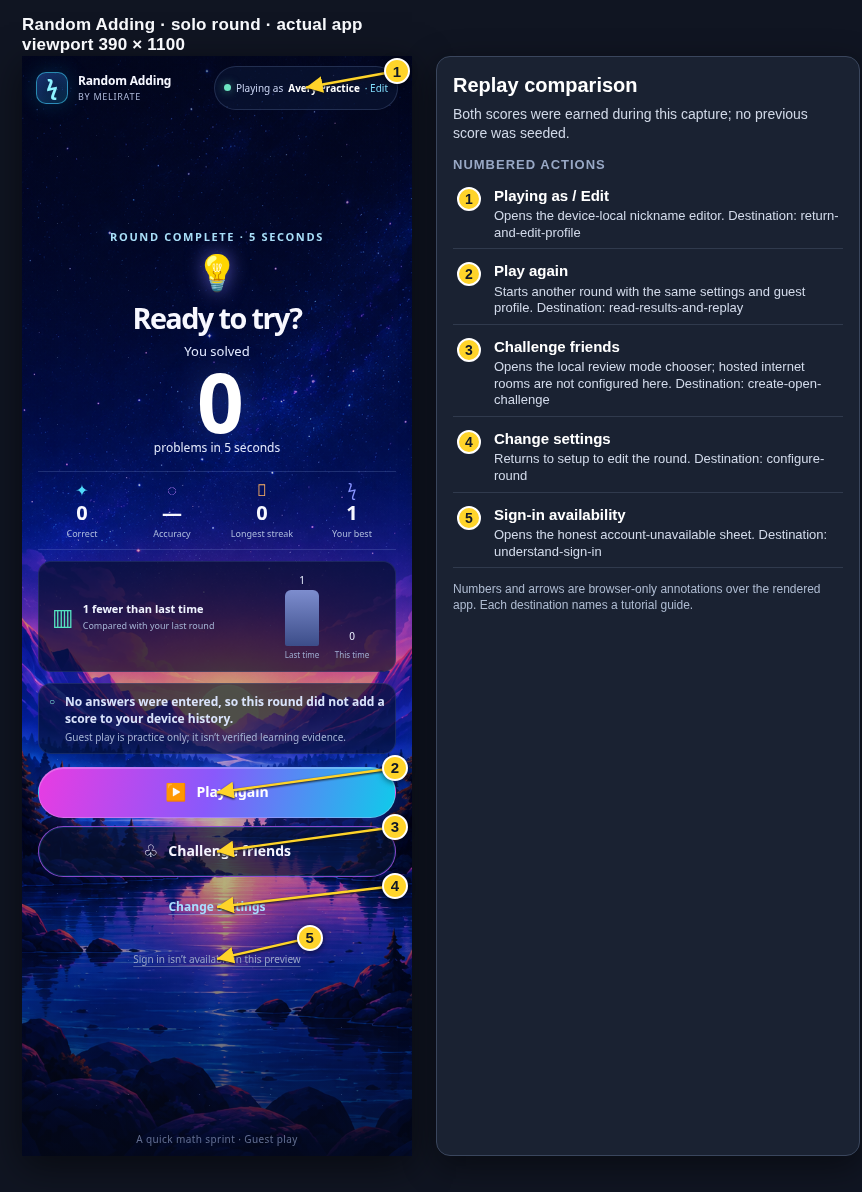
Guest results lead with correct problems and an outcome headline that may compare prior guest rounds. Member results use a simple Nice work headline and show the current round without borrowing guest scores.
Open the Results: outcome headline guideCheck the supporting measures
Guest results include accuracy, longest streak, and a configuration-specific local best/comparison. Member results include accuracy and longest streak; they do not use the guest best score.
Open the Results: metrics and local save guideRead the save message
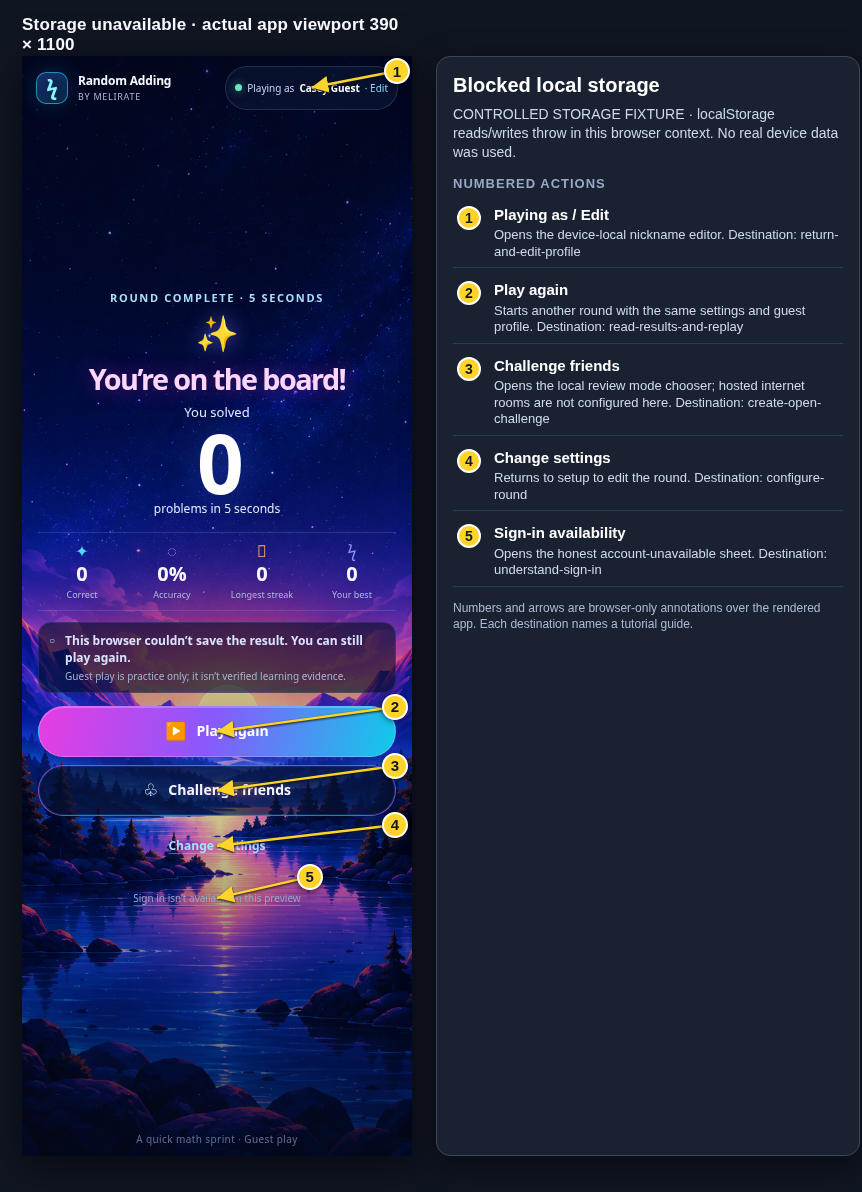
For guest play, Saved on this device confirms a browser-storage write; it is not a Melirate receipt. Member results appear immediately while the answer journal syncs after the round. Saving means the batch is in progress; Retry means it still needs a receipt. Reconnect to retry automatically or choose Retry sync. Only a confirmed receipt says answers are saved in Melirate Activity, where the results link opens them. Eligible solo facts count toward skill predictions.
Open the Results: metrics and local save guideChoose a next step
Play again starts a fresh sequence with the same settings. Change settings returns to setup. Challenge friends remains the guest/group flow; it does not attach room scores to the member learner.
Open the Results: next actions guide
What to expect
- The guest best score remains configuration-specific and local to the device.
- Verified players and guardians with practice permission can sync member answers to Activity. New canonical answer records appear there only after confirmed receipts and eligible solo facts contribute to skill predictions.
- The recording and screenshots show the guest result path; member sync and Activity are explained in text only.
Other paths
Replay and improve a room score
Open Challenge results keep the participant's best accepted attempt rather than adding all attempts.
Open guide: Play again and improve an Open Challenge scoreSee the room sync status
Pending, accepted, and rejected room uploads are described separately.
Open guide: Recover an offline or unsaved resultHow guest data is stored
Read the local-storage and evidence boundary.
Open guide: Understand guest data and practice scores
Visual guide
Recorded walkthrough
These are silent local synthetic preview captures. Account clips and screenshots show the unconfigured guest preview, not the locally prepared member flow. Some demos use 5-, 15-, or 20-second timers; private invitation details are hidden. If playback is unavailable, use the captions when present or read the full transcript below.
Read the full recording transcript
Start a short guest round and answer the actual displayed question.
The results screen reports correct answers, accuracy, longest streak, best score, and the local-save status.
Choose Play again to start a fresh round with the same settings.
The next result compares this round with the previous round completed in this same browser. Both are synthetic demo scores.
Annotated screens
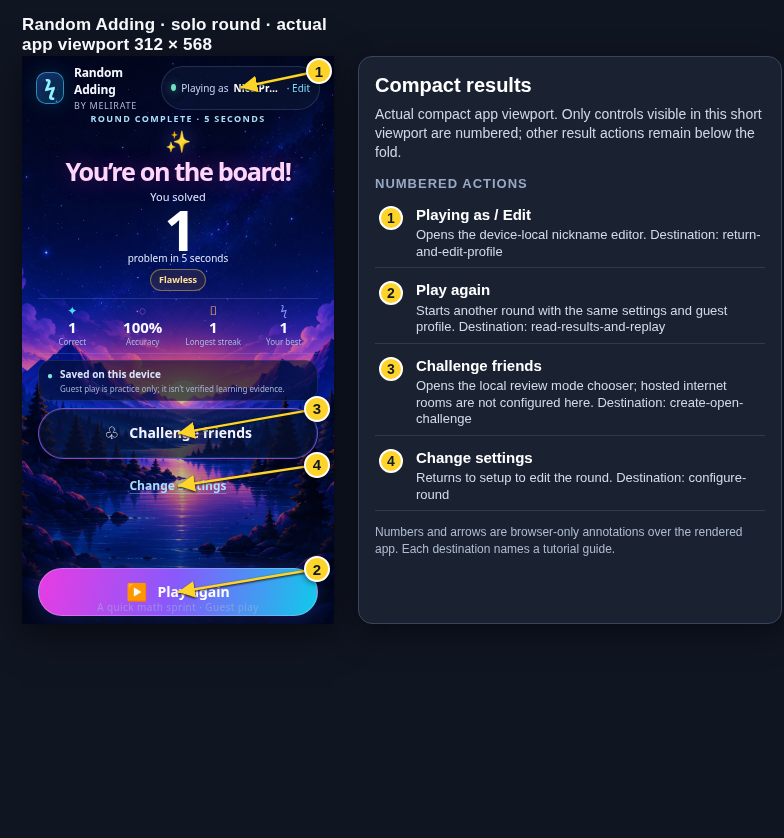
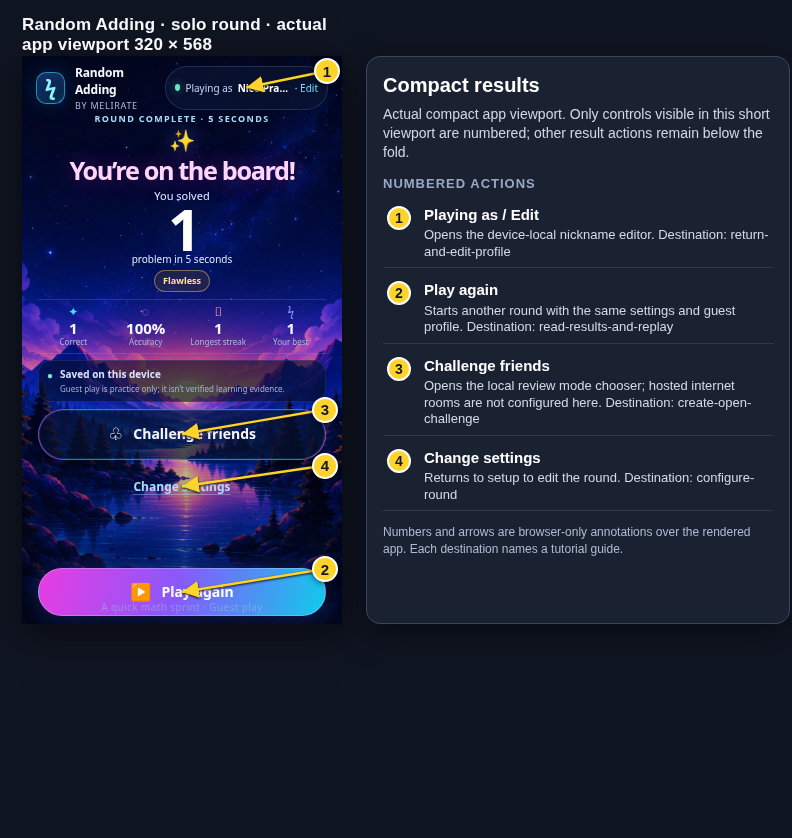
Each numbered note names the control or state marked on the screen.
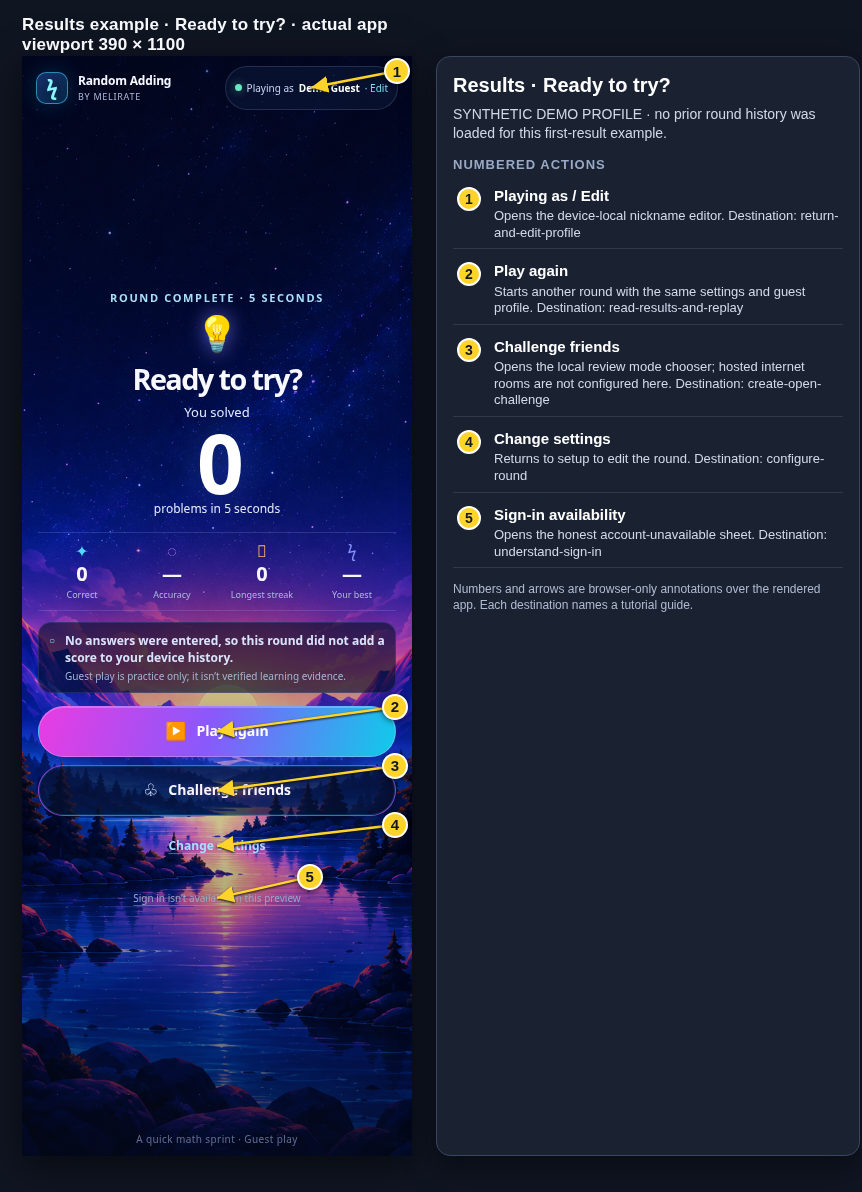 View full-size original annotated screen (new tab)
What the numbered markers show
- 1Playing as / EditOpens the device-local nickname editor.Open guide: Return and edit your guest nickname
- 2Play againStarts another round with the same settings and guest profile.Open guide: Read your results and replay
- 3Challenge friendsOpens the local review mode chooser; hosted internet rooms are not configured here.Open guide: Create an Open Challenge
- 4Change settingsReturns to setup to edit the round.Open guide: Choose round settings
- 5Sign-in availabilityOpens the honest account-unavailable sheet.Open guide: Sign in and choose a learner
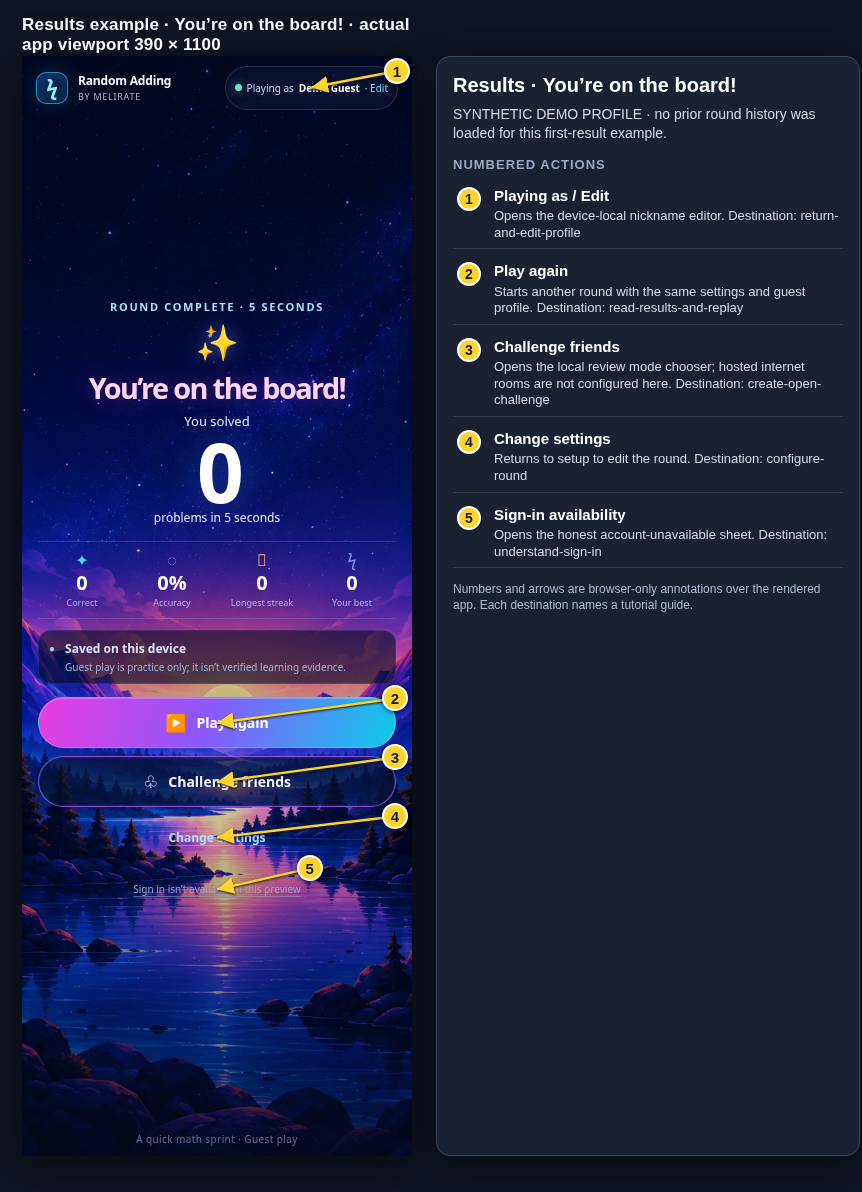 View full-size original annotated screen (new tab)
What the numbered markers show
- 1Playing as / EditOpens the device-local nickname editor.Open guide: Return and edit your guest nickname
- 2Play againStarts another round with the same settings and guest profile.Open guide: Read your results and replay
- 3Challenge friendsOpens the local review mode chooser; hosted internet rooms are not configured here.Open guide: Create an Open Challenge
- 4Change settingsReturns to setup to edit the round.Open guide: Choose round settings
- 5Sign-in availabilityOpens the honest account-unavailable sheet.Open guide: Sign in and choose a learner
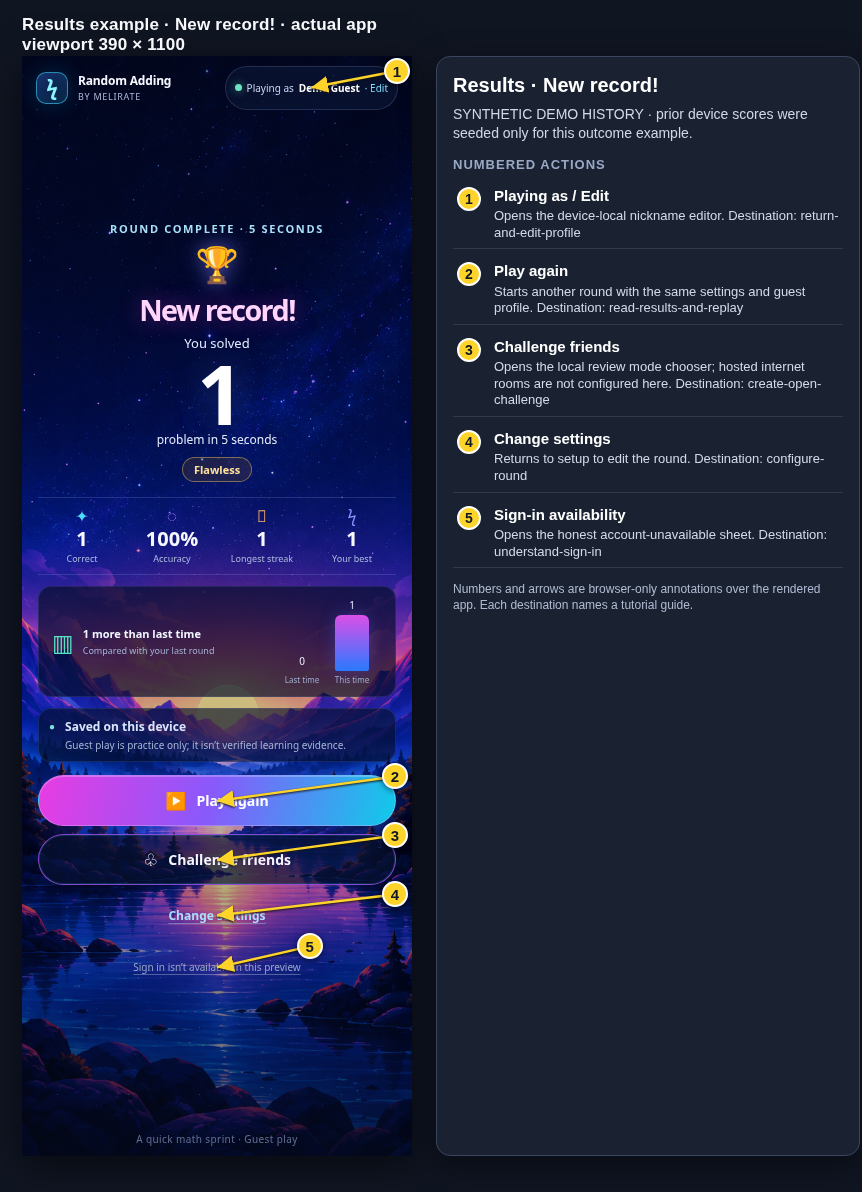 View full-size original annotated screen (new tab)
What the numbered markers show
- 1Playing as / EditOpens the device-local nickname editor.Open guide: Return and edit your guest nickname
- 2Play againStarts another round with the same settings and guest profile.Open guide: Read your results and replay
- 3Challenge friendsOpens the local review mode chooser; hosted internet rooms are not configured here.Open guide: Create an Open Challenge
- 4Change settingsReturns to setup to edit the round.Open guide: Choose round settings
- 5Sign-in availabilityOpens the honest account-unavailable sheet.Open guide: Sign in and choose a learner
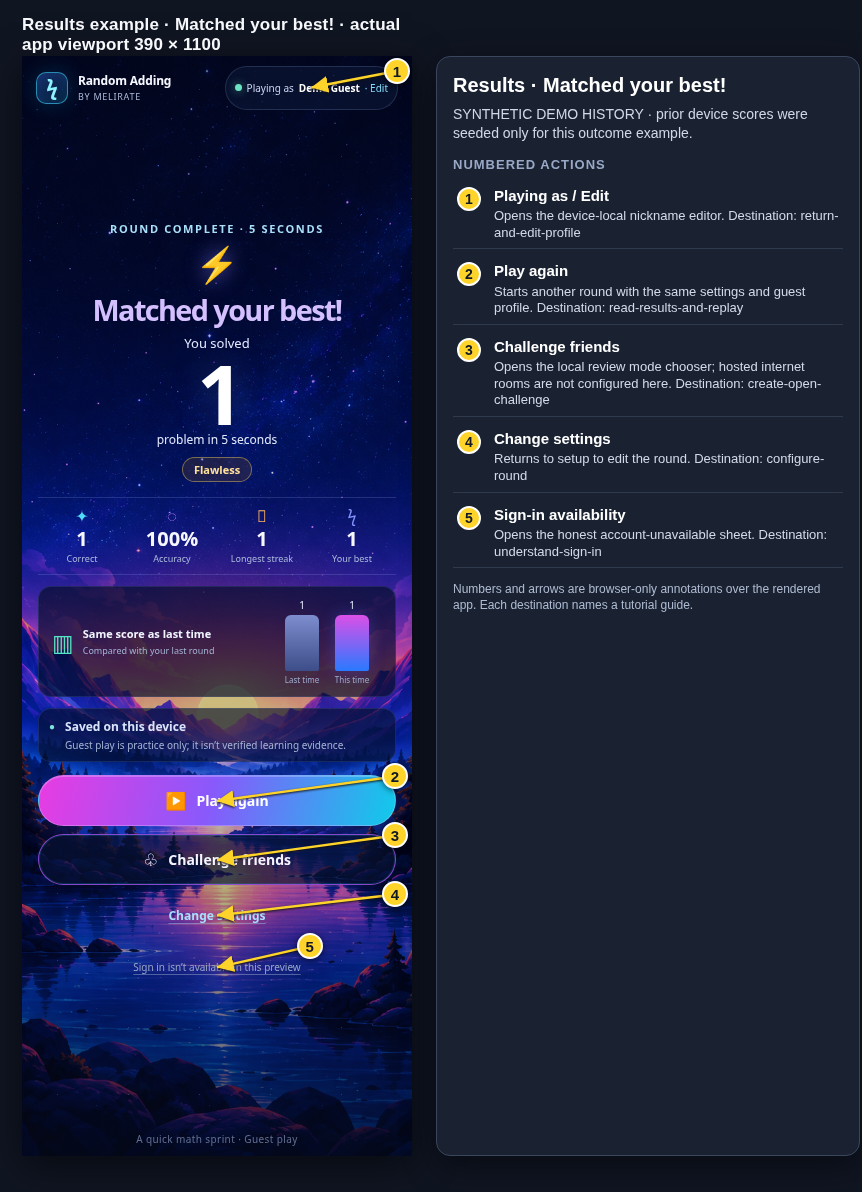 View full-size original annotated screen (new tab)
What the numbered markers show
- 1Playing as / EditOpens the device-local nickname editor.Open guide: Return and edit your guest nickname
- 2Play againStarts another round with the same settings and guest profile.Open guide: Read your results and replay
- 3Challenge friendsOpens the local review mode chooser; hosted internet rooms are not configured here.Open guide: Create an Open Challenge
- 4Change settingsReturns to setup to edit the round.Open guide: Choose round settings
- 5Sign-in availabilityOpens the honest account-unavailable sheet.Open guide: Sign in and choose a learner
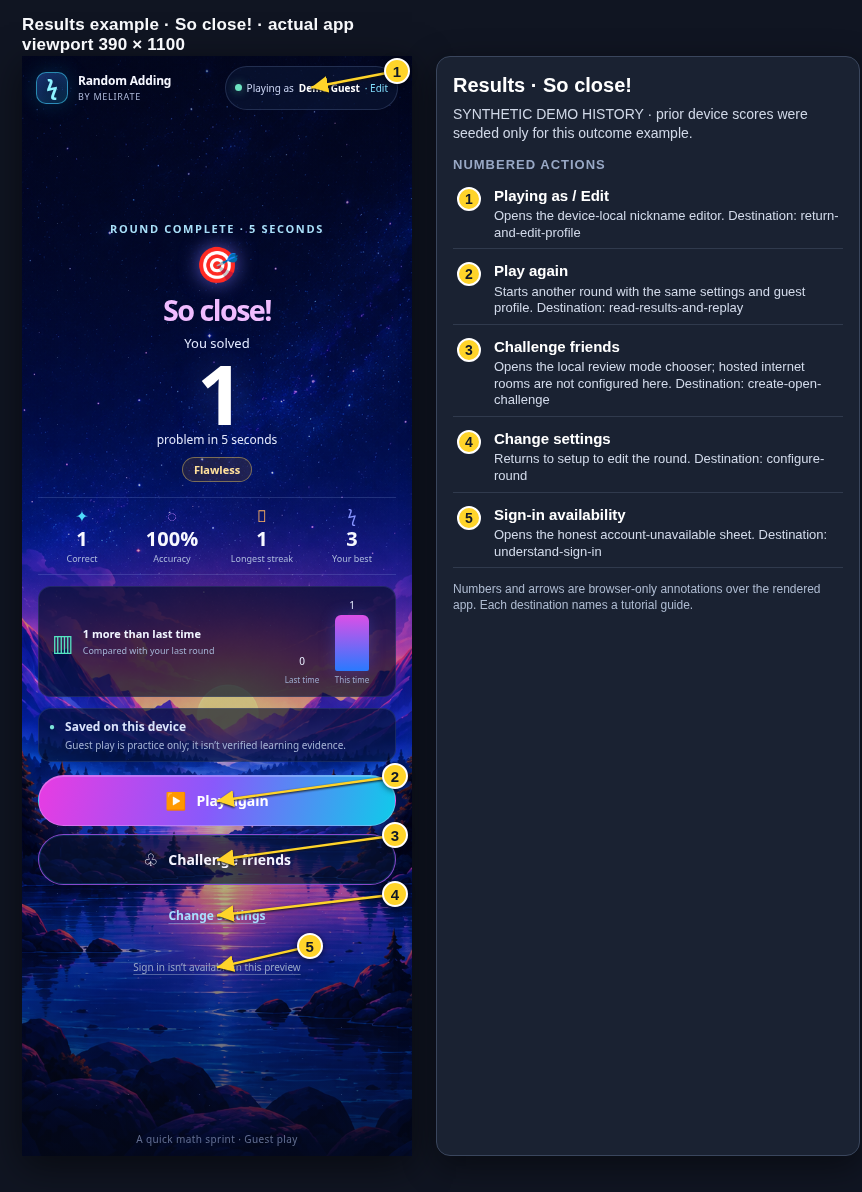 View full-size original annotated screen (new tab)
What the numbered markers show
- 1Playing as / EditOpens the device-local nickname editor.Open guide: Return and edit your guest nickname
- 2Play againStarts another round with the same settings and guest profile.Open guide: Read your results and replay
- 3Challenge friendsOpens the local review mode chooser; hosted internet rooms are not configured here.Open guide: Create an Open Challenge
- 4Change settingsReturns to setup to edit the round.Open guide: Choose round settings
- 5Sign-in availabilityOpens the honest account-unavailable sheet.Open guide: Sign in and choose a learner
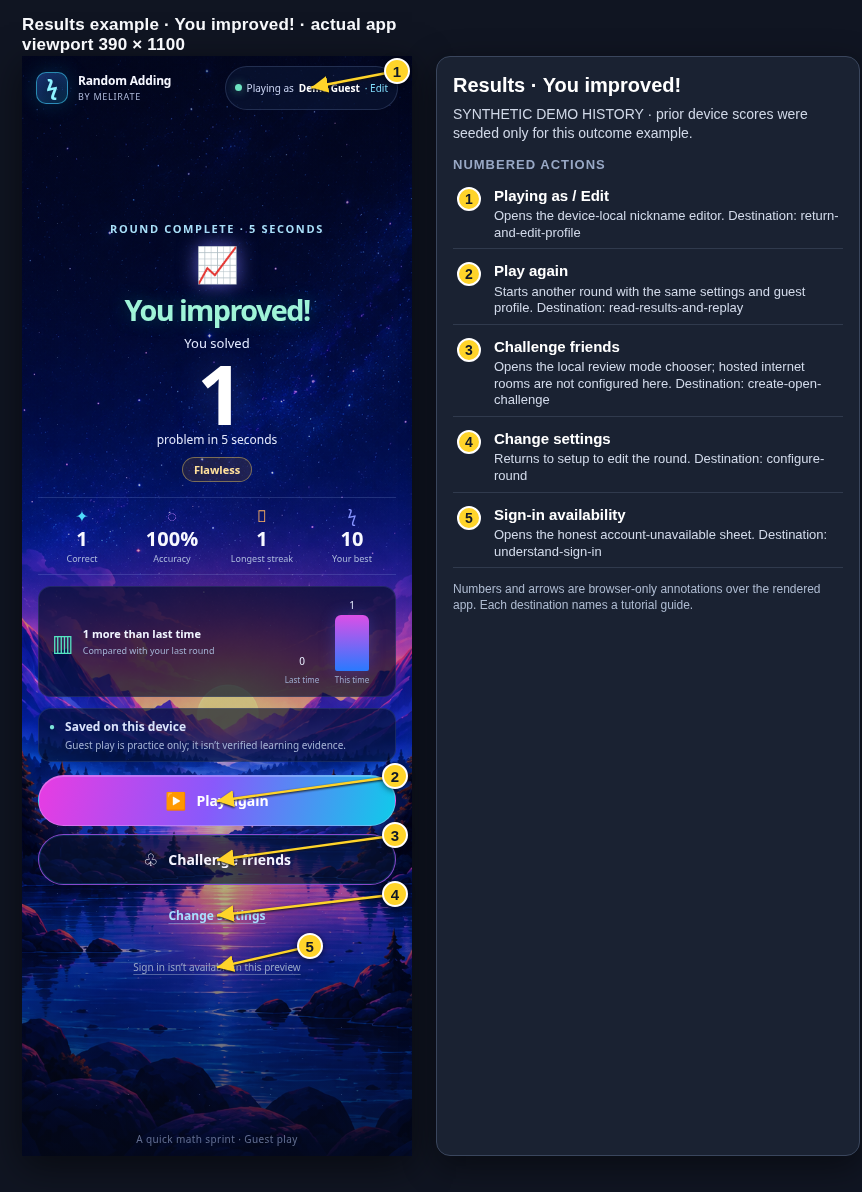 View full-size original annotated screen (new tab)
What the numbered markers show
- 1Playing as / EditOpens the device-local nickname editor.Open guide: Return and edit your guest nickname
- 2Play againStarts another round with the same settings and guest profile.Open guide: Read your results and replay
- 3Challenge friendsOpens the local review mode chooser; hosted internet rooms are not configured here.Open guide: Create an Open Challenge
- 4Change settingsReturns to setup to edit the round.Open guide: Choose round settings
- 5Sign-in availabilityOpens the honest account-unavailable sheet.Open guide: Sign in and choose a learner
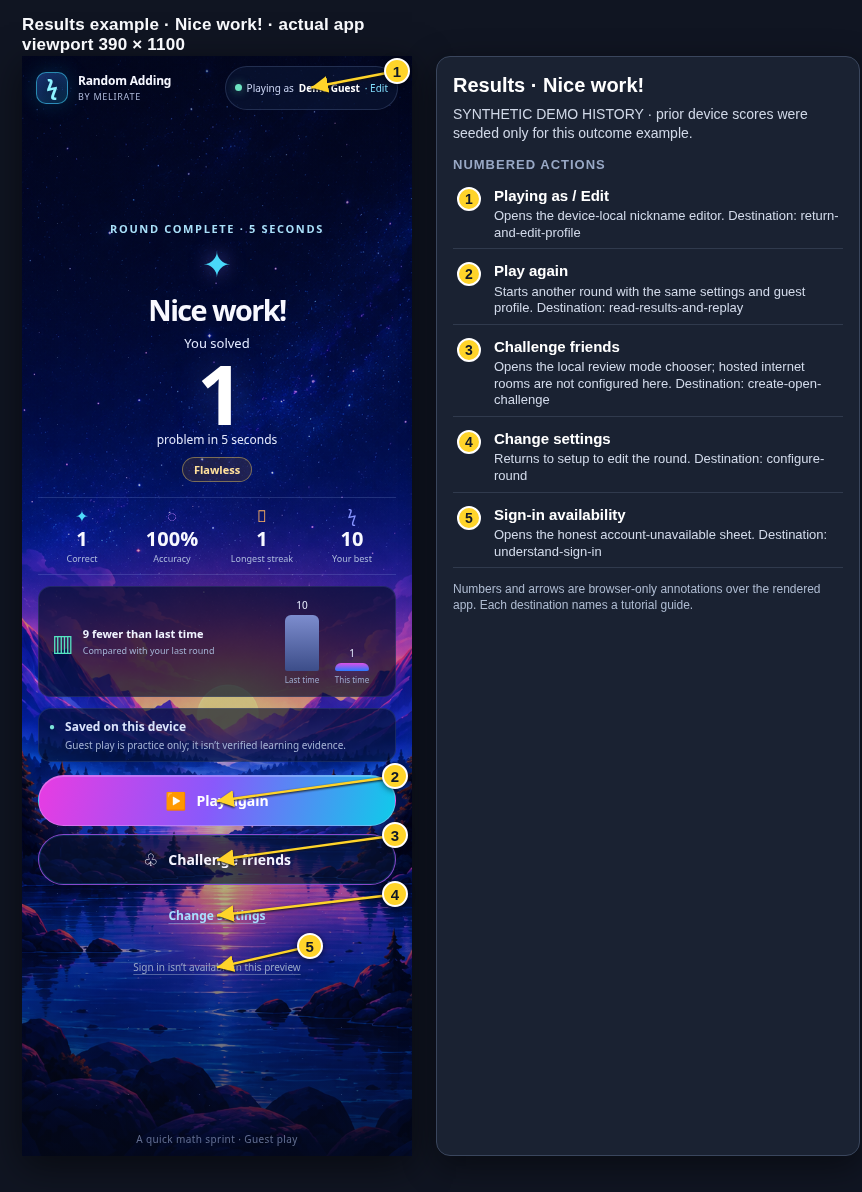 View full-size original annotated screen (new tab)
What the numbered markers show
- 1Playing as / EditOpens the device-local nickname editor.Open guide: Return and edit your guest nickname
- 2Play againStarts another round with the same settings and guest profile.Open guide: Read your results and replay
- 3Challenge friendsOpens the local review mode chooser; hosted internet rooms are not configured here.Open guide: Create an Open Challenge
- 4Change settingsReturns to setup to edit the round.Open guide: Choose round settings
- 5Sign-in availabilityOpens the honest account-unavailable sheet.Open guide: Sign in and choose a learner
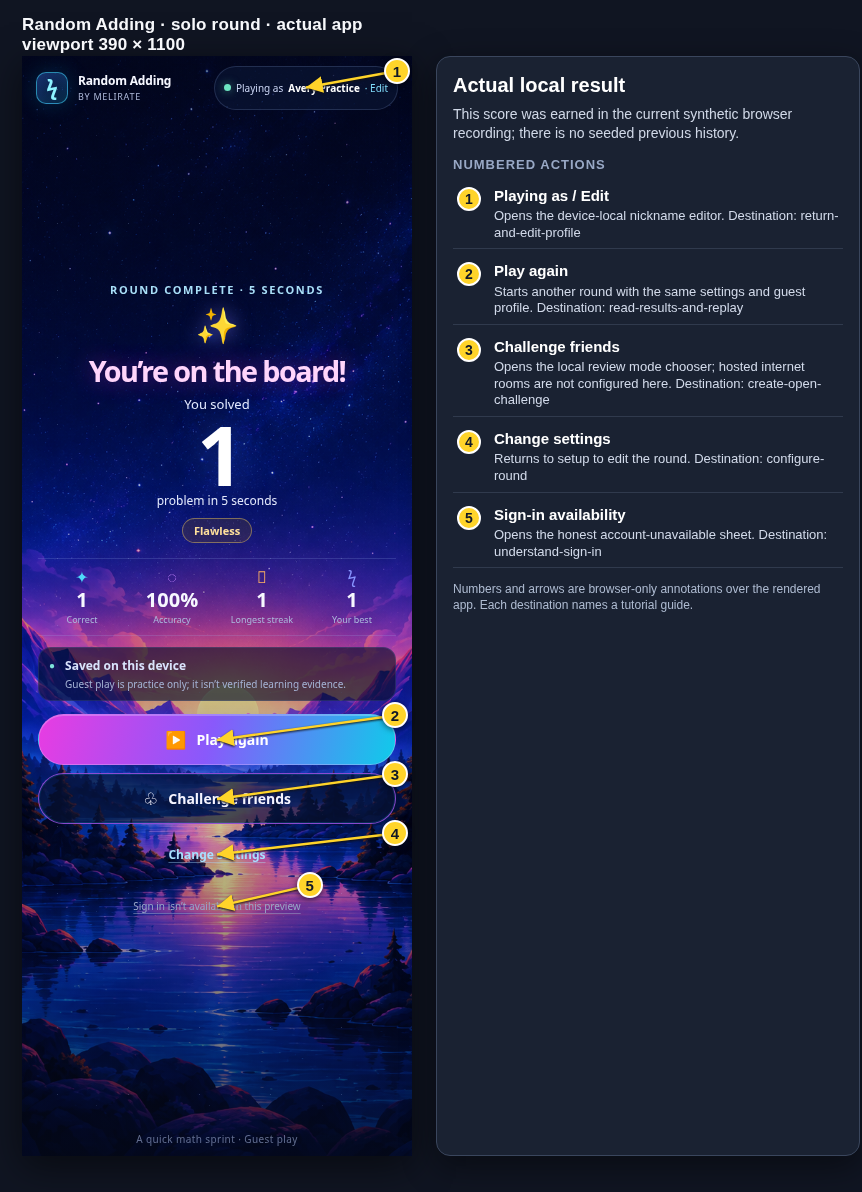 View full-size original annotated screen (new tab)
What the numbered markers show
- 1Playing as / EditOpens the device-local nickname editor.Open guide: Return and edit your guest nickname
- 2Play againStarts another round with the same settings and guest profile.Open guide: Read your results and replay
- 3Challenge friendsOpens the local review mode chooser; hosted internet rooms are not configured here.Open guide: Create an Open Challenge
- 4Change settingsReturns to setup to edit the round.Open guide: Choose round settings
- 5Sign-in availabilityOpens the honest account-unavailable sheet.Open guide: Sign in and choose a learner
 View full-size original annotated screen (new tab)
What the numbered markers show
- 1Playing as / EditOpens the device-local nickname editor.Open guide: Return and edit your guest nickname
- 2Play againStarts another round with the same settings and guest profile.Open guide: Read your results and replay
- 3Challenge friendsOpens the local review mode chooser; hosted internet rooms are not configured here.Open guide: Create an Open Challenge
- 4Change settingsReturns to setup to edit the round.Open guide: Choose round settings
- 5Sign-in availabilityOpens the honest account-unavailable sheet.Open guide: Sign in and choose a learner
 View full-size original annotated screen (new tab)
What the numbered markers show
- 1Playing as / EditOpens the device-local nickname editor.Open guide: Return and edit your guest nickname
- 2Play againStarts another round with the same settings and guest profile.Open guide: Read your results and replay
- 3Challenge friendsOpens the local review mode chooser; hosted internet rooms are not configured here.Open guide: Create an Open Challenge
- 4Change settingsReturns to setup to edit the round.Open guide: Choose round settings
- 5Sign-in availabilityOpens the honest account-unavailable sheet.Open guide: Sign in and choose a learner
 View full-size original annotated screen (new tab)
What the numbered markers show
- 1Playing as / EditOpens the device-local nickname editor.Open guide: Return and edit your guest nickname
- 2Play againStarts another round with the same settings and guest profile.Open guide: Read your results and replay
- 3Challenge friendsOpens the local review mode chooser; hosted internet rooms are not configured here.Open guide: Create an Open Challenge
- 4Change settingsReturns to setup to edit the round.Open guide: Choose round settings
 View full-size original annotated screen (new tab)
What the numbered markers show
- 1Playing as / EditOpens the device-local nickname editor.Open guide: Return and edit your guest nickname
- 2Play againStarts another round with the same settings and guest profile.Open guide: Read your results and replay
- 3Challenge friendsOpens the local review mode chooser; hosted internet rooms are not configured here.Open guide: Create an Open Challenge
- 4Change settingsReturns to setup to edit the round.Open guide: Choose round settings