Open Challenge
Play again and improve an Open Challenge score
Submit rounds in an Open Challenge, read the current room comparison, and understand how best-score ranking updates.
Before you start
- Join or create an Open Challenge on a local review server. The room ranking is not a Melirate record or learning-evidence result.
Steps
Start an attempt
In the active room, choose Play now. Each attempt has its own timed question sequence; there is no waiting for other participants.
Open the Open Challenge: empty room guideFinish the round
Answer until the timer expires. The local result stays visible while the room checks the answer record. A pending upload is not yet a published placement.
Open the Open Challenge: result sync states guideRead the room context
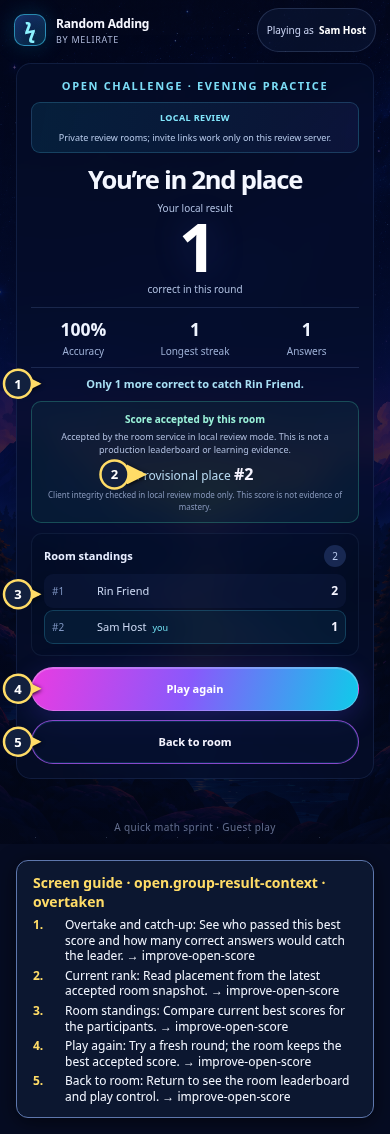
After an accepted room receipt, the result may show a provisional place, a tie or lead, or how many more correct answers would catch the leader. Active rooms can still change.
Open the Open Challenge: result context guideReplay or return to standings
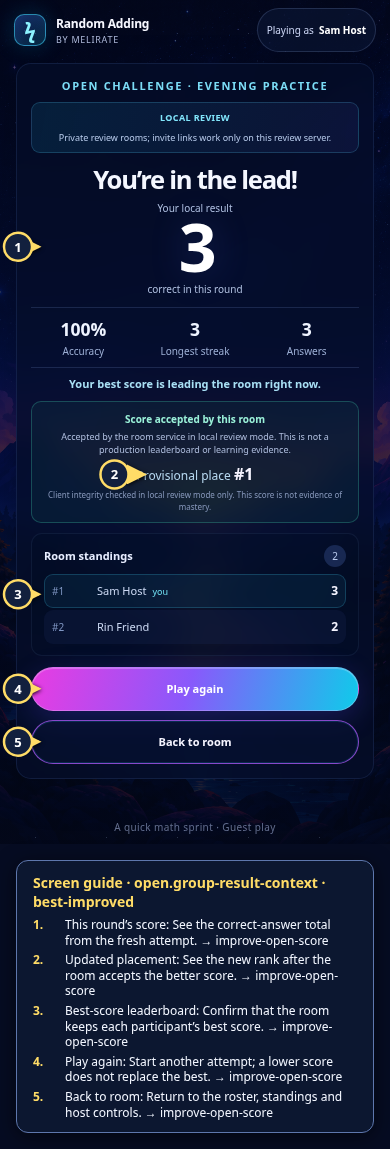
Choose Play again for a fresh attempt, or Back to room. The room ranks each participant's best accepted score; ties share a place and repeated attempts do not add together.
Open the Open Challenge: standings and lifecycle guide
What to expect
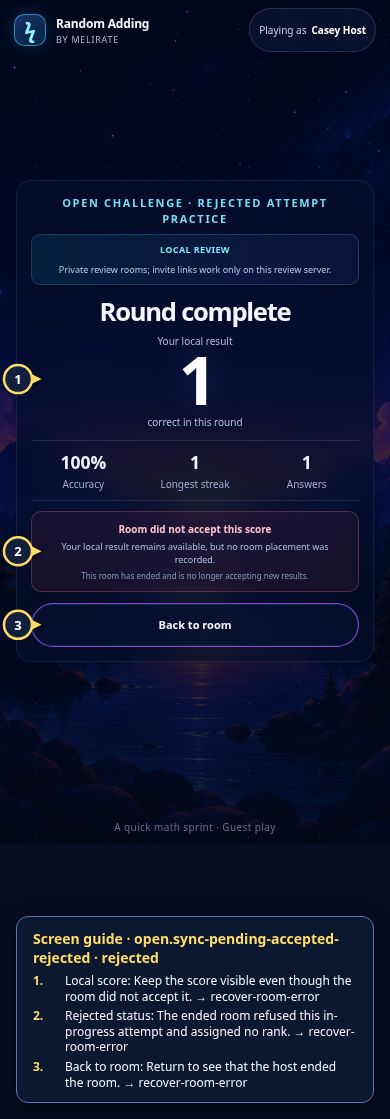
- A room rejection leaves the local result visible but does not claim a placement.
- The local preview has bounded room/attempt capacity and does not promise unlimited hosted replay.
Other paths
Retry a pending result
Retry the same queued attempt after connectivity returns.
Open guide: Recover an offline or unsaved resultRead general result details
Review the personal score, comparison, and next actions.
Open guide: Read your results and replayEnd or moderate the room
Only the host can remove a participant or end the room.
Open guide: Moderate or end a room
Visual guide
Recorded walkthrough
These are silent local synthetic preview captures. Account clips and screenshots show the unconfigured guest preview, not the locally prepared member flow. Some demos use 5-, 15-, or 20-second timers; private invitation details are hidden. If playback is unavailable, use the captions when present or read the full transcript below.
Read the full recording transcript
This capture uses a synthetic five-second round to keep the local demonstration short.
Open Challenge rankings use each guest’s best accepted score, not a simultaneous race.
One guest scores two correct answers; another scores one and moves into second place.
The result names the overtake and shows the exact gap to the leader.
Play again and improve the best score. The accepted room snapshot updates the rank and leaderboard together.
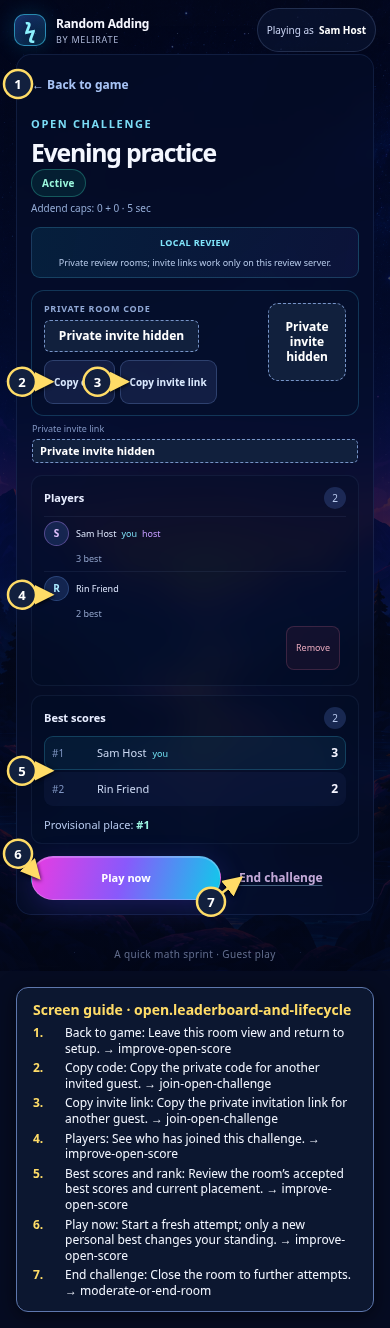
Back in the room, compare the best scores and start another round whenever ready.
Annotated screens
Each numbered note names the control or state marked on the screen.
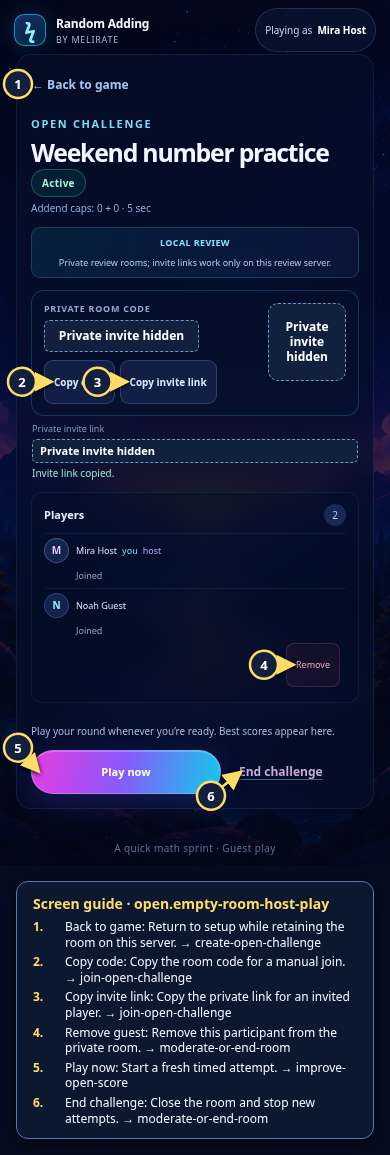 View full-size original annotated screen (new tab)
What the numbered markers show
- 1Back to gameReturn to setup while retaining the room on this server.Open guide: Create an Open Challenge
- 2Copy codeCopy the room code for a manual join.Open guide: Join an Open Challenge
- 3Copy invite linkCopy the private link for an invited player.Open guide: Join an Open Challenge
- 4Remove guestRemove this participant from the private room.Open guide: Moderate or end a room
- 5Play nowStart a fresh timed attempt.Open guide: Play again and improve an Open Challenge score
- 6End challengeClose the room and stop new attempts.Open guide: Moderate or end a room
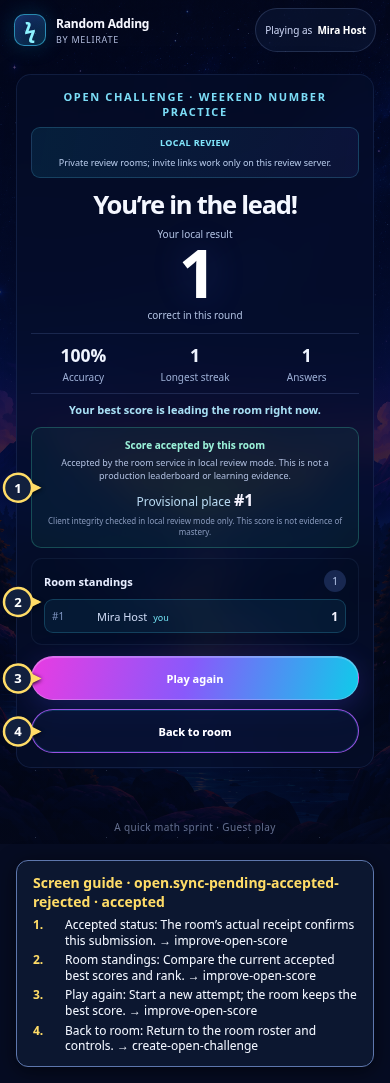 View full-size original annotated screen (new tab)
What the numbered markers show
- 1Accepted statusThe room’s actual receipt confirms this submission.Open guide: Play again and improve an Open Challenge score
- 2Room standingsCompare the current accepted best scores and rank.Open guide: Play again and improve an Open Challenge score
- 3Play againStart a new attempt; the room keeps the best score.Open guide: Play again and improve an Open Challenge score
- 4Back to roomReturn to the room roster and controls.Open guide: Create an Open Challenge
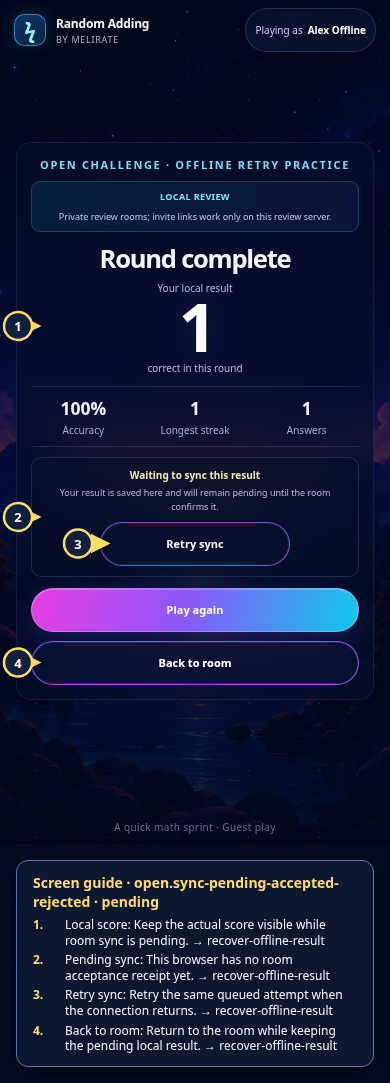 View full-size original annotated screen (new tab)
What the numbered markers show
- 1Local scoreKeep the actual score visible while room sync is pending.Open guide: Recover an offline or unsaved result
- 2Pending syncThis browser has no room acceptance receipt yet.Open guide: Recover an offline or unsaved result
- 3Retry syncRetry the same queued attempt when the connection returns.Open guide: Recover an offline or unsaved result
- 4Back to roomReturn to the room while keeping the pending local result.Open guide: Recover an offline or unsaved result
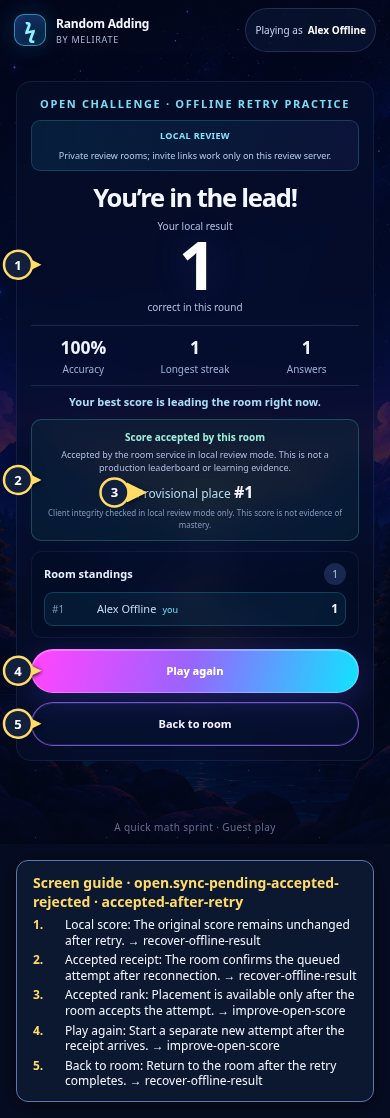 View full-size original annotated screen (new tab)
What the numbered markers show
- 1Local scoreThe original score remains unchanged after retry.Open guide: Recover an offline or unsaved result
- 2Accepted receiptThe room confirms the queued attempt after reconnection.Open guide: Recover an offline or unsaved result
- 3Accepted rankPlacement is available only after the room accepts the attempt.Open guide: Play again and improve an Open Challenge score
- 4Play againStart a separate new attempt after the receipt arrives.Open guide: Play again and improve an Open Challenge score
- 5Back to roomReturn to the room after the retry completes.Open guide: Recover an offline or unsaved result
 View full-size original annotated screen (new tab)
What the numbered markers show
- 1Local scoreKeep the score visible even though the room did not accept it.Open guide: Recover an unavailable, expired, or interrupted room
- 2Rejected statusThe ended room refused this in-progress attempt and assigned no rank.Open guide: Recover an unavailable, expired, or interrupted room
- 3Back to roomReturn to see that the host ended the room.Open guide: Recover an unavailable, expired, or interrupted room
 View full-size original annotated screen (new tab)
What the numbered markers show
- 1Overtake and catch-upSee who passed this best score and how many correct answers would catch the leader.Open guide: Play again and improve an Open Challenge score
- 2Current rankRead placement from the latest accepted room snapshot.Open guide: Play again and improve an Open Challenge score
- 3Room standingsCompare current best scores for the participants.Open guide: Play again and improve an Open Challenge score
- 4Play againTry a fresh round; the room keeps the best accepted score.Open guide: Play again and improve an Open Challenge score
- 5Back to roomReturn to see the room leaderboard and play control.Open guide: Play again and improve an Open Challenge score
 View full-size original annotated screen (new tab)
What the numbered markers show
- 1This round’s scoreSee the correct-answer total from the fresh attempt.Open guide: Play again and improve an Open Challenge score
- 2Updated placementSee the new rank after the room accepts the better score.Open guide: Play again and improve an Open Challenge score
- 3Best-score leaderboardConfirm that the room keeps each participant’s best score.Open guide: Play again and improve an Open Challenge score
- 4Play againStart another attempt; a lower score does not replace the best.Open guide: Play again and improve an Open Challenge score
- 5Back to roomReturn to the roster, standings and host controls.Open guide: Play again and improve an Open Challenge score
 View full-size original annotated screen (new tab)
What the numbered markers show
- 1Back to gameLeave this room view and return to setup.Open guide: Play again and improve an Open Challenge score
- 2Copy codeCopy the private code for another invited guest.Open guide: Join an Open Challenge
- 3Copy invite linkCopy the private invitation link for another guest.Open guide: Join an Open Challenge
- 4PlayersSee who has joined this challenge.Open guide: Play again and improve an Open Challenge score
- 5Best scores and rankReview the room’s accepted best scores and current placement.Open guide: Play again and improve an Open Challenge score
- 6Play nowStart a fresh attempt; only a new personal best changes your standing.Open guide: Play again and improve an Open Challenge score
- 7End challengeClose the room to further attempts.Open guide: Moderate or end a room
 View full-size original annotated screen (new tab)
What the numbered markers show
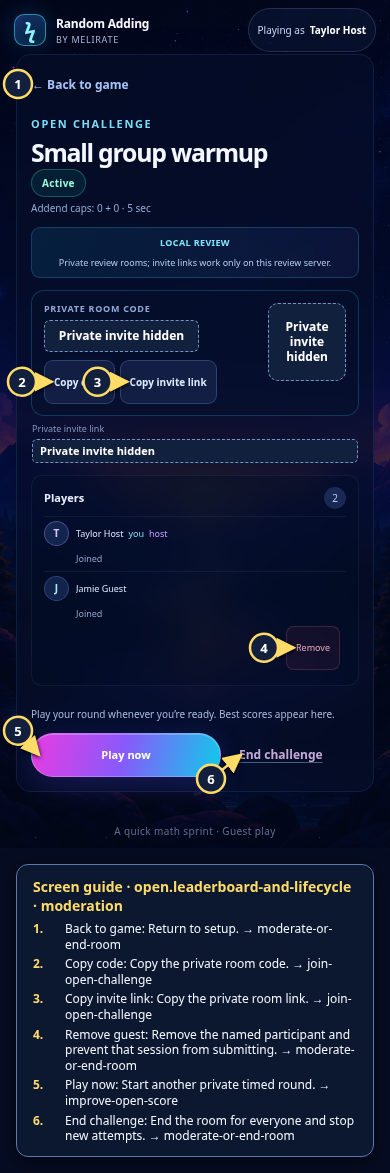
- 1Back to gameReturn to setup.Open guide: Moderate or end a room
- 2Copy codeCopy the private room code.Open guide: Join an Open Challenge
- 3Copy invite linkCopy the private room link.Open guide: Join an Open Challenge
- 4Remove guestRemove the named participant and prevent that session from submitting.Open guide: Moderate or end a room
- 5Play nowStart another private timed round.Open guide: Play again and improve an Open Challenge score
- 6End challengeEnd the room for everyone and stop new attempts.Open guide: Moderate or end a room
 View full-size original annotated screen (new tab)
What the numbered markers show
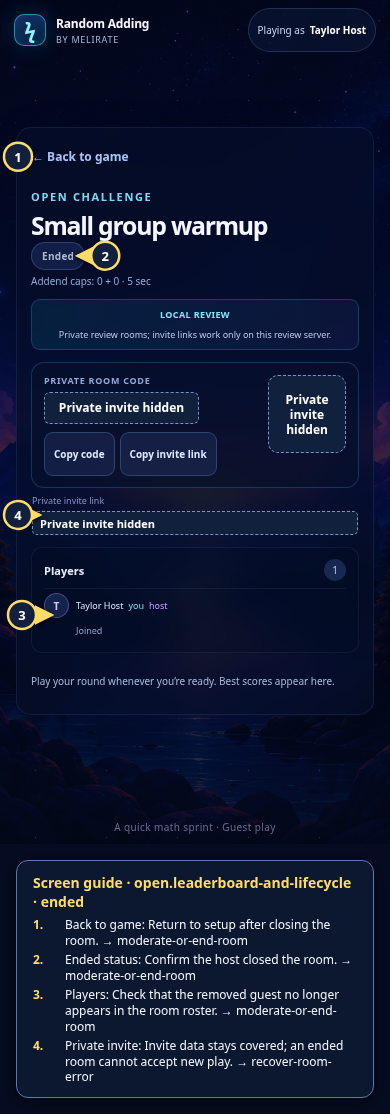
- 1Back to gameReturn to setup after closing the room.Open guide: Moderate or end a room
- 2Ended statusConfirm the host closed the room.Open guide: Moderate or end a room
- 3PlayersCheck that the removed guest no longer appears in the room roster.Open guide: Moderate or end a room
- 4Private inviteInvite data stays covered; an ended room cannot accept new play.Open guide: Recover an unavailable, expired, or interrupted room