Open Challenge
Join an Open Challenge
Enter a private local-review room from an invite link or six-character code, then play without waiting for the host.
Before you start
- Open the invite in a browser on the same machine as the loopback-only local review server, or get its six-character code there. A first-time guest needs a nickname.
Steps
Open the invite or room chooser
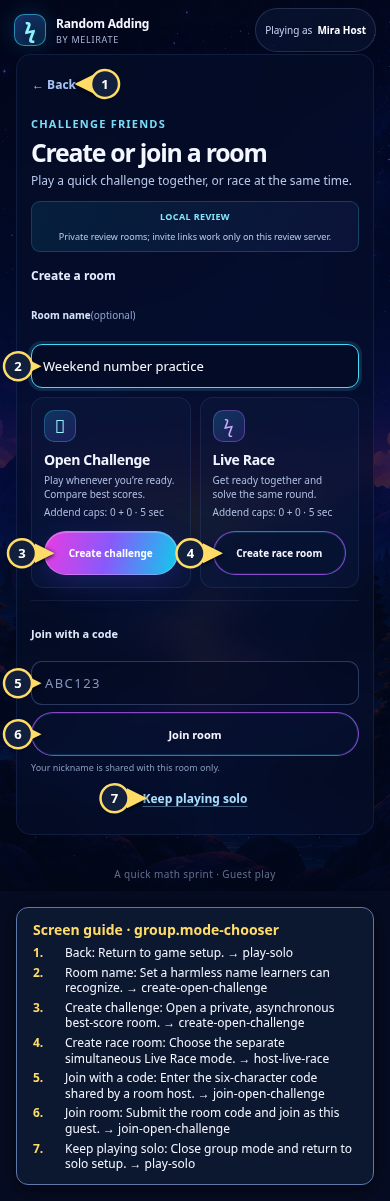
A valid invite link opens the exact room. To join manually, choose Challenge friends, enter the six-character code, and choose Join room.
Open the Open Challenge: join by link or code guideEnter a nickname if prompted
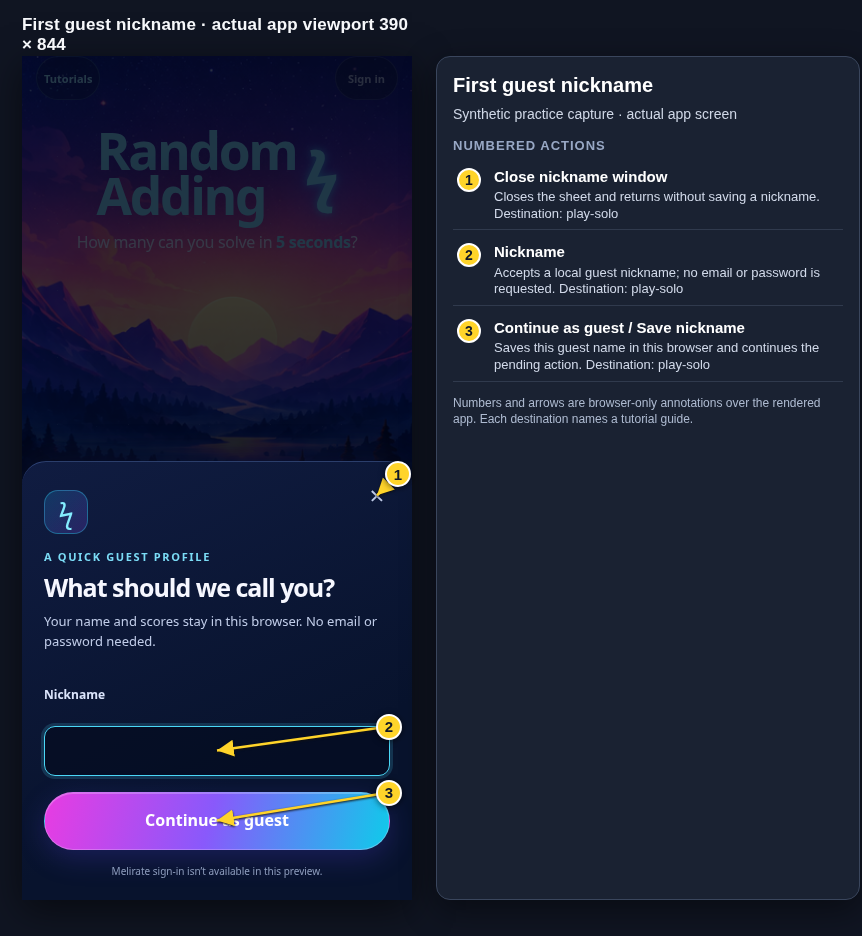
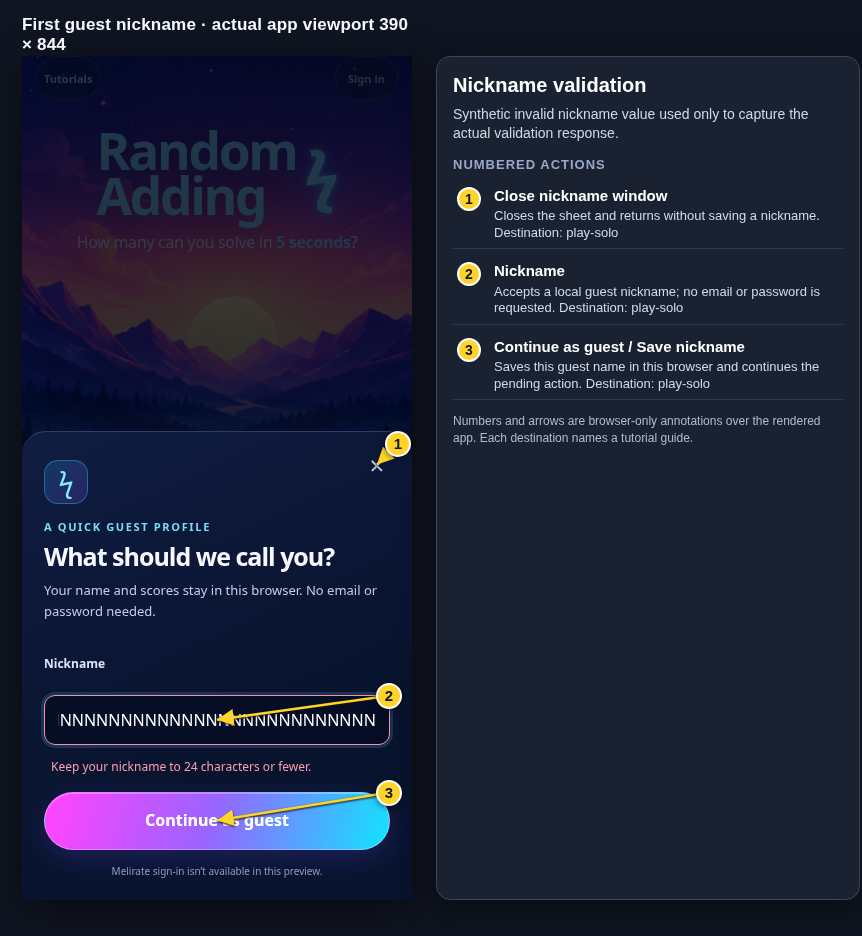
A new guest enters a room-visible nickname once. Closing the sheet cancels the join. A returning guest reuses the same browser identity.
Open the Guest profile: first nickname guideReview the room
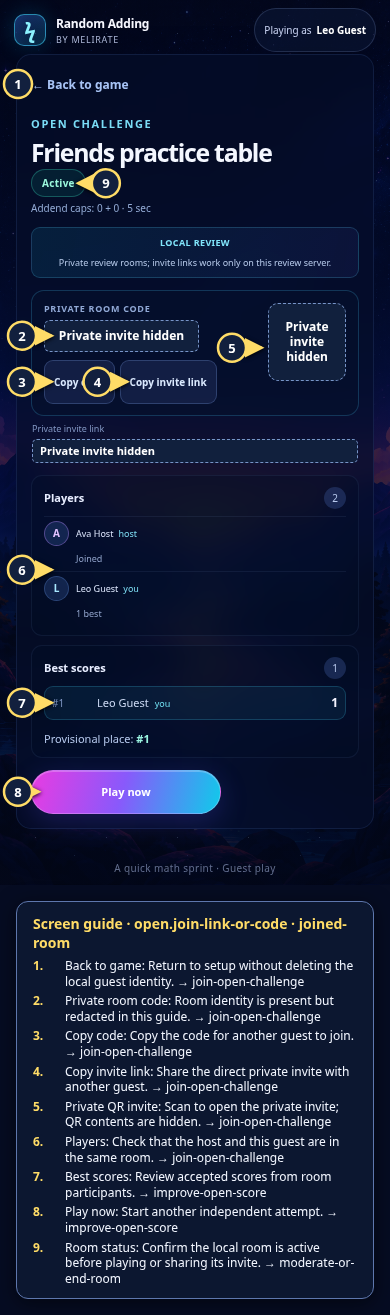
Check its name, stored settings, participant list, private code, and current best scores. An Open Challenge participant can play as soon as they join.
Open the Open Challenge: empty room guideRecover from an invalid invite
For a malformed, missing, or expired room, check the code or invite, return to the chooser, or ask for a fresh invite. Solo play remains available.
Open the Open Challenge: invalid or expired room guide
What to expect
- A direct link on the local review machine does not ask you to enter the room code or settings again.
- The loopback-only service cannot be joined from a separate device and does not create a public hosted room.
Other paths
Create your own Open Challenge
Start a room and share its code or link.
Open guide: Create an Open ChallengeRecover a room error
Use the detailed error and offline fallback steps.
Open guide: Recover an unavailable, expired, or interrupted roomJoin a Live Race
A Live Race uses readiness and a shared countdown.
Open guide: Join a Live Race
Visual guide
Recorded walkthrough
These are silent local synthetic preview captures. Account clips and screenshots show the unconfigured guest preview, not the locally prepared member flow. Some demos use 5-, 15-, or 20-second timers; private invitation details are hidden. If playback is unavailable, use the captions when present or read the full transcript below.
Read the full recording transcript
This capture uses a synthetic five-second round to keep the local demonstration short.
A room host shares a private invite link. The code, full URL and QR are hidden in this guide.
Opening a valid link takes the guest to the matching private room. The guest name is shared with that room only.
Play a round and wait for the room’s accepted receipt before reading the score as part of its standings.
Back to the room, then reload to rejoin with the same guest session and room invite.
A manual six-character code is also available from the Create or join a room screen.
Annotated screens
Each numbered note names the control or state marked on the screen.
 View full-size original annotated screen (new tab)
What the numbered markers show
- 1BackReturn to game setup.Open guide: Play a solo round
- 2Room nameSet a harmless name learners can recognize.Open guide: Create an Open Challenge
- 3Create challengeOpen a private, asynchronous best-score room.Open guide: Create an Open Challenge
- 4Create race roomChoose the separate simultaneous Live Race mode.Open guide: Host a Live Race
- 5Join with a codeEnter the six-character code shared by a room host.Open guide: Join an Open Challenge
- 6Join roomSubmit the room code and join as this guest.Open guide: Join an Open Challenge
- 7Keep playing soloClose group mode and return to solo setup.Open guide: Play a solo round
 View full-size original annotated screen (new tab)
What the numbered markers show
- 1Back to gameReturn to setup without deleting the local guest identity.Open guide: Join an Open Challenge
- 2Private room codeRoom identity is present but redacted in this guide.Open guide: Join an Open Challenge
- 3Copy codeCopy the code for another guest to join.Open guide: Join an Open Challenge
- 4Copy invite linkShare the direct private invite with another guest.Open guide: Join an Open Challenge
- 5Private QR inviteScan to open the private invite; QR contents are hidden.Open guide: Join an Open Challenge
- 6PlayersCheck that the host and this guest are in the same room.Open guide: Join an Open Challenge
- 7Best scoresReview accepted scores from room participants.Open guide: Play again and improve an Open Challenge score
- 8Play nowStart another independent attempt.Open guide: Play again and improve an Open Challenge score
- 9Room statusConfirm the local room is active before playing or sharing its invite.Open guide: Moderate or end a room
 View full-size original annotated screen (new tab)
What the numbered markers show
- 1Close nickname windowCloses the sheet and returns without saving a nickname.Open guide: Play a solo round
- 2NicknameAccepts a local guest nickname; no email or password is requested.Open guide: Play a solo round
- 3Continue as guest / Save nicknameSaves this guest name in this browser and continues the pending action.Open guide: Play a solo round
 View full-size original annotated screen (new tab)
What the numbered markers show
- 1Close nickname windowCloses the sheet and returns without saving a nickname.Open guide: Play a solo round
- 2NicknameAccepts a local guest nickname; no email or password is requested.Open guide: Play a solo round
- 3Continue as guest / Save nicknameSaves this guest name in this browser and continues the pending action.Open guide: Play a solo round
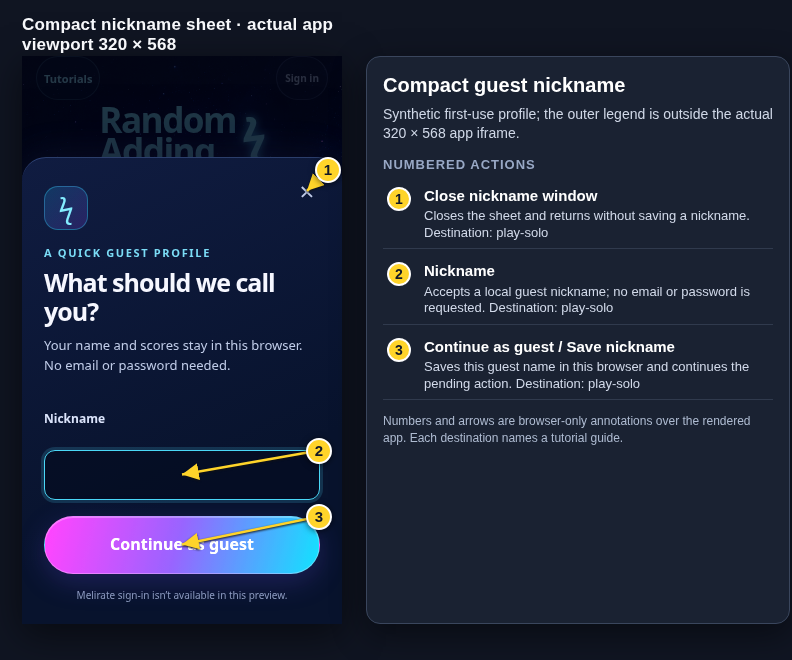 View full-size original annotated screen (new tab)
What the numbered markers show
- 1Close nickname windowCloses the sheet and returns without saving a nickname.Open guide: Play a solo round
- 2NicknameAccepts a local guest nickname; no email or password is requested.Open guide: Play a solo round
- 3Continue as guest / Save nicknameSaves this guest name in this browser and continues the pending action.Open guide: Play a solo round
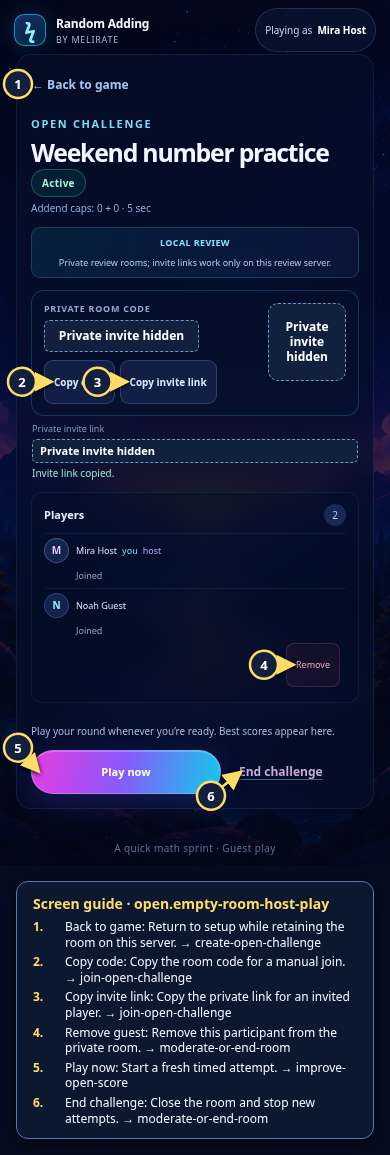 View full-size original annotated screen (new tab)
What the numbered markers show
- 1Back to gameReturn to setup while retaining the room on this server.Open guide: Create an Open Challenge
- 2Copy codeCopy the room code for a manual join.Open guide: Join an Open Challenge
- 3Copy invite linkCopy the private link for an invited player.Open guide: Join an Open Challenge
- 4Remove guestRemove this participant from the private room.Open guide: Moderate or end a room
- 5Play nowStart a fresh timed attempt.Open guide: Play again and improve an Open Challenge score
- 6End challengeClose the room and stop new attempts.Open guide: Moderate or end a room
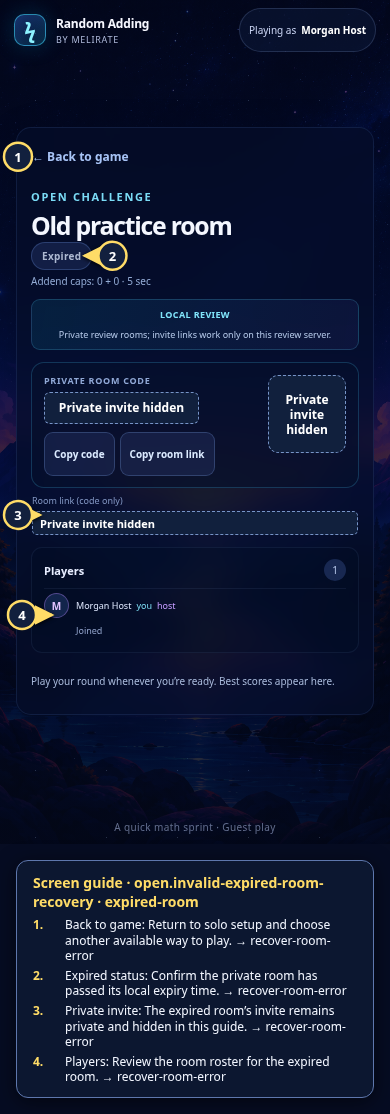 View full-size original annotated screen (new tab)
What the numbered markers show
- 1Back to gameReturn to setup and continue locally.Open guide: Recover an unavailable, expired, or interrupted room
- 2Expired statusSee that this room has expired and cannot start a new attempt.Open guide: Recover an unavailable, expired, or interrupted room
- 3Private inviteInvite details remain hidden and private.Open guide: Join an Open Challenge
- 4PlayersReview the participants stored in this local room.Open guide: Recover an unavailable, expired, or interrupted room
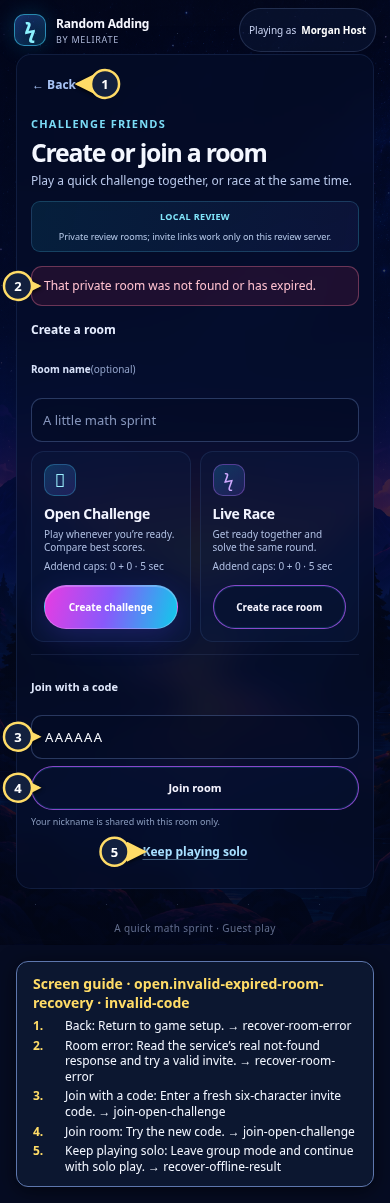 View full-size original annotated screen (new tab)
What the numbered markers show
- 1BackReturn to game setup.Open guide: Recover an unavailable, expired, or interrupted room
- 2Room errorRead the service’s real not-found response and try a valid invite.Open guide: Recover an unavailable, expired, or interrupted room
- 3Join with a codeEnter a fresh six-character invite code.Open guide: Join an Open Challenge
- 4Join roomTry the new code.Open guide: Join an Open Challenge
- 5Keep playing soloLeave group mode and continue with solo play.Open guide: Recover an offline or unsaved result