Live Race
Join a Live Race
Open a local-review race invitation, join the lobby, mark ready, and play after the host starts the shared countdown.
Before you start
- Get a Live Race invite from a host using the same loopback-only local review instance on the same machine. A first-time guest enters a nickname before joining.
Steps
Open the invite or enter the code
On the local review machine, use the invite link for direct room entry or open Challenge friends and enter the six-character room code. A generated loopback link is not reachable from another device.
Open the Open Challenge: join by link or code guideJoin the race lobby
Enter a nickname if asked. Review participants and choose I'm ready when set. The host controls when the race starts.
Open the Live Race: ready lobby guideWait for the shared countdown
Stay in the lobby through 3–2–1. All active participants receive the same ordered questions and deadline.
Open the Live Race: countdown guidePlay and review your finish
Solve until the shared timer expires. Your personal result can show before placement is final; wait for the room's final standings.
Open the Live Race: provisional result guide
What to expect
- A late joiner watches the current race and can participate in a later race.
- No account is required for guest play; the room is local-review only.
Other paths
Host a Live Race
Create a room and start when everyone is ready.
Open guide: Host a Live RaceLeave and return
The view can be left without pausing the race.
Open guide: Leave and return to a Live RaceReconnect to a running race
Resume your saved answer prefix before its original deadline.
Open guide: Reconnect to a Live Race
Visual guide
Recorded walkthrough
These are silent local synthetic preview captures. Account clips and screenshots show the unconfigured guest preview, not the locally prepared member flow. Some demos use 5-, 15-, or 20-second timers; private invitation details are hidden. If playback is unavailable, use the captions when present or read the full transcript below.
Read the full recording transcript
The participant continues with a nickname; the app checks the host-prepared private room and opens its ready lobby. Invite values stay hidden.
Once both connected racers are ready, the host starts one shared countdown with the same fixed deadline.
The guest receives the same question sequence and fixed deadline as the host.
After expiry, the room finalizes the accepted local score into standings; this is not production learning evidence.
Annotated screens
Each numbered note names the control or state marked on the screen.
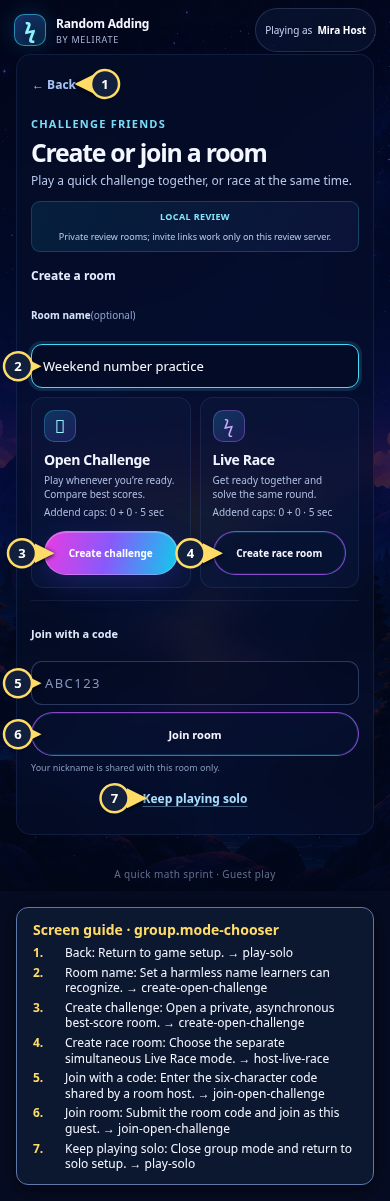 View full-size original annotated screen (new tab)
What the numbered markers show
- 1BackReturn to game setup.Open guide: Play a solo round
- 2Room nameSet a harmless name learners can recognize.Open guide: Create an Open Challenge
- 3Create challengeOpen a private, asynchronous best-score room.Open guide: Create an Open Challenge
- 4Create race roomChoose the separate simultaneous Live Race mode.Open guide: Host a Live Race
- 5Join with a codeEnter the six-character code shared by a room host.Open guide: Join an Open Challenge
- 6Join roomSubmit the room code and join as this guest.Open guide: Join an Open Challenge
- 7Keep playing soloClose group mode and return to solo setup.Open guide: Play a solo round
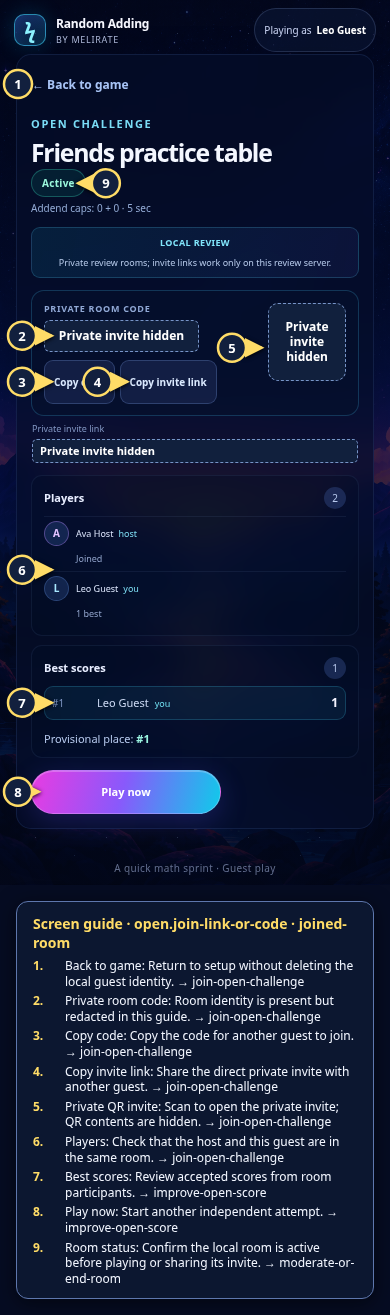 View full-size original annotated screen (new tab)
What the numbered markers show
- 1Back to gameReturn to setup without deleting the local guest identity.Open guide: Join an Open Challenge
- 2Private room codeRoom identity is present but redacted in this guide.Open guide: Join an Open Challenge
- 3Copy codeCopy the code for another guest to join.Open guide: Join an Open Challenge
- 4Copy invite linkShare the direct private invite with another guest.Open guide: Join an Open Challenge
- 5Private QR inviteScan to open the private invite; QR contents are hidden.Open guide: Join an Open Challenge
- 6PlayersCheck that the host and this guest are in the same room.Open guide: Join an Open Challenge
- 7Best scoresReview accepted scores from room participants.Open guide: Play again and improve an Open Challenge score
- 8Play nowStart another independent attempt.Open guide: Play again and improve an Open Challenge score
- 9Room statusConfirm the local room is active before playing or sharing its invite.Open guide: Moderate or end a room
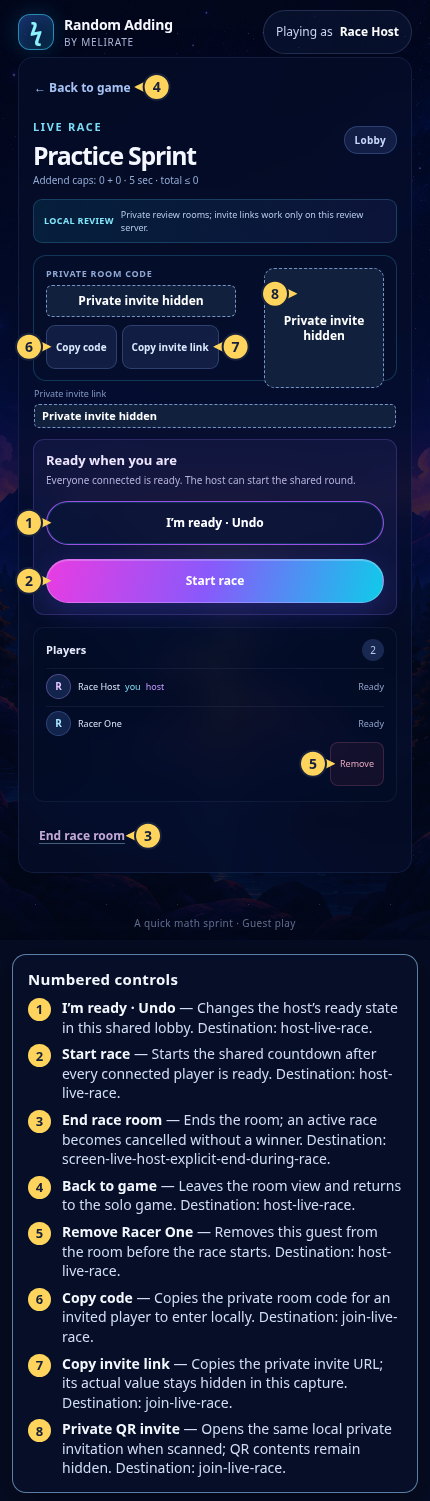 View full-size original annotated screen (new tab)
What the numbered markers show
- 1I’m ready · UndoChanges the host’s ready state in this shared lobby.Open guide: Host a Live Race
- 2Start raceStarts the shared countdown after every connected player is ready.Open guide: Host a Live Race
- 3End race roomEnds the room; an active race becomes cancelled without a winner.Open guide: Live Race: host ends a race
- 4Back to gameLeaves the room view and returns to the solo game.Open guide: Host a Live Race
- 5Remove Racer OneRemoves this guest from the room before the race starts.Open guide: Host a Live Race
- 6Copy codeCopies the private room code for an invited player to enter locally.Open guide: Join a Live Race
- 7Copy invite linkCopies the private invite URL; its actual value stays hidden in this capture.Open guide: Join a Live Race
- 8Private QR inviteOpens the same local private invitation when scanned; QR contents remain hidden.Open guide: Join a Live Race
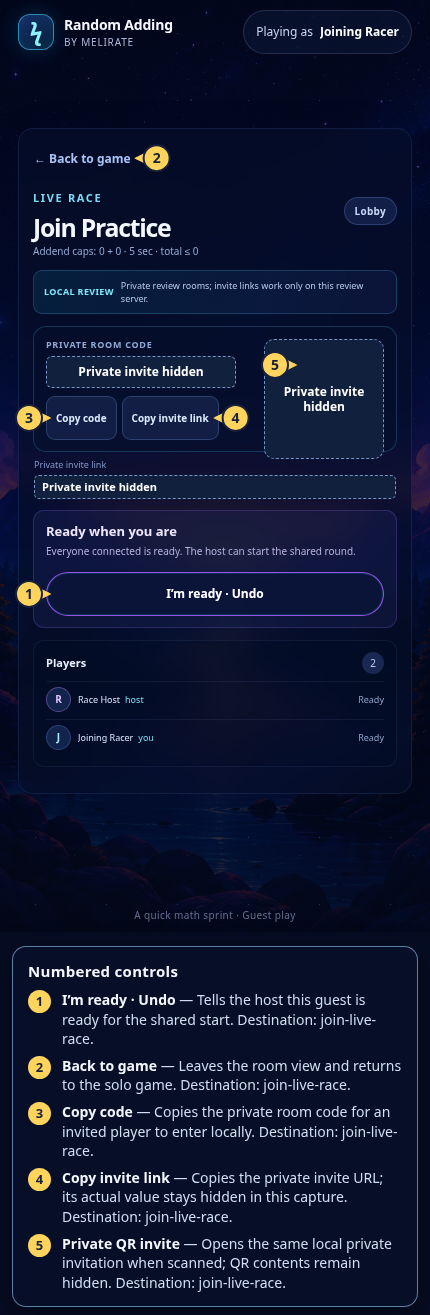 View full-size original annotated screen (new tab)
What the numbered markers show
- 1I’m ready · UndoTells the host this guest is ready for the shared start.Open guide: Join a Live Race
- 2Back to gameLeaves the room view and returns to the solo game.Open guide: Join a Live Race
- 3Copy codeCopies the private room code for an invited player to enter locally.Open guide: Join a Live Race
- 4Copy invite linkCopies the private invite URL; its actual value stays hidden in this capture.Open guide: Join a Live Race
- 5Private QR inviteOpens the same local private invitation when scanned; QR contents remain hidden.Open guide: Join a Live Race
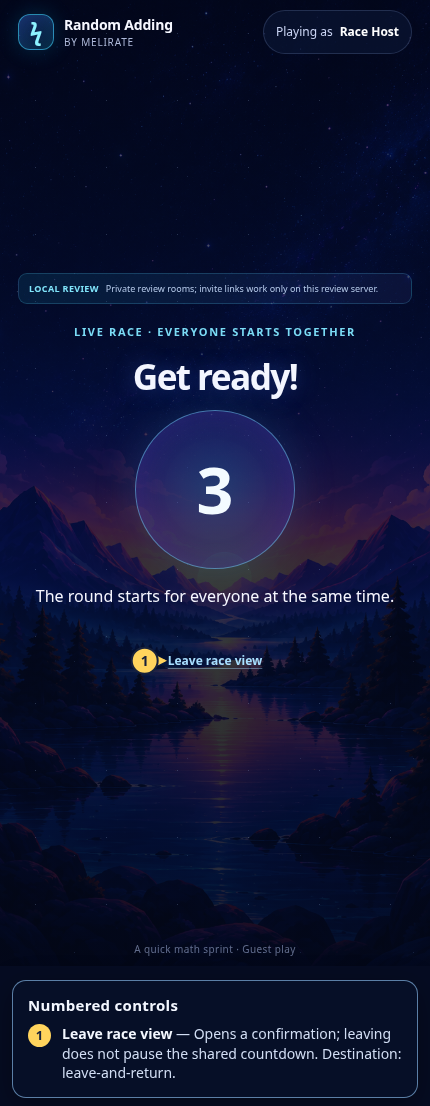 View full-size original annotated screen (new tab)
What the numbered markers show
- 1Leave race viewOpens a confirmation; leaving does not pause the shared countdown.Open guide: Leave and return to a Live Race
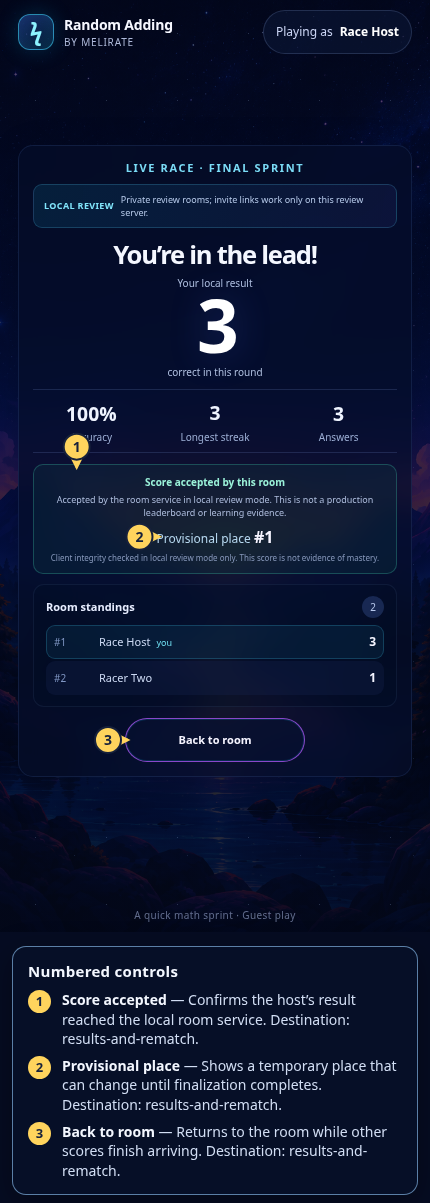 View full-size original annotated screen (new tab)
What the numbered markers show
- 1Score acceptedConfirms the host’s result reached the local room service.Open guide: Read group results and rematch
- 2Provisional placeShows a temporary place that can change until finalization completes.Open guide: Read group results and rematch
- 3Back to roomReturns to the room while other scores finish arriving.Open guide: Read group results and rematch
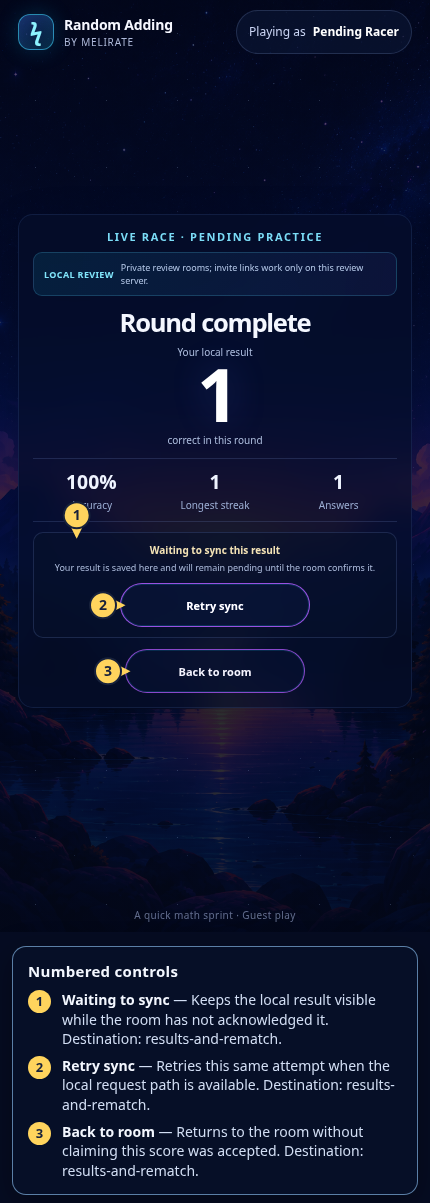 View full-size original annotated screen (new tab)
What the numbered markers show
- 1Waiting to syncKeeps the local result visible while the room has not acknowledged it.Open guide: Read group results and rematch
- 2Retry syncRetries this same attempt when the local request path is available.Open guide: Read group results and rematch
- 3Back to roomReturns to the room without claiming this score was accepted.Open guide: Read group results and rematch
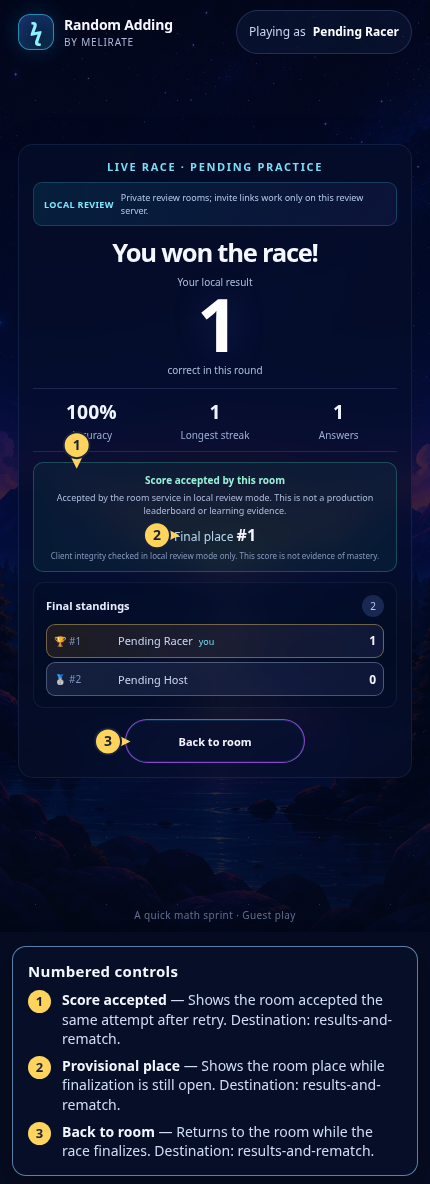 View full-size original annotated screen (new tab)
What the numbered markers show
- 1Score acceptedShows the room accepted the same attempt after retry.Open guide: Read group results and rematch
- 2Provisional placeShows the room place while finalization is still open.Open guide: Read group results and rematch
- 3Back to roomReturns to the room while the race finalizes.Open guide: Read group results and rematch