Solo play
Play a solo round
Set up a timed addition sprint as a guest, or practice for an explicitly selected Melirate learner when member access is enabled.
Before you start
- Guest play is available immediately; first guest play asks for a nickname. Member practice requires an enabled identity service. The current hosted preview is still unconfigured for member access.
Steps
Check the round settings
The starting round uses two addends capped at 10, no maximum total, and 60 seconds. Edit these first if you want a different round.
Open the Setup: the default round guideChoose guest or member practice
Choose Play now for guest play; first use asks for a nickname and starts without an account request. To use a Melirate learner, explicitly choose Sign in. In a configured build, Home handles sign-in and asks you to choose a learner before Continue. Random Adding then opens member setup for the verified selection. This does not change an active guest or group round.
Open the Guest profile: first nickname guideAnswer each problem
Enter digits with the keypad or keyboard and submit with the arrow or Enter. A correct answer earns one point and moves to the next problem; a wrong answer is recorded as incorrect, earns no point, resets the streak, and moves immediately to the next problem. Member questions and scoring run locally, so answers do not wait for a network request.
Open the Gameplay: correct, wrong, and empty answers guideFinish and choose what is next
The timer continues if the tab is in the background. At zero, results appear before member sync finishes. Member results show Saving, Saved, Retry, or another truthful sync state; only a confirmed canonical receipt says Saved, and saved answers link to Activity. Choose Play again for another round or Change settings to return to setup while sync continues.
Open the Results: next actions guide
What to expect
- Guest play begins without an account request or per-question network wait; there is no pause control.
- Member play begins locally and never waits for per-question sync. Only verified self practice can sync canonically; guest and member data remain separate, and eligible solo answers count toward skill predictions.
- The recording and screenshots show an earlier guest build. Its wrong-answer retry segment is archival: the current game advances after every valid answer. They do not depict the locally prepared member screens.
Other paths
Choose different settings
Open the round setup guide to edit addends, optional total, or duration.
Open guide: Choose round settingsReview results and replay
See how result comparisons and replay work.
Open guide: Read your results and replayA solo result did not save
Play remains available when browser storage is blocked; follow the recovery guide.
Open guide: Recover an offline or unsaved result
Visual guide
Recorded walkthrough
These are silent local synthetic preview captures. Account clips and screenshots show the unconfigured guest preview, not the locally prepared member flow. Some demos use 5-, 15-, or 20-second timers; private invitation details are hidden. If playback is unavailable, use the captions when present or read the full transcript below.
Read the full recording transcript
The setup starts at one minute. For this synthetic demo, use the seconds wheel to shorten the round.
This recording uses a 15-second timer so the result appears quickly.
On first use, enter a nickname for this device-local guest profile.
The timed round starts at the first question. The answer field and number keypad both accept a response.
Earlier version shown: current wrong answers are recorded as incorrect and advance immediately.
A correct answer increments the score and advances to a new problem.
When the timer ends, the app shows the score and round summary. The short timer is only for this demo.
Annotated screens
Each numbered note names the control or state marked on the screen.
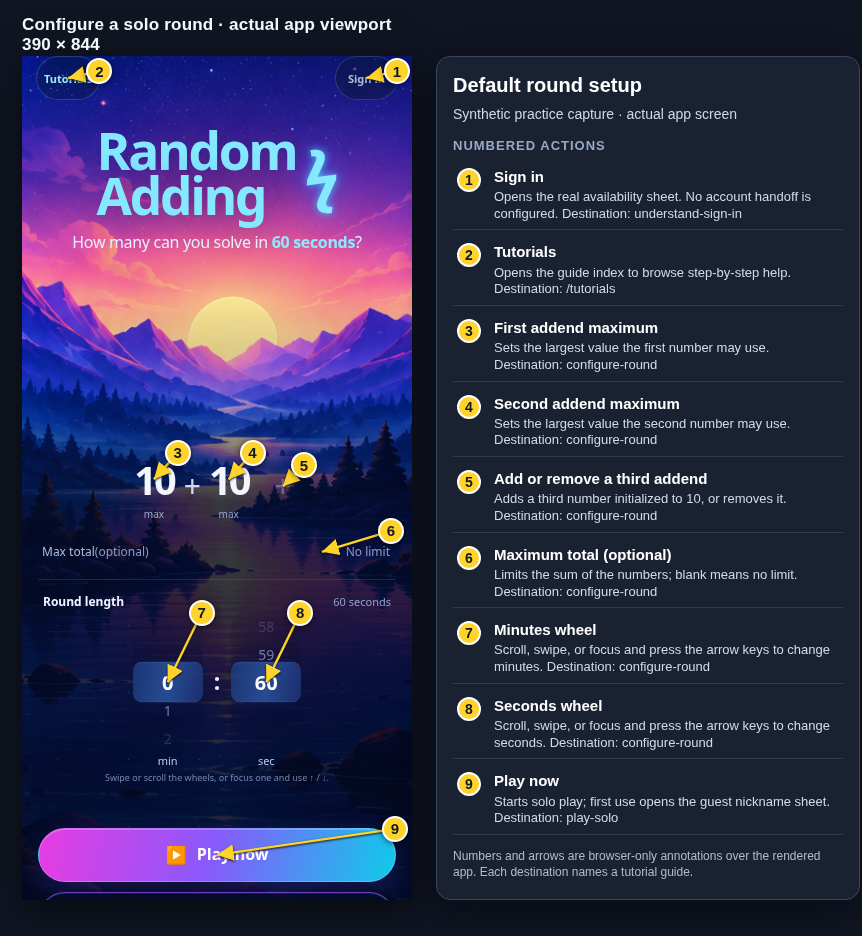 View full-size original annotated screen (new tab)
What the numbered markers show
- 1Sign inOpens the real availability sheet. No account handoff is configured.Open guide: Sign in and choose a learner
- 2TutorialsOpens the guide index to browse step-by-step help.Browse all tutorials
- 3First addend maximumSets the largest value the first number may use.Open guide: Choose round settings
- 4Second addend maximumSets the largest value the second number may use.Open guide: Choose round settings
- 5Add or remove a third addendAdds a third number initialized to 10, or removes it.Open guide: Choose round settings
- 6Maximum total (optional)Limits the sum of the numbers; blank means no limit.Open guide: Choose round settings
- 7Minutes wheelScroll, swipe, or focus and press the arrow keys to change minutes.Open guide: Choose round settings
- 8Seconds wheelScroll, swipe, or focus and press the arrow keys to change seconds.Open guide: Choose round settings
- 9Play nowStarts solo play; first use opens the guest nickname sheet.Open guide: Play a solo round
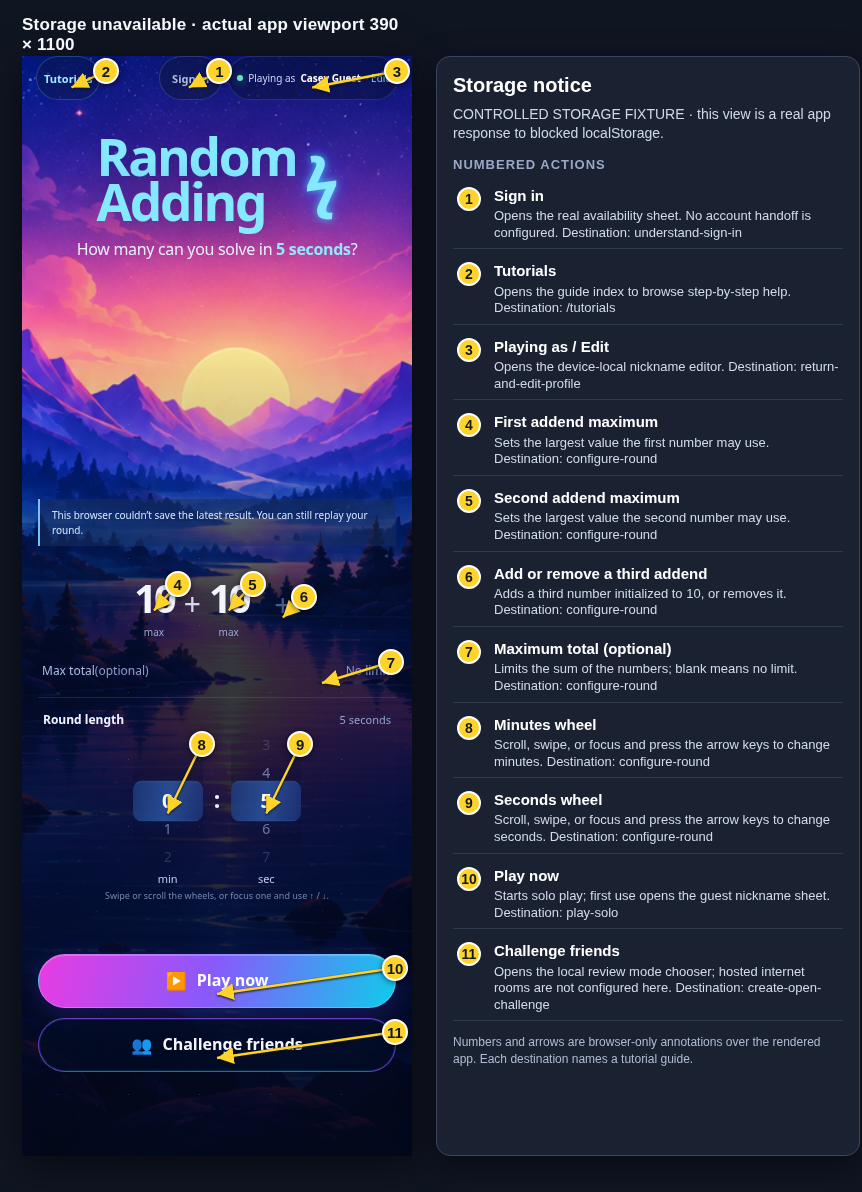 View full-size original annotated screen (new tab)
What the numbered markers show
- 1Sign inOpens the real availability sheet. No account handoff is configured.Open guide: Sign in and choose a learner
- 2TutorialsOpens the guide index to browse step-by-step help.Browse all tutorials
- 3Playing as / EditOpens the device-local nickname editor.Open guide: Return and edit your guest nickname
- 4First addend maximumSets the largest value the first number may use.Open guide: Choose round settings
- 5Second addend maximumSets the largest value the second number may use.Open guide: Choose round settings
- 6Add or remove a third addendAdds a third number initialized to 10, or removes it.Open guide: Choose round settings
- 7Maximum total (optional)Limits the sum of the numbers; blank means no limit.Open guide: Choose round settings
- 8Minutes wheelScroll, swipe, or focus and press the arrow keys to change minutes.Open guide: Choose round settings
- 9Seconds wheelScroll, swipe, or focus and press the arrow keys to change seconds.Open guide: Choose round settings
- 10Play nowStarts solo play; first use opens the guest nickname sheet.Open guide: Play a solo round
- 11Challenge friendsOpens the local review mode chooser; hosted internet rooms are not configured here.Open guide: Create an Open Challenge
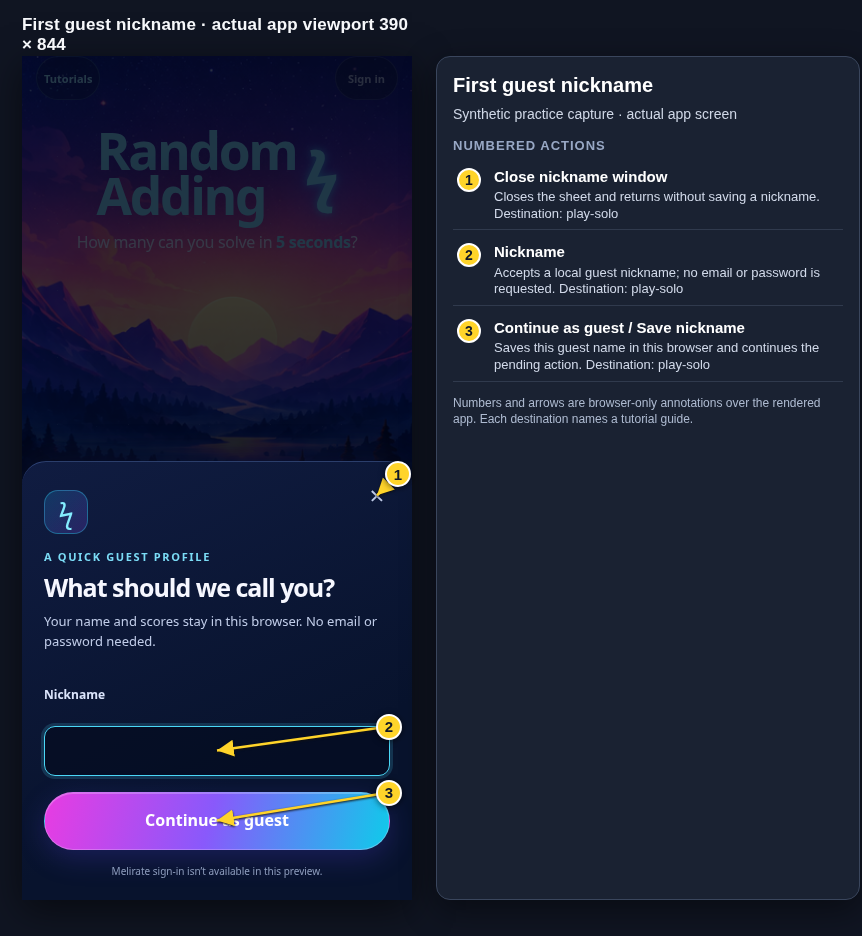 View full-size original annotated screen (new tab)
What the numbered markers show
- 1Close nickname windowCloses the sheet and returns without saving a nickname.Open guide: Play a solo round
- 2NicknameAccepts a local guest nickname; no email or password is requested.Open guide: Play a solo round
- 3Continue as guest / Save nicknameSaves this guest name in this browser and continues the pending action.Open guide: Play a solo round
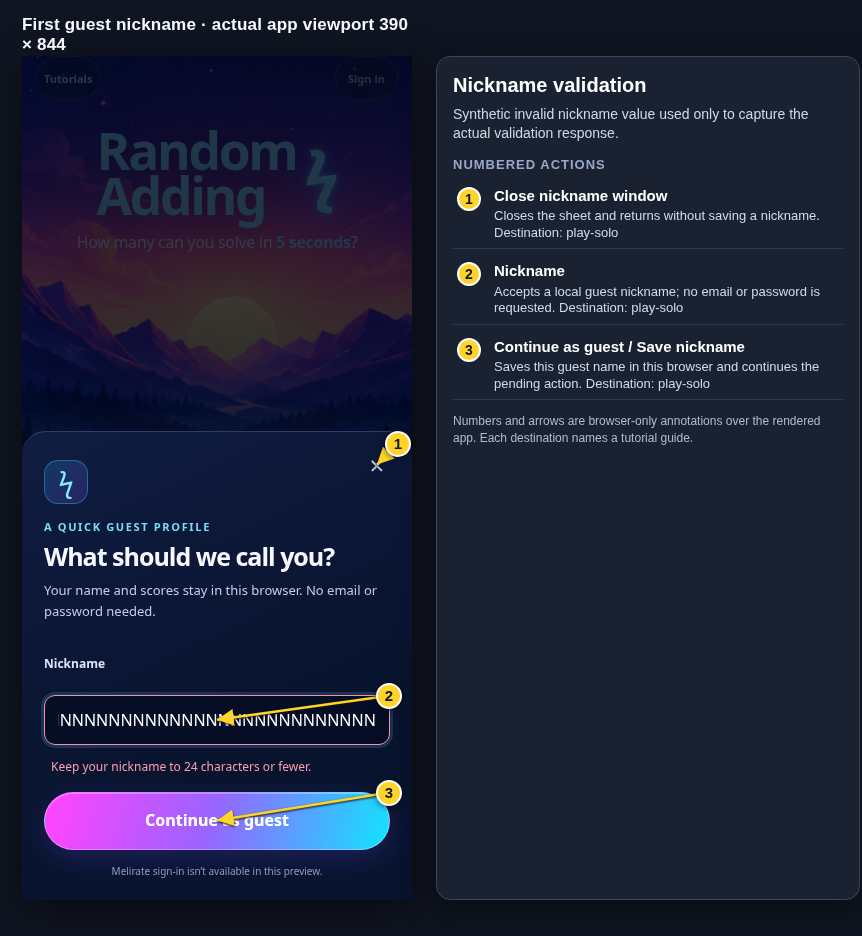 View full-size original annotated screen (new tab)
What the numbered markers show
- 1Close nickname windowCloses the sheet and returns without saving a nickname.Open guide: Play a solo round
- 2NicknameAccepts a local guest nickname; no email or password is requested.Open guide: Play a solo round
- 3Continue as guest / Save nicknameSaves this guest name in this browser and continues the pending action.Open guide: Play a solo round
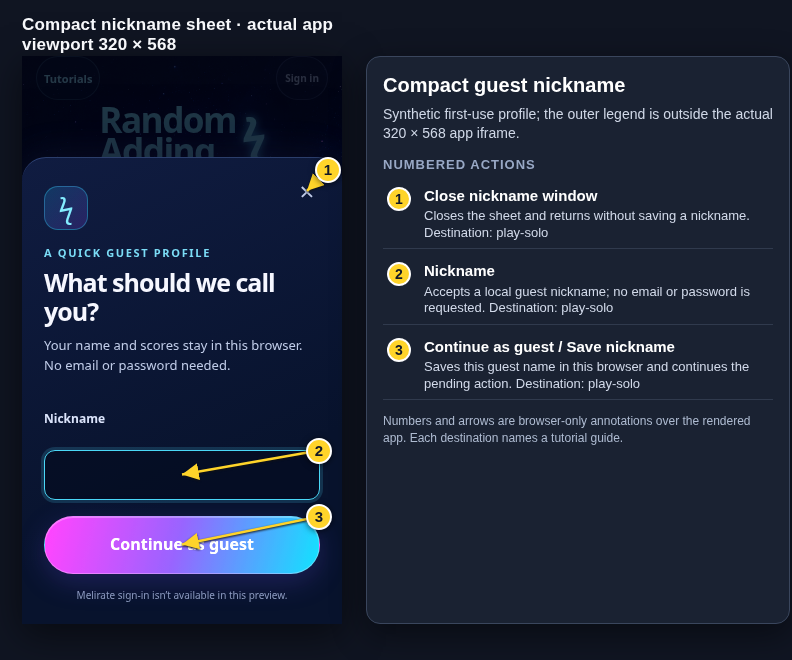 View full-size original annotated screen (new tab)
What the numbered markers show
- 1Close nickname windowCloses the sheet and returns without saving a nickname.Open guide: Play a solo round
- 2NicknameAccepts a local guest nickname; no email or password is requested.Open guide: Play a solo round
- 3Continue as guest / Save nicknameSaves this guest name in this browser and continues the pending action.Open guide: Play a solo round
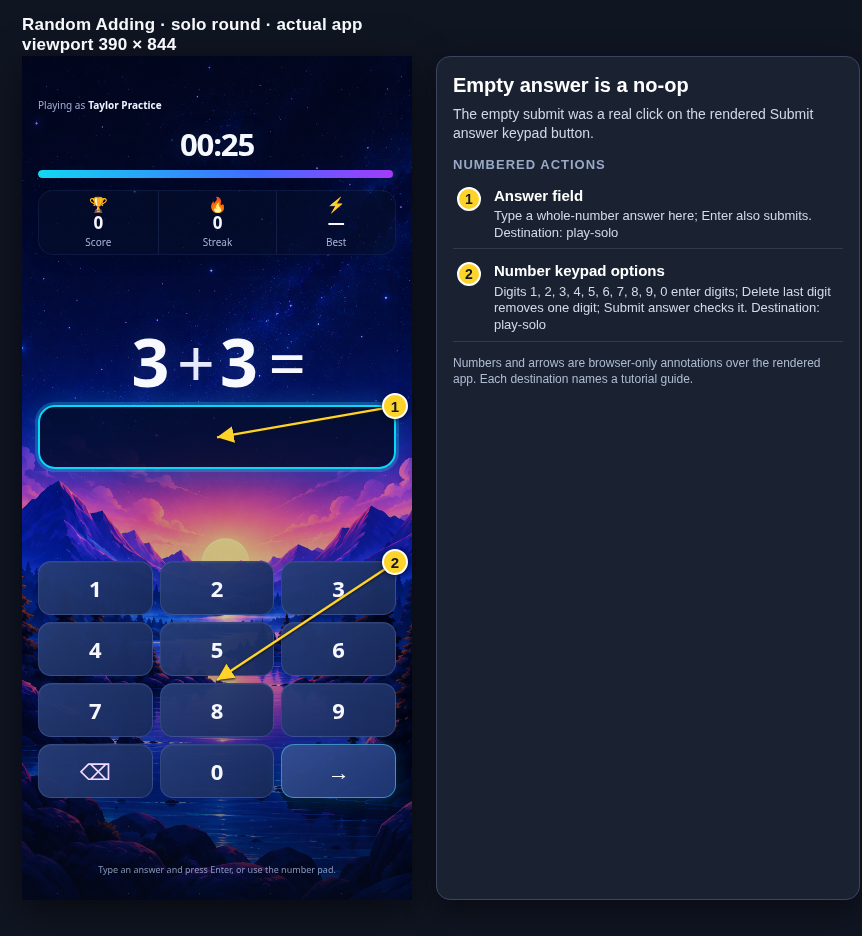 View full-size original annotated screen (new tab)
What the numbered markers show
- 1Answer fieldType a whole-number answer here; Enter also submits.Open guide: Play a solo round
- 2Number keypad optionsDigits 1, 2, 3, 4, 5, 6, 7, 8, 9, 0 enter digits; Delete last digit removes one digit; Submit answer checks it.Open guide: Play a solo round
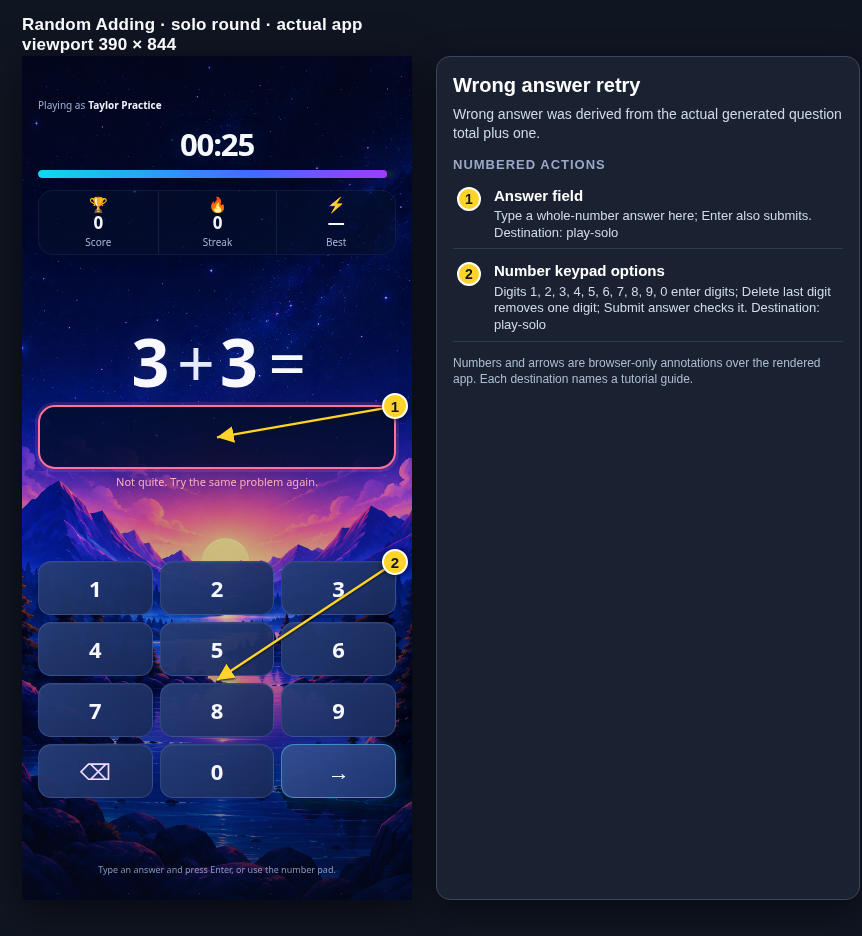 View full-size original annotated screen (new tab)
What the numbered markers show
- 1Answer fieldType a whole-number answer here; Enter also submits.Open guide: Play a solo round
- 2Number keypad optionsDigits 1, 2, 3, 4, 5, 6, 7, 8, 9, 0 enter digits; Delete last digit removes one digit; Submit answer checks it.Open guide: Play a solo round
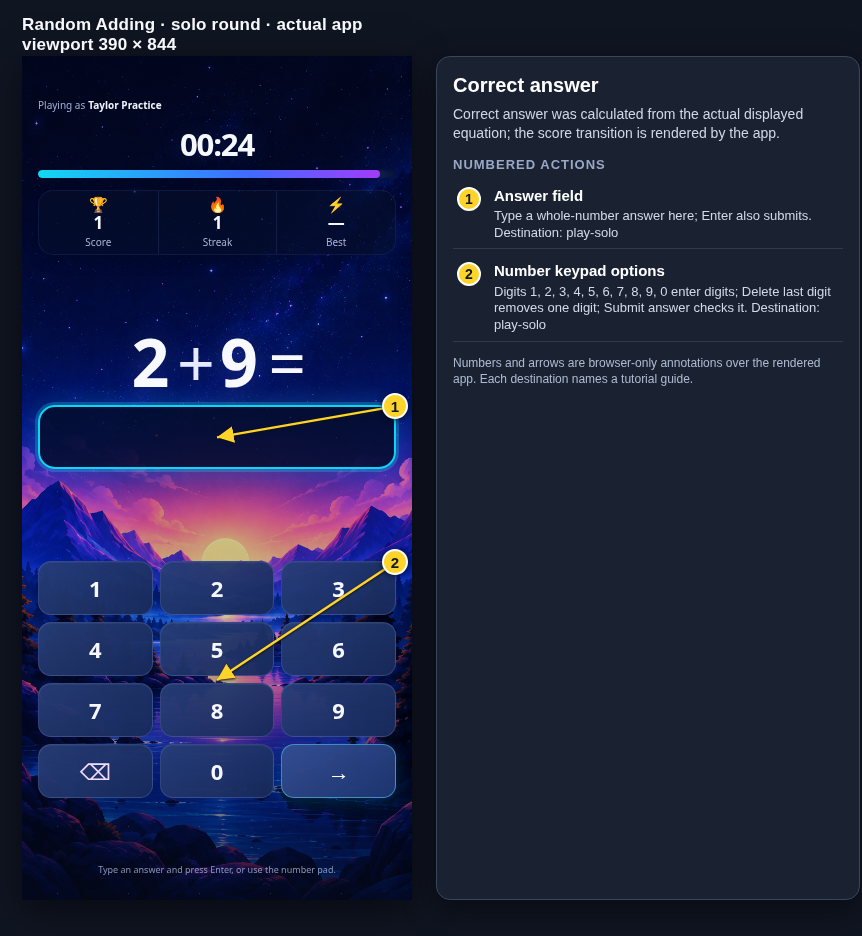 View full-size original annotated screen (new tab)
What the numbered markers show
- 1Answer fieldType a whole-number answer here; Enter also submits.Open guide: Play a solo round
- 2Number keypad optionsDigits 1, 2, 3, 4, 5, 6, 7, 8, 9, 0 enter digits; Delete last digit removes one digit; Submit answer checks it.Open guide: Play a solo round
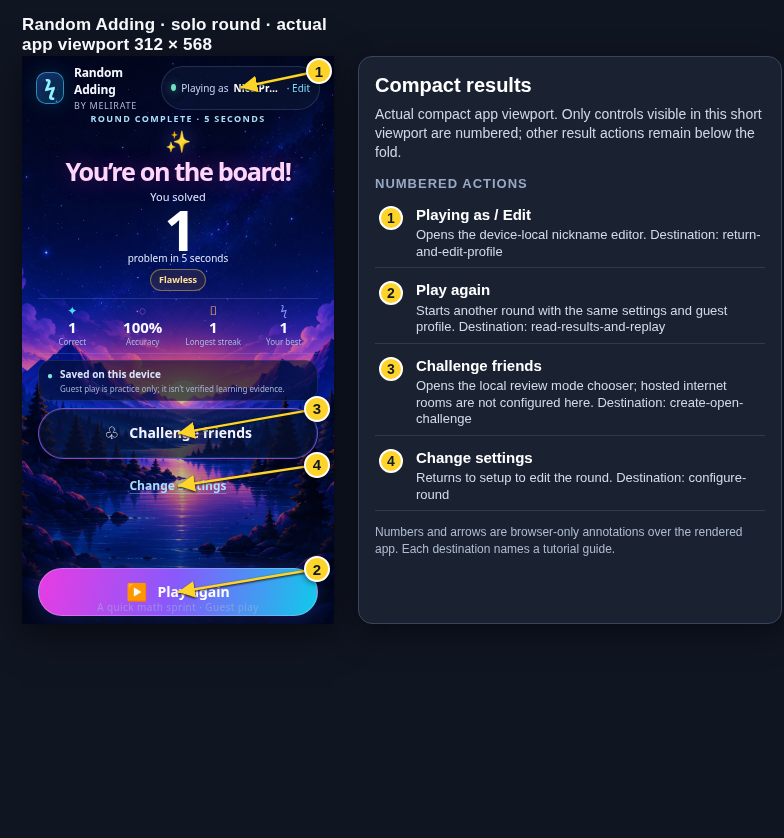 View full-size original annotated screen (new tab)
What the numbered markers show
- 1Playing as / EditOpens the device-local nickname editor.Open guide: Return and edit your guest nickname
- 2Play againStarts another round with the same settings and guest profile.Open guide: Read your results and replay
- 3Challenge friendsOpens the local review mode chooser; hosted internet rooms are not configured here.Open guide: Create an Open Challenge
- 4Change settingsReturns to setup to edit the round.Open guide: Choose round settings
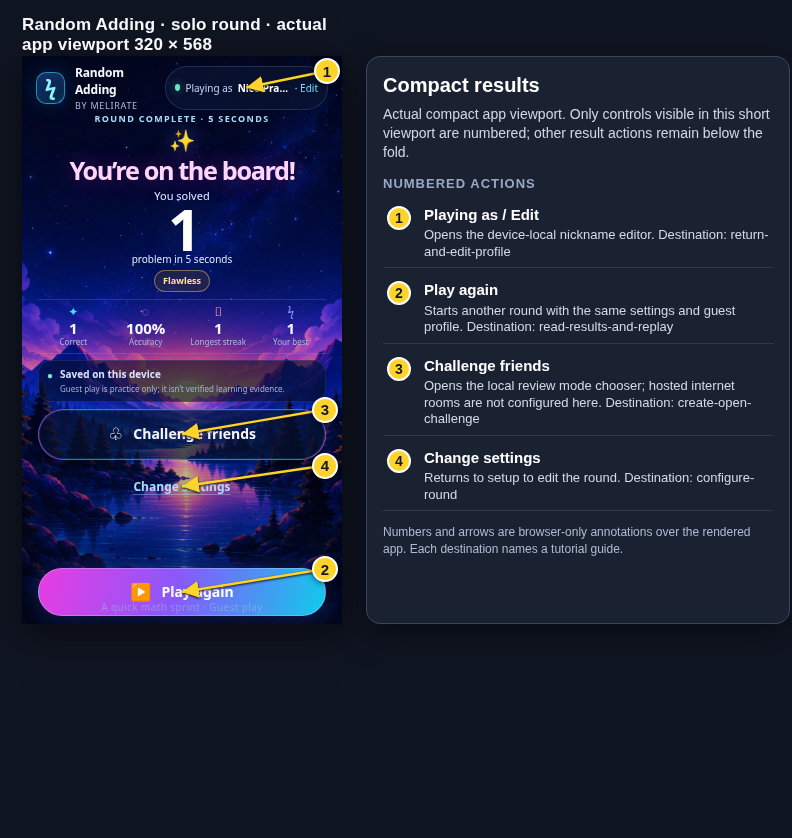 View full-size original annotated screen (new tab)
What the numbered markers show
- 1Playing as / EditOpens the device-local nickname editor.Open guide: Return and edit your guest nickname
- 2Play againStarts another round with the same settings and guest profile.Open guide: Read your results and replay
- 3Challenge friendsOpens the local review mode chooser; hosted internet rooms are not configured here.Open guide: Create an Open Challenge
- 4Change settingsReturns to setup to edit the round.Open guide: Choose round settings