Availability
Group play: local review notice
The room screens identify the local review environment and limit claims about hosted availability.
Before you start
- Open a room chooser or room screen with the local review service enabled.
Steps
Read the local review notice
It explains that rooms are private review rooms and invite links work only on this review server.
Open the Group play: local review notice guideUse rooms only within that scope
A code or QR from a local preview is not a public invitation or a hosted production room.
Open the Group play: local review notice guide
What to expect
- The app does not claim hosted persistence or public realtime service.
Other paths
Review hosted room availability
See which room capabilities are not connected.
Open guide: Availability: hosted rooms unavailableCreate a local room
Open the local-review room guide.
Open guide: Create an Open Challenge
Visual guide
Annotated screens
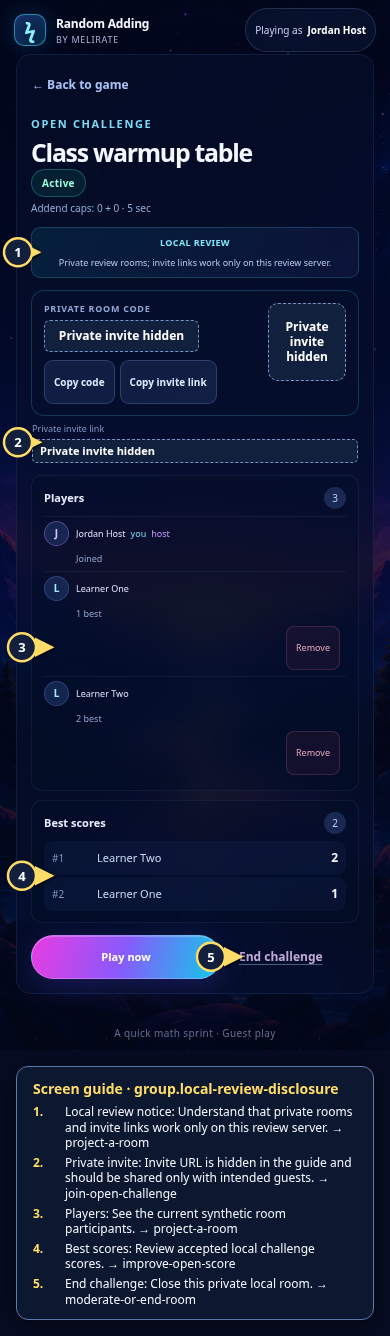
Each numbered note names the control or state marked on the screen.
 View full-size original annotated screen (new tab)
What the numbered markers show
- 1Local review noticeUnderstand that private rooms and invite links work only on this review server.Open guide: Review the projected-room flow locally
- 2Private inviteInvite URL is hidden in the guide and should be shared only with intended guests.Open guide: Join an Open Challenge
- 3PlayersSee the current synthetic room participants.Open guide: Review the projected-room flow locally
- 4Best scoresReview accepted local challenge scores.Open guide: Play again and improve an Open Challenge score
- 5End challengeClose this private local room.Open guide: Moderate or end a room