Recovery
Open Challenge: invalid or expired room
Use the friendly room error to check the invite, return to the chooser, or continue with solo play.
Before you start
- Open an invalid, malformed, or expired invite, or enter a room code that no longer exists.
Steps
Read the error
Check the six-character code or ask the host for a fresh invite. Expired rooms reject new joins and attempts.
Open the Open Challenge: invalid or expired room guideChoose a recovery path
Return to the room chooser to retry or keep playing solo. Creating a new room requires a host action.
Open the Open Challenge: invalid or expired room guide
What to expect
- Invalid or expired room errors do not imply that the user joined.
Other paths
Join with a corrected code
Use the direct or manual join flow.
Open guide: Join an Open ChallengeReturn to solo
Practice without room access.
Open guide: Play a solo round
Visual guide
Annotated screens
Each numbered note names the control or state marked on the screen.
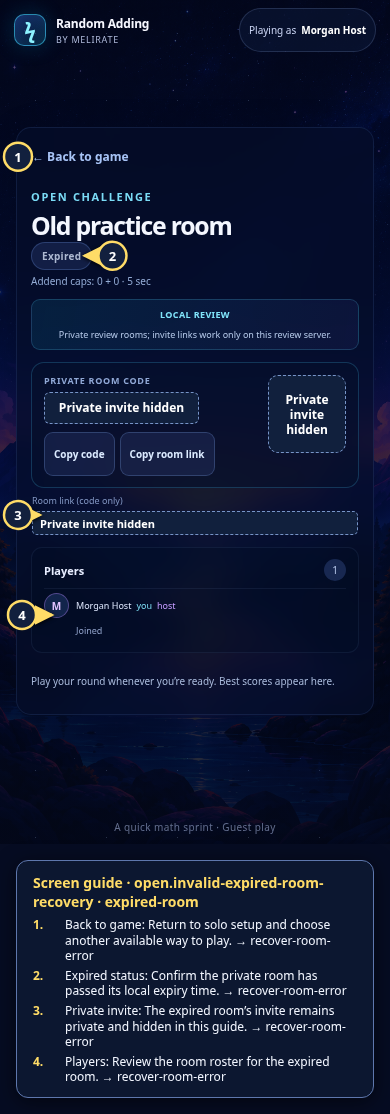 View full-size original annotated screen (new tab)
What the numbered markers show
- 1Back to gameReturn to setup and continue locally.Open guide: Recover an unavailable, expired, or interrupted room
- 2Expired statusSee that this room has expired and cannot start a new attempt.Open guide: Recover an unavailable, expired, or interrupted room
- 3Private inviteInvite details remain hidden and private.Open guide: Join an Open Challenge
- 4PlayersReview the participants stored in this local room.Open guide: Recover an unavailable, expired, or interrupted room
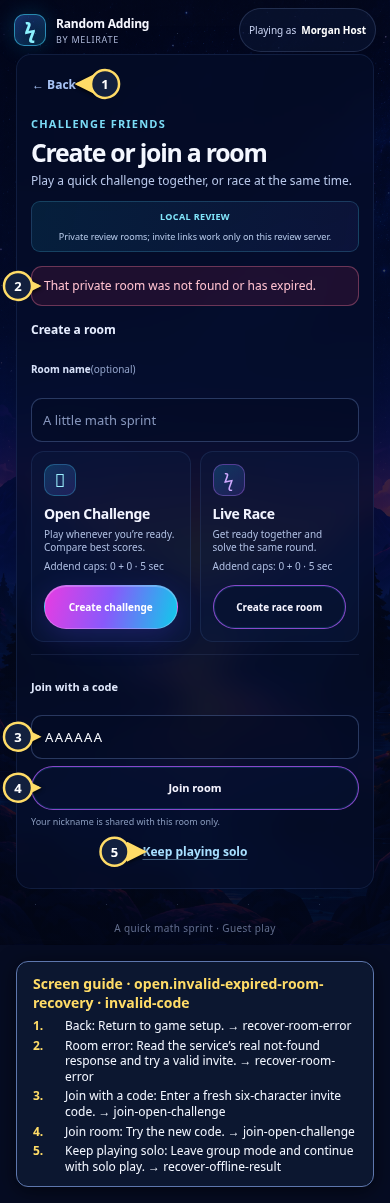 View full-size original annotated screen (new tab)
What the numbered markers show
- 1BackReturn to game setup.Open guide: Recover an unavailable, expired, or interrupted room
- 2Room errorRead the service’s real not-found response and try a valid invite.Open guide: Recover an unavailable, expired, or interrupted room
- 3Join with a codeEnter a fresh six-character invite code.Open guide: Join an Open Challenge
- 4Join roomTry the new code.Open guide: Join an Open Challenge
- 5Keep playing soloLeave group mode and continue with solo play.Open guide: Recover an offline or unsaved result