Open Challenge
Open Challenge: join by link or code
A direct invite opens the exact room; a manual join uses its six-character code.
Before you start
- Have a valid invite URL or six-character code from this local review server.
Steps
Open the room link
The URL includes the target room and can include an invite token; the app attempts direct entry.
Open the Open Challenge: join by link or code guideOr enter the code
In the room chooser, enter six letters or numbers and choose Join room. Nickname is the only guest identity input.
Open the Open Challenge: join by link or code guide
What to expect
- A valid direct link does not require re-entering room settings.
Other paths
Join Open Challenge
Follow the complete participant path.
Open guide: Join an Open ChallengeRecover an invalid invite
Check a missing, malformed, or expired room.
Open guide: Recover an unavailable, expired, or interrupted room
Visual guide
Annotated screens
Each numbered note names the control or state marked on the screen.
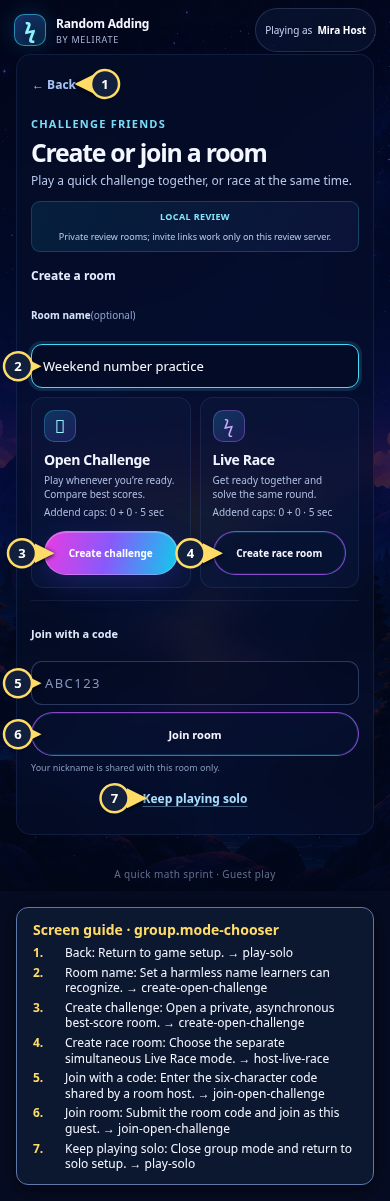 View full-size original annotated screen (new tab)
What the numbered markers show
- 1BackReturn to game setup.Open guide: Play a solo round
- 2Room nameSet a harmless name learners can recognize.Open guide: Create an Open Challenge
- 3Create challengeOpen a private, asynchronous best-score room.Open guide: Create an Open Challenge
- 4Create race roomChoose the separate simultaneous Live Race mode.Open guide: Host a Live Race
- 5Join with a codeEnter the six-character code shared by a room host.Open guide: Join an Open Challenge
- 6Join roomSubmit the room code and join as this guest.Open guide: Join an Open Challenge
- 7Keep playing soloClose group mode and return to solo setup.Open guide: Play a solo round
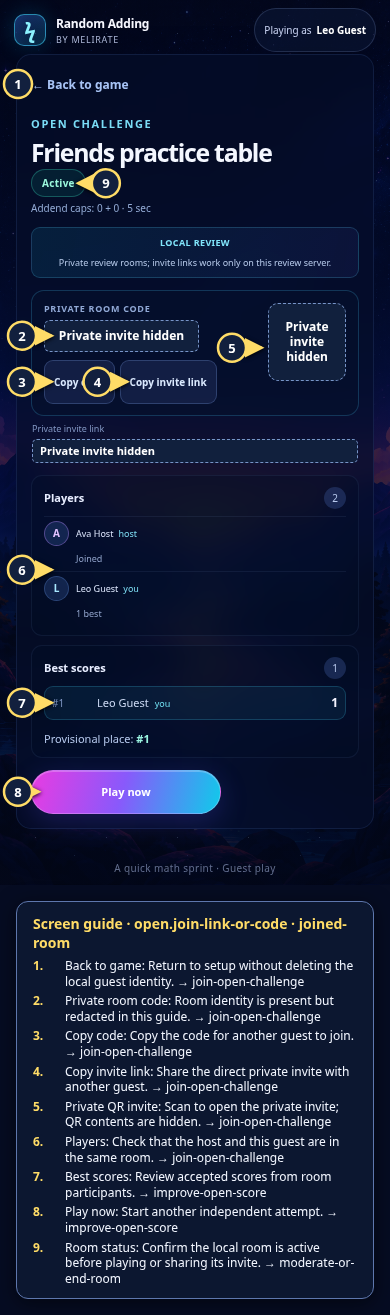 View full-size original annotated screen (new tab)
What the numbered markers show
- 1Back to gameReturn to setup without deleting the local guest identity.Open guide: Join an Open Challenge
- 2Private room codeRoom identity is present but redacted in this guide.Open guide: Join an Open Challenge
- 3Copy codeCopy the code for another guest to join.Open guide: Join an Open Challenge
- 4Copy invite linkShare the direct private invite with another guest.Open guide: Join an Open Challenge
- 5Private QR inviteScan to open the private invite; QR contents are hidden.Open guide: Join an Open Challenge
- 6PlayersCheck that the host and this guest are in the same room.Open guide: Join an Open Challenge
- 7Best scoresReview accepted scores from room participants.Open guide: Play again and improve an Open Challenge score
- 8Play nowStart another independent attempt.Open guide: Play again and improve an Open Challenge score
- 9Room statusConfirm the local room is active before playing or sharing its invite.Open guide: Moderate or end a room