Open Challenge
Open Challenge: empty room
The host can start their own Open Challenge attempt before any other participant joins.
Before you start
- Create or join an active Open Challenge.
Steps
Start when ready
Choose Play now. There is no lobby or ready-up gate for Open Challenge.
Open the Open Challenge: empty room guideReturn to the room
After the personal result, return to see the current room participants and best scores.
Open the Open Challenge: empty room guide
What to expect
- No other player must be online before the host can play.
Other paths
Improve your room score
See how repeated attempts update best-score ranking.
Open guide: Play again and improve an Open Challenge score
Visual guide
Annotated screens
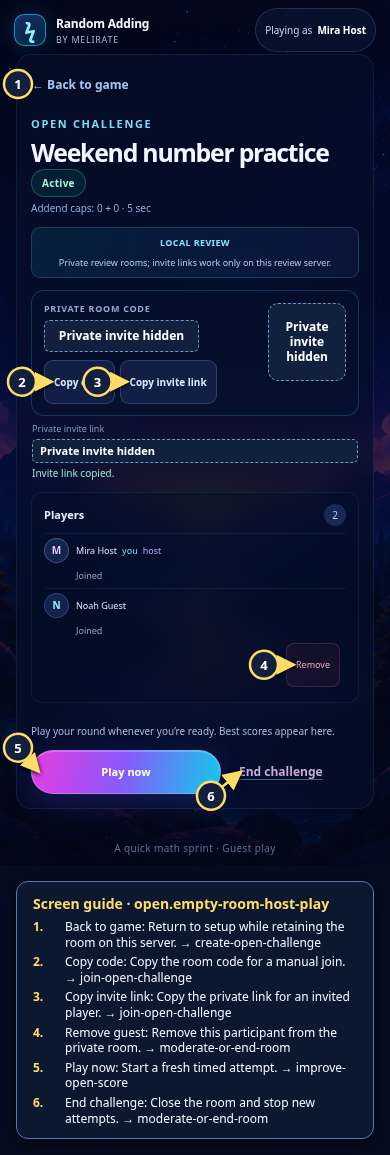
Each numbered note names the control or state marked on the screen.
 View full-size original annotated screen (new tab)
What the numbered markers show
- 1Back to gameReturn to setup while retaining the room on this server.Open guide: Create an Open Challenge
- 2Copy codeCopy the room code for a manual join.Open guide: Join an Open Challenge
- 3Copy invite linkCopy the private link for an invited player.Open guide: Join an Open Challenge
- 4Remove guestRemove this participant from the private room.Open guide: Moderate or end a room
- 5Play nowStart a fresh timed attempt.Open guide: Play again and improve an Open Challenge score
- 6End challengeClose the room and stop new attempts.Open guide: Moderate or end a room