Room management
Moderate or end a room
Use host-only controls to remove a participant or close an Open Challenge or Live Race room.
Before you start
- Be the room host in a local review room. The room service is local review infrastructure and is not a hosted classroom-management system.
Steps
Review the participant list
In the room screen, find the participant you intend to remove. Only the host sees Remove beside another participant.
Open the Open Challenge: standings and lifecycle guideRemove a participant if needed
Choose Remove on that participant's row. The action is sent to the room service; a non-host cannot perform moderation.
Open the Open Challenge: standings and lifecycle guideEnd the room deliberately
Choose End challenge or End race room. An Open Challenge closes and freezes its standings. Ending a Live Race during play cancels it; already accepted results remain, while unfinished rounds have no placement.
Open the Live Race: host ends a race guideStart a new room if you need another session
Return to the game and create another room using the setup settings you want. A cancelled Live Race itself cannot be restarted as a rematch.
Open the Open Challenge: standings and lifecycle guide
What to expect
- Host controls are explicit; room end is not confused with a host disconnect.
- This preview provides no roster, student record, gradebook, or report-export tools.
Other paths
Create and share a new Open Challenge
Open the private room creation guide.
Open guide: Create an Open ChallengeRecover a cancelled or ended room
Review the room error and fallback states.
Open guide: Recover an unavailable, expired, or interrupted roomProject a room
Use code and QR for group access in local review.
Open guide: Review the projected-room flow locally
Visual guide
Recorded walkthrough
These are silent local synthetic preview captures. Account clips and screenshots show the unconfigured guest preview, not the locally prepared member flow. Some demos use 5-, 15-, or 20-second timers; private invitation details are hidden. If playback is unavailable, use the captions when present or read the full transcript below.
Read the full recording transcript
This capture uses a synthetic five-second round to keep the local demonstration short.
The host’s room screen lists current participants and private sharing controls. Invite values are hidden in this recording.
Use Remove beside a participant to remove that session from the room.
End challenge closes the room and prevents new rounds from starting.
The ended status is visible in the room screen. A closed room needs a new invite to play again.
Annotated screens
Each numbered note names the control or state marked on the screen.
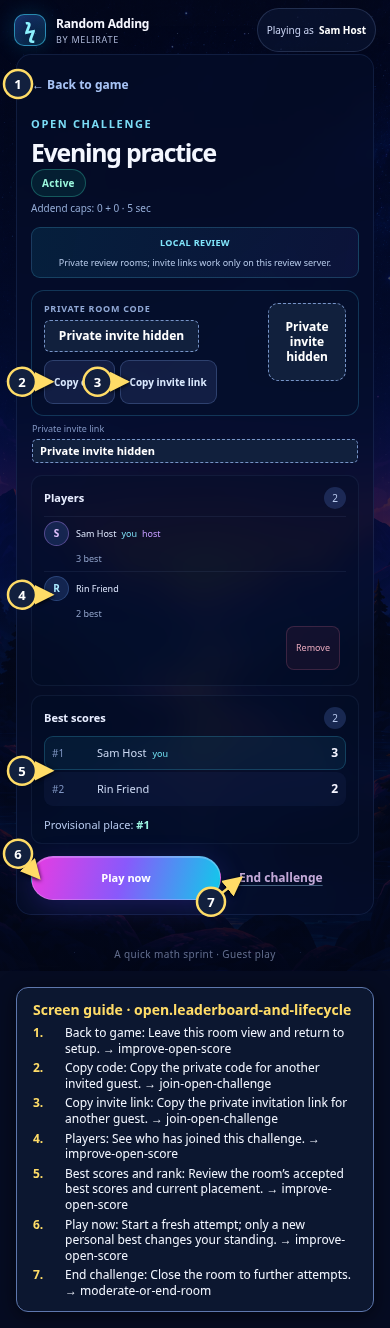 View full-size original annotated screen (new tab)
What the numbered markers show
- 1Back to gameLeave this room view and return to setup.Open guide: Play again and improve an Open Challenge score
- 2Copy codeCopy the private code for another invited guest.Open guide: Join an Open Challenge
- 3Copy invite linkCopy the private invitation link for another guest.Open guide: Join an Open Challenge
- 4PlayersSee who has joined this challenge.Open guide: Play again and improve an Open Challenge score
- 5Best scores and rankReview the room’s accepted best scores and current placement.Open guide: Play again and improve an Open Challenge score
- 6Play nowStart a fresh attempt; only a new personal best changes your standing.Open guide: Play again and improve an Open Challenge score
- 7End challengeClose the room to further attempts.Open guide: Moderate or end a room
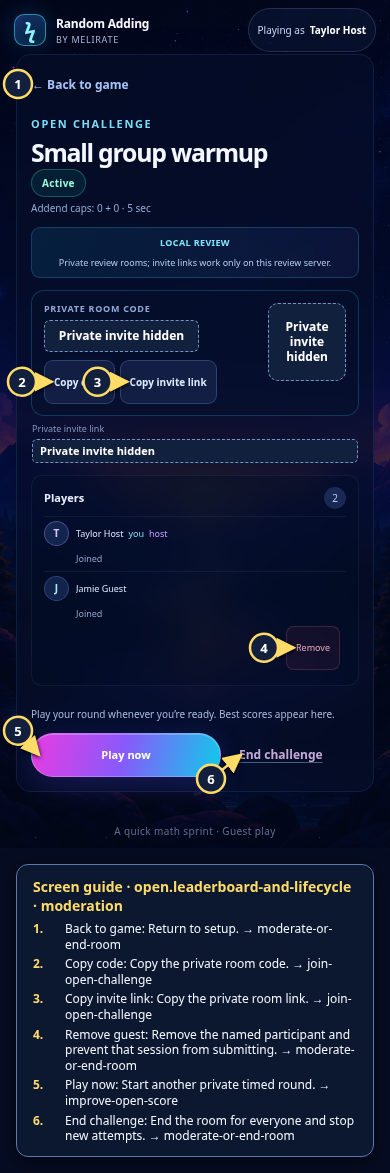 View full-size original annotated screen (new tab)
What the numbered markers show
- 1Back to gameReturn to setup.Open guide: Moderate or end a room
- 2Copy codeCopy the private room code.Open guide: Join an Open Challenge
- 3Copy invite linkCopy the private room link.Open guide: Join an Open Challenge
- 4Remove guestRemove the named participant and prevent that session from submitting.Open guide: Moderate or end a room
- 5Play nowStart another private timed round.Open guide: Play again and improve an Open Challenge score
- 6End challengeEnd the room for everyone and stop new attempts.Open guide: Moderate or end a room
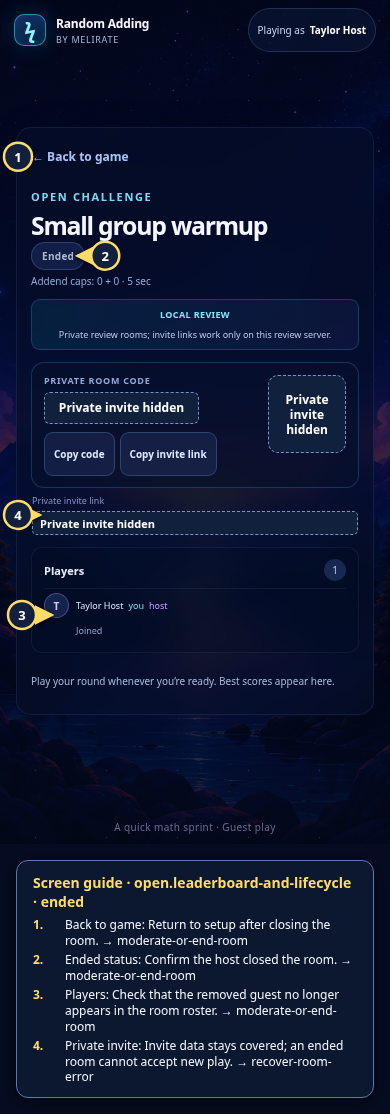 View full-size original annotated screen (new tab)
What the numbered markers show
- 1Back to gameReturn to setup after closing the room.Open guide: Moderate or end a room
- 2Ended statusConfirm the host closed the room.Open guide: Moderate or end a room
- 3PlayersCheck that the removed guest no longer appears in the room roster.Open guide: Moderate or end a room
- 4Private inviteInvite data stays covered; an ended room cannot accept new play.Open guide: Recover an unavailable, expired, or interrupted room
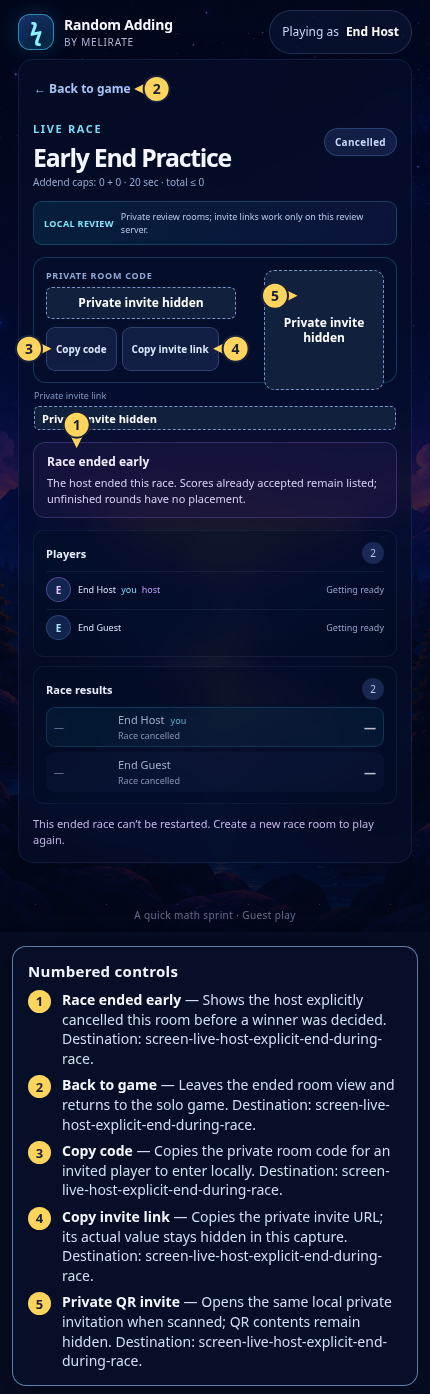 View full-size original annotated screen (new tab)
What the numbered markers show
- 1Race ended earlyShows the host explicitly cancelled this room before a winner was decided.Open guide: Live Race: host ends a race
- 2Back to gameLeaves the ended room view and returns to the solo game.Open guide: Live Race: host ends a race
- 3Copy codeCopies the private room code for an invited player to enter locally.Open guide: Live Race: host ends a race
- 4Copy invite linkCopies the private invite URL; its actual value stays hidden in this capture.Open guide: Live Race: host ends a race
- 5Private QR inviteOpens the same local private invitation when scanned; QR contents remain hidden.Open guide: Live Race: host ends a race
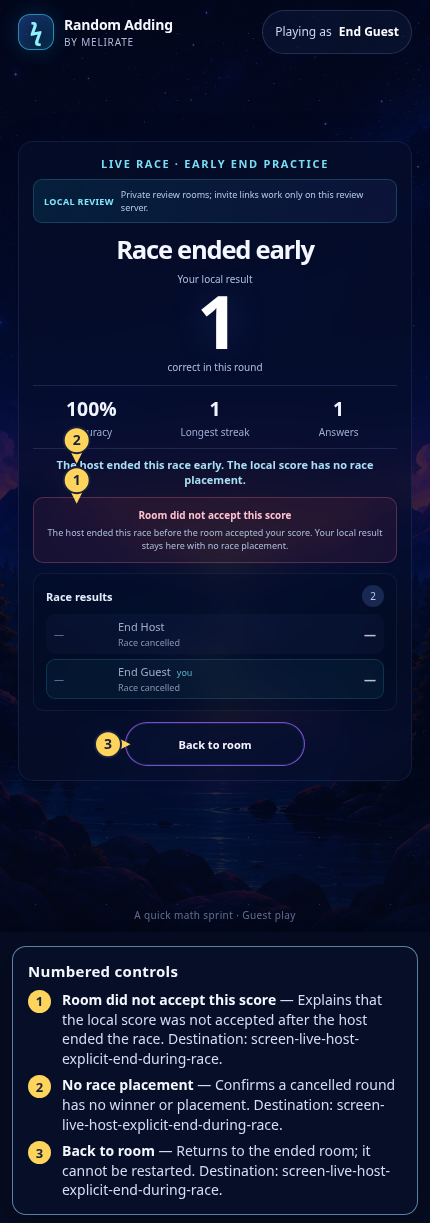 View full-size original annotated screen (new tab)
What the numbered markers show
- 1Room did not accept this scoreExplains that the local score was not accepted after the host ended the race.Open guide: Live Race: host ends a race
- 2No race placementConfirms a cancelled round has no winner or placement.Open guide: Live Race: host ends a race
- 3Back to roomReturns to the ended room; it cannot be restarted.Open guide: Live Race: host ends a race