Results
Open Challenge: result context
Read an accepted result's current room placement, tie/lead context, or gap to the leader.
Before you start
- Finish an Open Challenge attempt and wait for an accepted room receipt.
Steps
Read personal score first
The result shows your local score and metrics independently from room standings.
Open the Open Challenge: result context guideRead the room context
Depending on current standings, the result may show that you lead, share the lead, have a place, or need a certain number of correct answers to catch the leader.
Open the Open Challenge: result context guide
What to expect
- The room can change later while an Open Challenge is active; the current place is not a final winner claim.
Other paths
Improve the room score
Replay and return to current standings.
Open guide: Play again and improve an Open Challenge scoreRead result status
Distinguish pending, accepted, and rejected uploads.
Open guide: Read group results and rematch
Visual guide
Annotated screens
Each numbered note names the control or state marked on the screen.
 View full-size original annotated screen (new tab)
What the numbered markers show
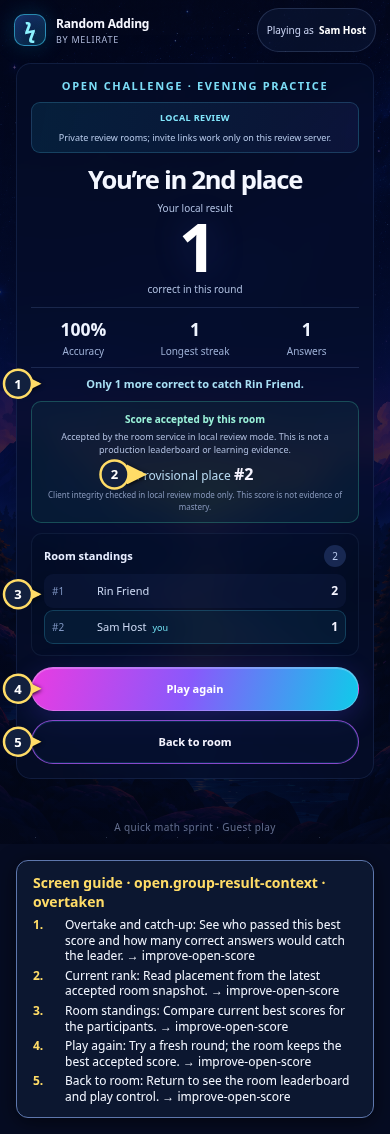
- 1Overtake and catch-upSee who passed this best score and how many correct answers would catch the leader.Open guide: Play again and improve an Open Challenge score
- 2Current rankRead placement from the latest accepted room snapshot.Open guide: Play again and improve an Open Challenge score
- 3Room standingsCompare current best scores for the participants.Open guide: Play again and improve an Open Challenge score
- 4Play againTry a fresh round; the room keeps the best accepted score.Open guide: Play again and improve an Open Challenge score
- 5Back to roomReturn to see the room leaderboard and play control.Open guide: Play again and improve an Open Challenge score
 View full-size original annotated screen (new tab)
What the numbered markers show
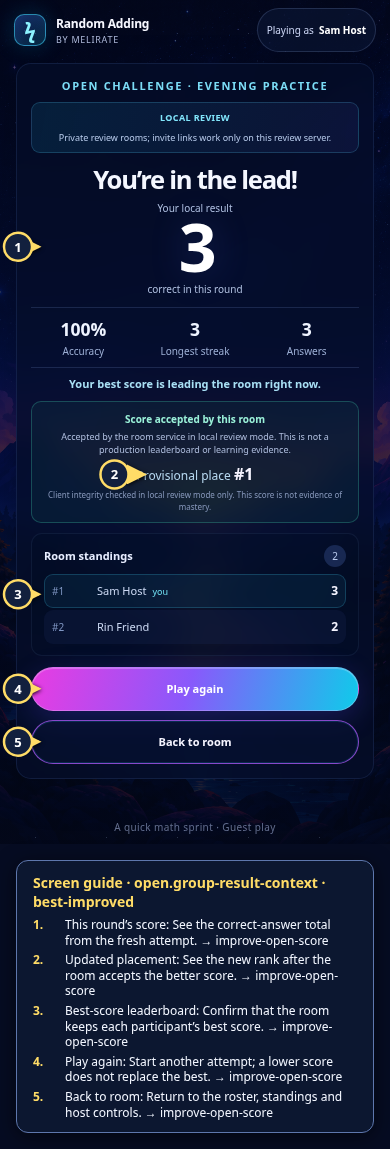
- 1This round’s scoreSee the correct-answer total from the fresh attempt.Open guide: Play again and improve an Open Challenge score
- 2Updated placementSee the new rank after the room accepts the better score.Open guide: Play again and improve an Open Challenge score
- 3Best-score leaderboardConfirm that the room keeps each participant’s best score.Open guide: Play again and improve an Open Challenge score
- 4Play againStart another attempt; a lower score does not replace the best.Open guide: Play again and improve an Open Challenge score
- 5Back to roomReturn to the roster, standings and host controls.Open guide: Play again and improve an Open Challenge score