Open Challenge
Open Challenge: invitation
After room creation, copy its code or link or display the QR for the private room.
Before you start
- Create an Open Challenge on the local review server.
Steps
Choose what to share
Copy the six-character room code for manual entry, copy the invite link, or let participants scan the QR.
Open the Open Challenge: invitation guideKeep the invite private
An invite URL may carry a long random token. Share it only with intended participants; room links work only on this review server.
Open the Open Challenge: invitation guide
What to expect
- The QR encodes a local-review invitation, not a public production link.
Other paths
Create a challenge
See the full room creation steps.
Open guide: Create an Open ChallengeProject a room
Use the invitation in a local group activity.
Open guide: Review the projected-room flow locally
Visual guide
Annotated screens
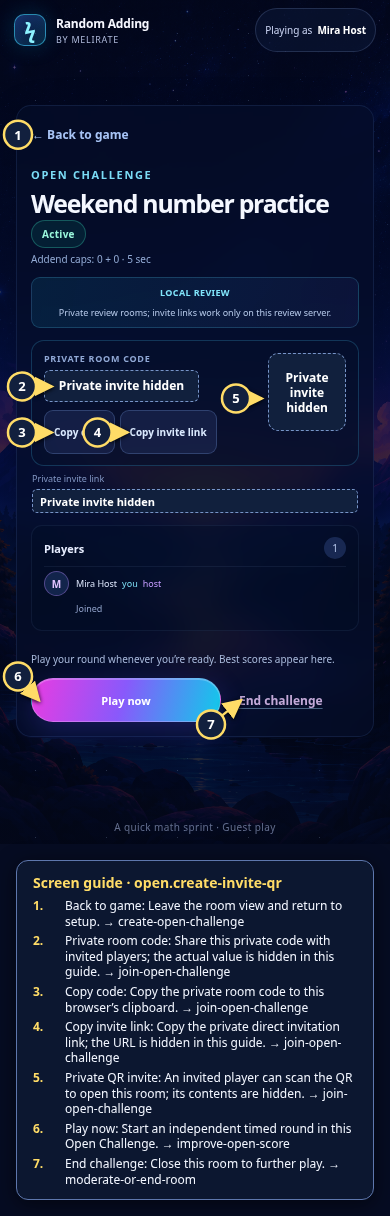
Each numbered note names the control or state marked on the screen.
 View full-size original annotated screen (new tab)
What the numbered markers show
- 1Back to gameLeave the room view and return to setup.Open guide: Create an Open Challenge
- 2Private room codeShare this private code with invited players; the actual value is hidden in this guide.Open guide: Join an Open Challenge
- 3Copy codeCopy the private room code to this browser’s clipboard.Open guide: Join an Open Challenge
- 4Copy invite linkCopy the private direct invitation link; the URL is hidden in this guide.Open guide: Join an Open Challenge
- 5Private QR inviteAn invited player can scan the QR to open this room; its contents are hidden.Open guide: Join an Open Challenge
- 6Play nowStart an independent timed round in this Open Challenge.Open guide: Play again and improve an Open Challenge score
- 7End challengeClose this room to further play.Open guide: Moderate or end a room