Group play
Rooms: choose a mode
Choose Open Challenge for independent play or Live Race for a shared start, or join using a room code.
Before you start
- Choose Challenge friends. First-time guests save a nickname before the mode chooser appears.
Steps
Choose Open Challenge
Create a room where participants start whenever ready and compare best accepted scores.
Open the Rooms: choose a mode guideChoose Live Race
Create a lobby where the host starts after everyone is ready; the round uses a shared countdown.
Open the Rooms: choose a mode guideJoin with a code
Enter the six-character room code, or use the invite URL to open its exact room.
Open the Rooms: choose a mode guide
What to expect
- A Local review notice indicates the room service is not hosted production.
Other paths
Create an Open Challenge
Follow the private-room flow.
Open guide: Create an Open ChallengeHost a Live Race
Follow the shared race flow.
Open guide: Host a Live Race
Visual guide
Annotated screens
Each numbered note names the control or state marked on the screen.
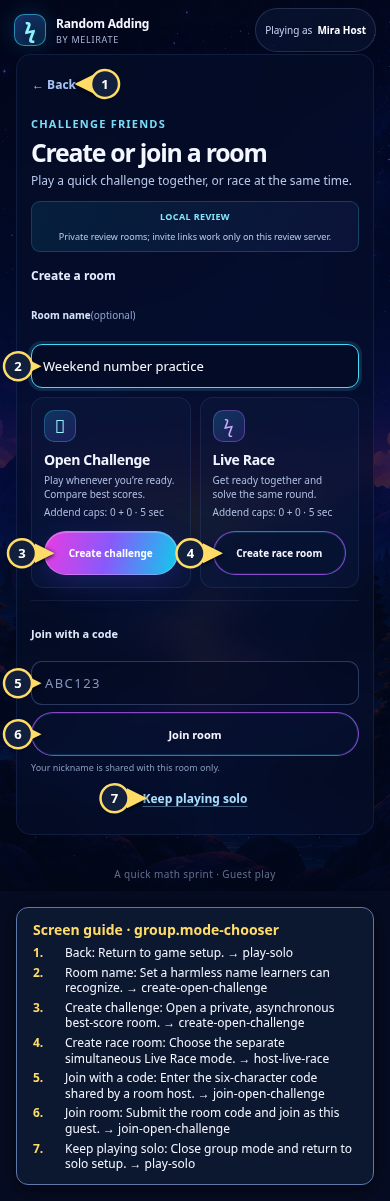 View full-size original annotated screen (new tab)
What the numbered markers show
- 1BackReturn to game setup.Open guide: Play a solo round
- 2Room nameSet a harmless name learners can recognize.Open guide: Create an Open Challenge
- 3Create challengeOpen a private, asynchronous best-score room.Open guide: Create an Open Challenge
- 4Create race roomChoose the separate simultaneous Live Race mode.Open guide: Host a Live Race
- 5Join with a codeEnter the six-character code shared by a room host.Open guide: Join an Open Challenge
- 6Join roomSubmit the room code and join as this guest.Open guide: Join an Open Challenge
- 7Keep playing soloClose group mode and return to solo setup.Open guide: Play a solo round