Accessibility
Accessibility: touch and responsive controls
Use the reviewed mobile controls and keyboard alternatives across setup and gameplay.
Before you start
- Open setup or gameplay at a phone-sized viewport.
Steps
Use the setup controls
Edit addend fields directly and use touch, scroll, or arrow keys on the duration wheels.
Open the Accessibility: touch and responsive controls guideUse the answer controls
Enter digits on the keypad or a hardware keyboard. Incorrect answers include text feedback and are not indicated by color alone.
Open the Accessibility: touch and responsive controls guide
What to expect
- The local geometry review checked interactive control sizes and narrow layout; manual assistive-device acceptance is a separate pending check.
Other paths
Configure a round
Review setup controls and keyboard alternatives.
Open guide: Choose round settingsPlay a solo round
Use the keypad and keyboard submission.
Open guide: Play a solo round
Visual guide
Annotated screens
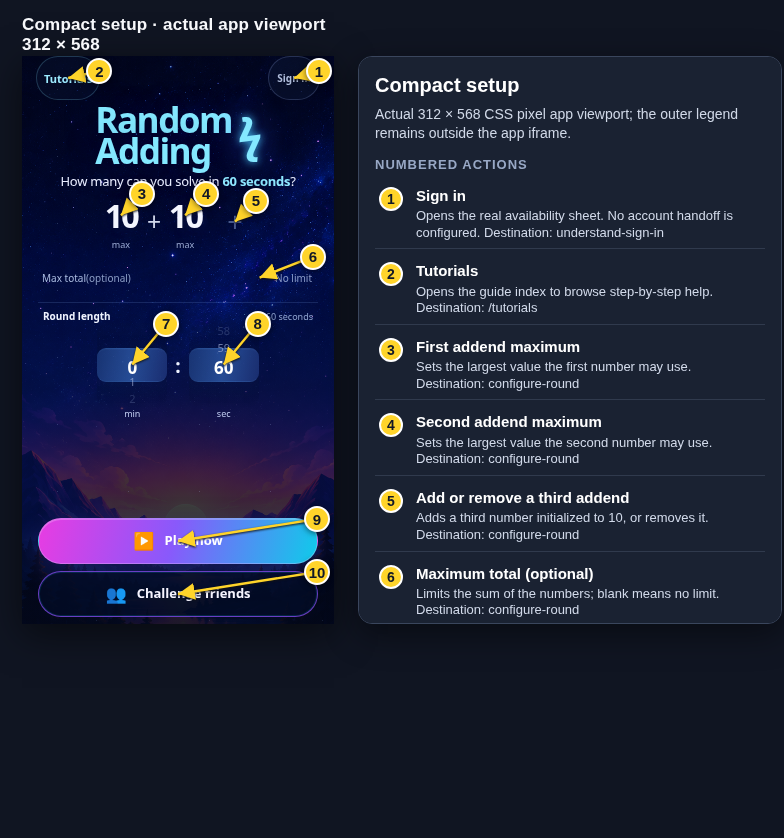
Each numbered note names the control or state marked on the screen.
 View full-size original annotated screen (new tab)
What the numbered markers show
- 1Sign inOpens the real availability sheet. No account handoff is configured.Open guide: Sign in and choose a learner
- 2TutorialsOpens the guide index to browse step-by-step help.Browse all tutorials
- 3First addend maximumSets the largest value the first number may use.Open guide: Choose round settings
- 4Second addend maximumSets the largest value the second number may use.Open guide: Choose round settings
- 5Add or remove a third addendAdds a third number initialized to 10, or removes it.Open guide: Choose round settings
- 6Maximum total (optional)Limits the sum of the numbers; blank means no limit.Open guide: Choose round settings
- 7Minutes wheelScroll, swipe, or focus and press the arrow keys to change minutes.Open guide: Choose round settings
- 8Seconds wheelScroll, swipe, or focus and press the arrow keys to change seconds.Open guide: Choose round settings
- 9Play nowStarts solo play; first use opens the guest nickname sheet.Open guide: Play a solo round
- 10Challenge friendsOpens the local review mode chooser; hosted internet rooms are not configured here.Open guide: Create an Open Challenge
 View full-size original annotated screen (new tab)
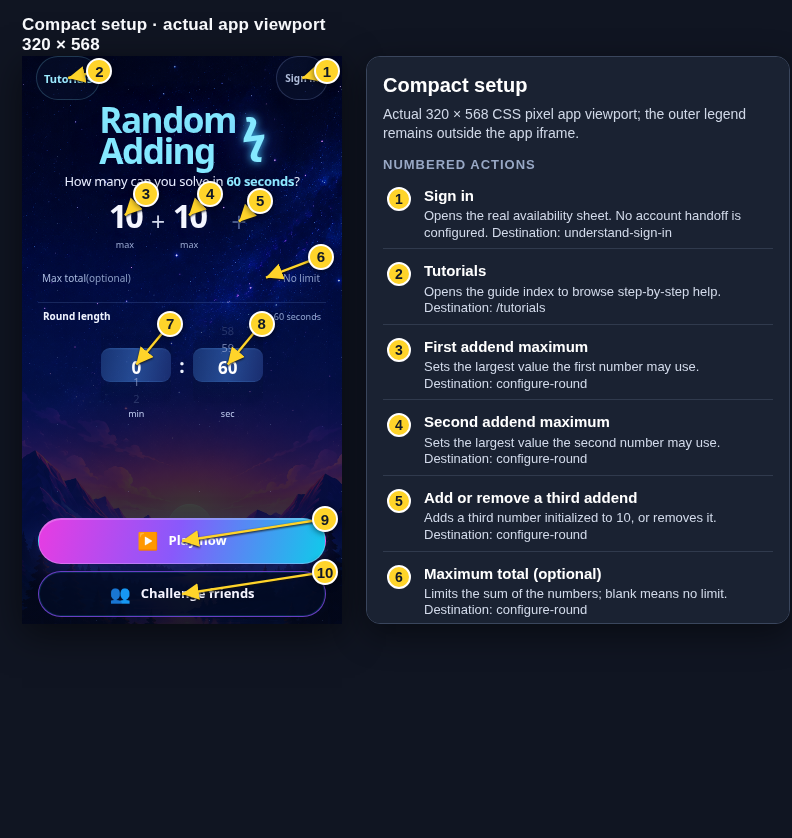
What the numbered markers show
- 1Sign inOpens the real availability sheet. No account handoff is configured.Open guide: Sign in and choose a learner
- 2TutorialsOpens the guide index to browse step-by-step help.Browse all tutorials
- 3First addend maximumSets the largest value the first number may use.Open guide: Choose round settings
- 4Second addend maximumSets the largest value the second number may use.Open guide: Choose round settings
- 5Add or remove a third addendAdds a third number initialized to 10, or removes it.Open guide: Choose round settings
- 6Maximum total (optional)Limits the sum of the numbers; blank means no limit.Open guide: Choose round settings
- 7Minutes wheelScroll, swipe, or focus and press the arrow keys to change minutes.Open guide: Choose round settings
- 8Seconds wheelScroll, swipe, or focus and press the arrow keys to change seconds.Open guide: Choose round settings
- 9Play nowStarts solo play; first use opens the guest nickname sheet.Open guide: Play a solo round
- 10Challenge friendsOpens the local review mode chooser; hosted internet rooms are not configured here.Open guide: Create an Open Challenge
 View full-size original annotated screen (new tab)
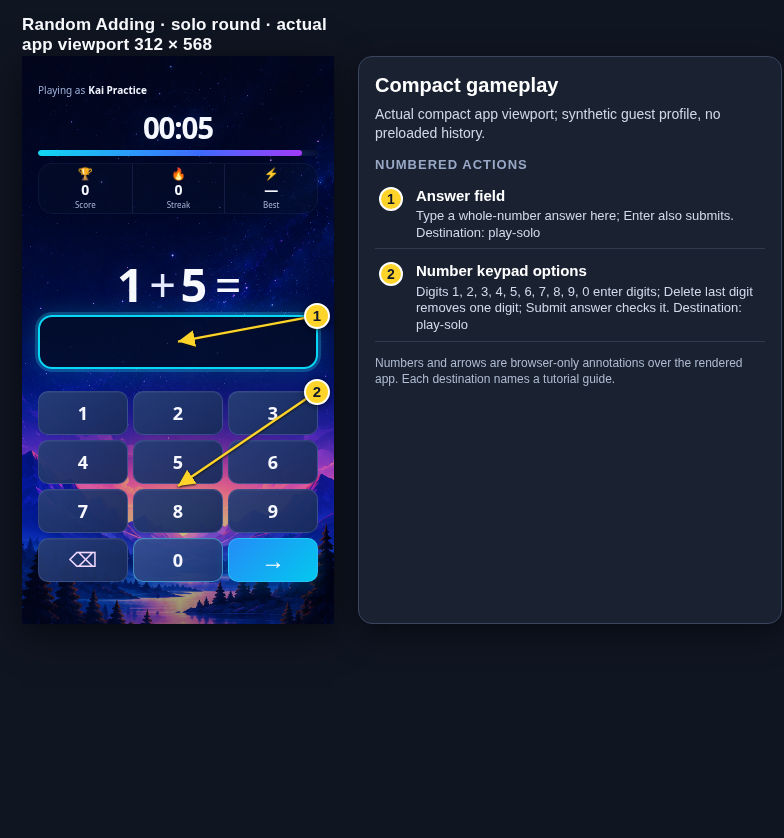
What the numbered markers show
- 1Answer fieldType a whole-number answer here; Enter also submits.Open guide: Play a solo round
- 2Number keypad optionsDigits 1, 2, 3, 4, 5, 6, 7, 8, 9, 0 enter digits; Delete last digit removes one digit; Submit answer checks it.Open guide: Play a solo round
 View full-size original annotated screen (new tab)
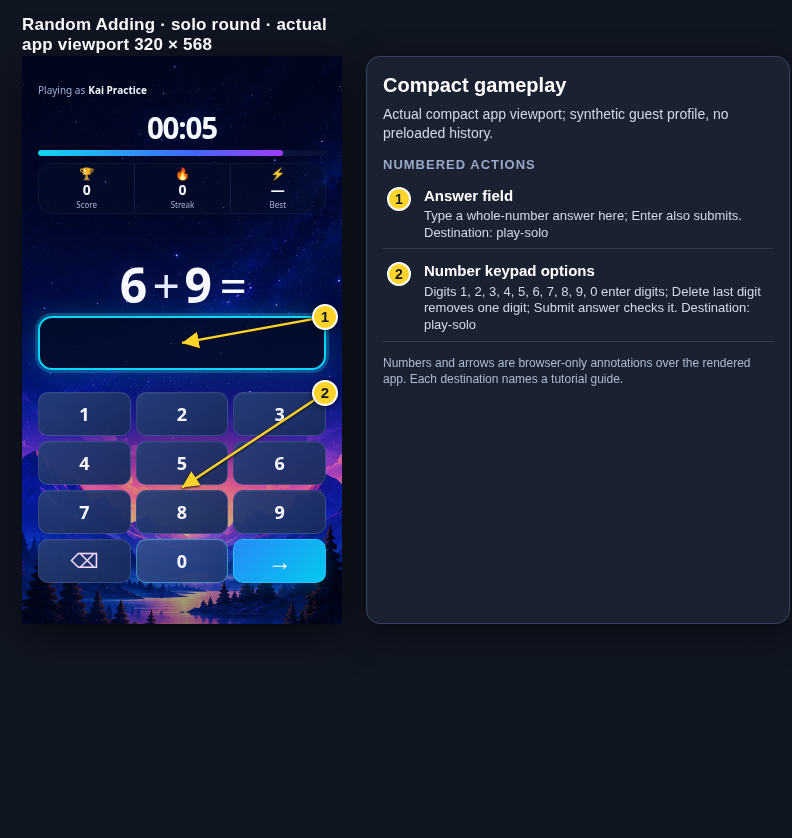
What the numbered markers show
- 1Answer fieldType a whole-number answer here; Enter also submits.Open guide: Play a solo round
- 2Number keypad optionsDigits 1, 2, 3, 4, 5, 6, 7, 8, 9, 0 enter digits; Delete last digit removes one digit; Submit answer checks it.Open guide: Play a solo round
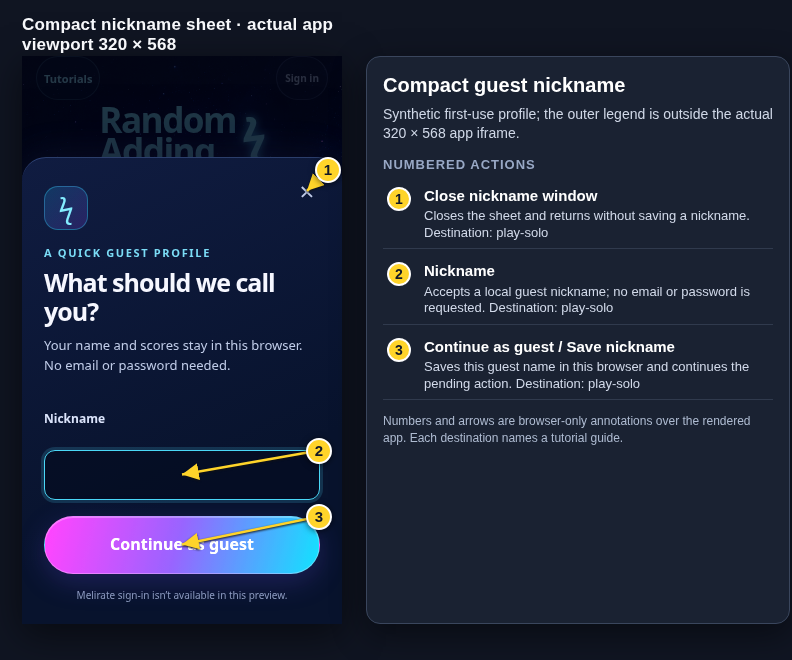 View full-size original annotated screen (new tab)
What the numbered markers show
- 1Close nickname windowCloses the sheet and returns without saving a nickname.Open guide: Play a solo round
- 2NicknameAccepts a local guest nickname; no email or password is requested.Open guide: Play a solo round
- 3Continue as guest / Save nicknameSaves this guest name in this browser and continues the pending action.Open guide: Play a solo round
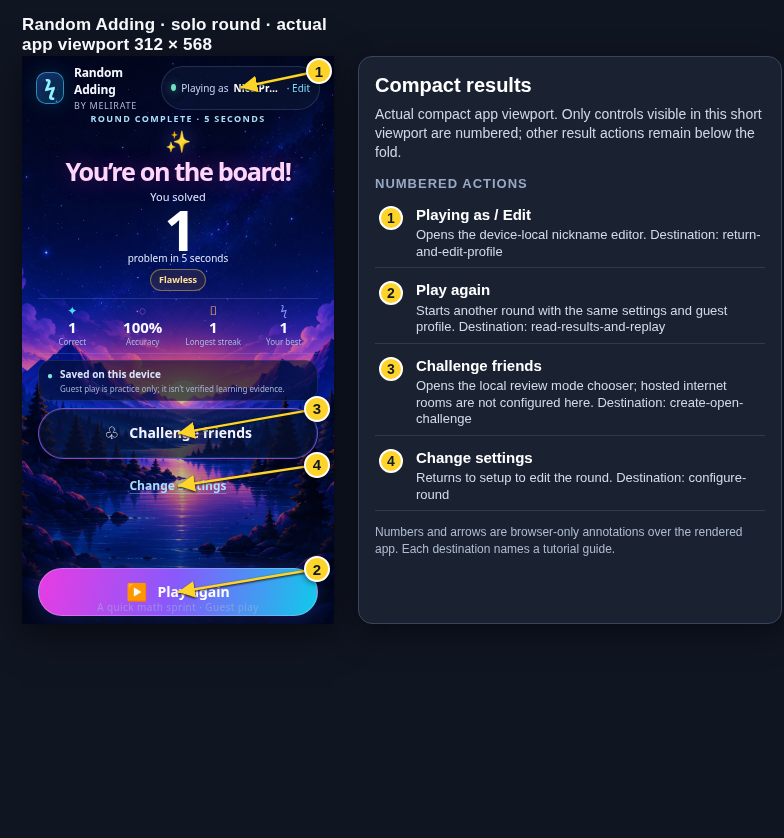 View full-size original annotated screen (new tab)
What the numbered markers show
- 1Playing as / EditOpens the device-local nickname editor.Open guide: Return and edit your guest nickname
- 2Play againStarts another round with the same settings and guest profile.Open guide: Read your results and replay
- 3Challenge friendsOpens the local review mode chooser; hosted internet rooms are not configured here.Open guide: Create an Open Challenge
- 4Change settingsReturns to setup to edit the round.Open guide: Choose round settings