Round setup
Setup: optional total cap
Set a nonnegative whole-number limit for the sum, or leave the field blank for No limit.
Before you start
- Open the setup screen.
Steps
Leave the cap blank
Blank means there is no additional maximum total.
Open the Setup: optional total cap guideEnter a whole number
Enter a nonnegative integer. If the value is invalid, read the inline explanation and correct it before Play now.
Open the Setup: optional total cap guide
What to expect
- Invalid values are explained inline and prevent starting with invalid settings.
Other paths
Review the full setup guide
See how the total interacts with addends and duration.
Open guide: Choose round settings
Visual guide
Annotated screens
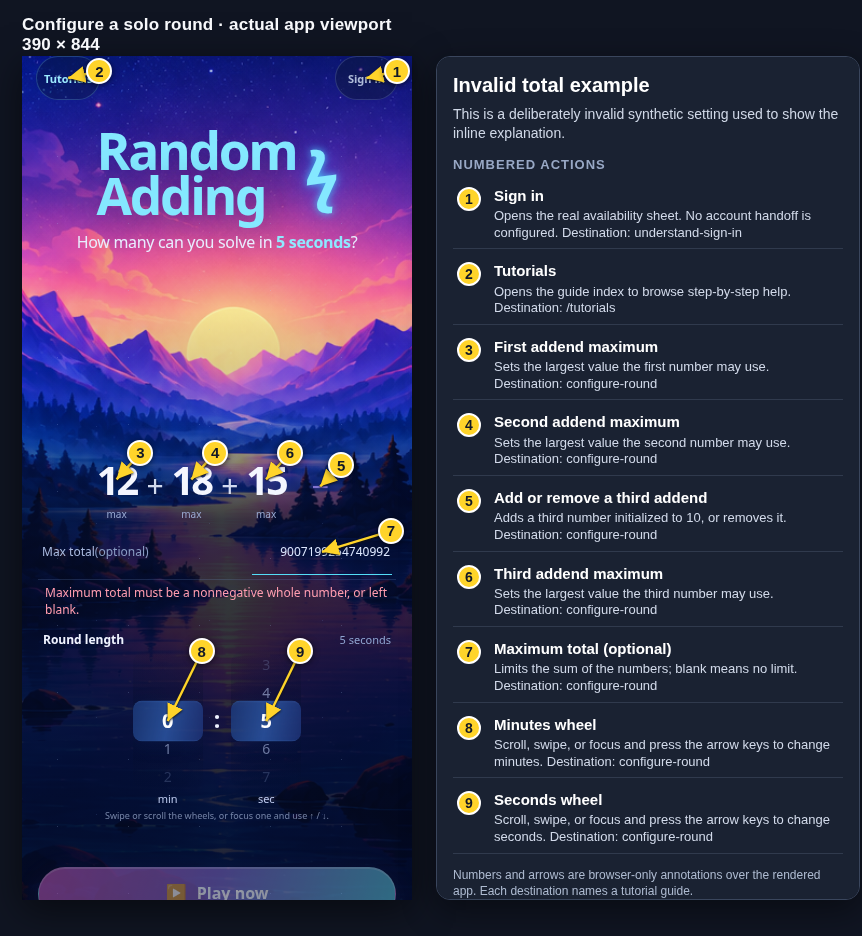
Each numbered note names the control or state marked on the screen.
 View full-size original annotated screen (new tab)
What the numbered markers show
- 1Sign inOpens the real availability sheet. No account handoff is configured.Open guide: Sign in and choose a learner
- 2TutorialsOpens the guide index to browse step-by-step help.Browse all tutorials
- 3First addend maximumSets the largest value the first number may use.Open guide: Choose round settings
- 4Second addend maximumSets the largest value the second number may use.Open guide: Choose round settings
- 5Add or remove a third addendAdds a third number initialized to 10, or removes it.Open guide: Choose round settings
- 6Third addend maximumSets the largest value the third number may use.Open guide: Choose round settings
- 7Maximum total (optional)Limits the sum of the numbers; blank means no limit.Open guide: Choose round settings
- 8Minutes wheelScroll, swipe, or focus and press the arrow keys to change minutes.Open guide: Choose round settings
- 9Seconds wheelScroll, swipe, or focus and press the arrow keys to change seconds.Open guide: Choose round settings